How SaaS startups run lean ops with AI agents
AI for SaaS operations, in practice: which recurring jobs to hand to AI agents first (MRR digests, failed payments, release notes) and what to keep human.
By the Wopie team · November 10, 2026 · 10 min read
Listen to the summary· 2 min

AI for SaaS operations works best when you hand an agent the recurring gathering work: the weekly MRR and churn digest, the failed-payment list, the briefing for a support escalation and the first draft of release notes. A lean SaaS team can keep its headcount down by not hiring someone whose main job is to copy numbers between Stripe, your support tool and your issue tracker. The agent reads, assembles and drafts. A person approves anything that reaches a customer or moves money.
That is the whole idea, and it is less dramatic than the headlines. This guide shows which jobs to hand over first, how a weekly digest works step by step, where the risks are and what to keep human. It is general information about running operations, not legal or security advice.
Why is lean ops hard for a small SaaS team?
At seed stage and Series A, nobody has the title "operations". The founder, the head of growth and the first support hire share the work. Every one of them keeps a private ritual: Monday morning, open billing, open analytics, open the support queue, paste numbers into a sheet, write three sentences for the team channel.
None of these rituals is hard. They are just frequent, and they sit in the gap between tools. The cost shows up as time, not as a line on the budget. If you want to put a number on it, our post on the real cost of context switching walks through the math for small teams.
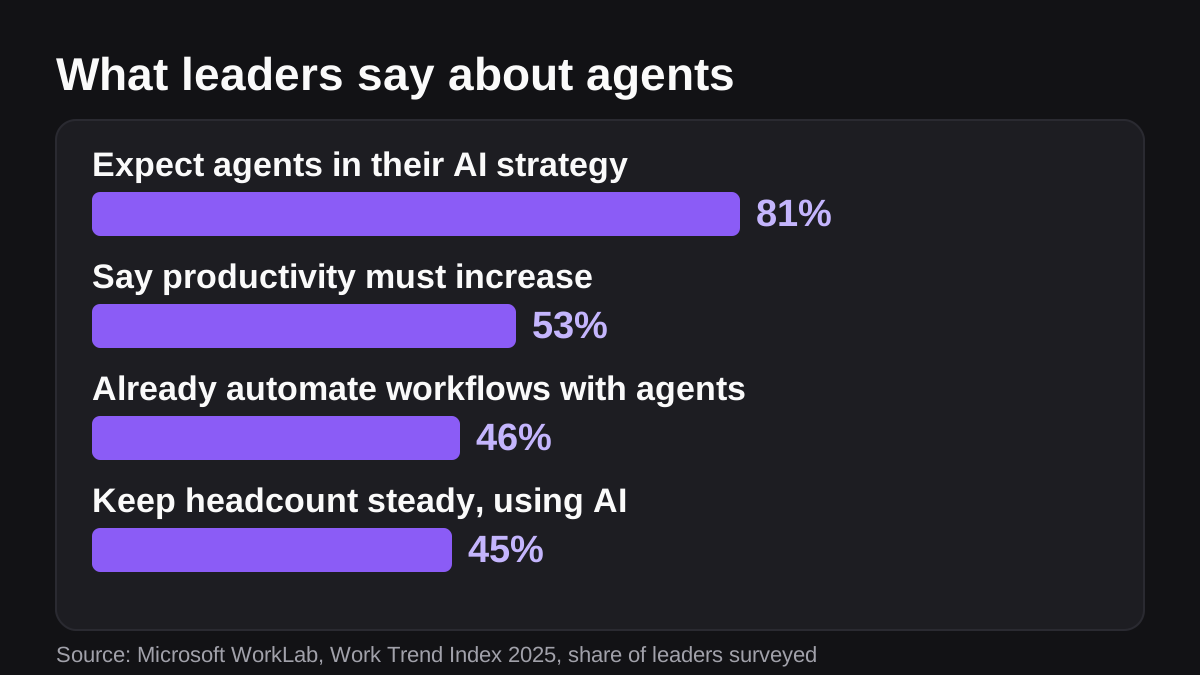
Leaders feel the same pressure at larger companies. Microsoft's 2025 Work Trend Index reports that 53% of leaders say productivity must increase, while 80% of the global workforce say they lack enough time or energy to do their work [3]. The same report found that 45% of leaders are keeping headcount steady while using AI as digital labor, 33% are considering headcount reductions and 32% are increasing headcount [3]. Those are survey answers from leaders, not a promise about results. They do show that "do more without hiring first" is now a mainstream plan.
Which SaaS operations jobs should an AI agent take first?
Rank each job on three questions. Does it repeat every week? Does it pull from several tools? What is the worst thing that happens if it is wrong? The best first jobs repeat, touch several tools and fail safely.
| Job | What the agent does | Risk if wrong | How to run it |
|---|---|---|---|
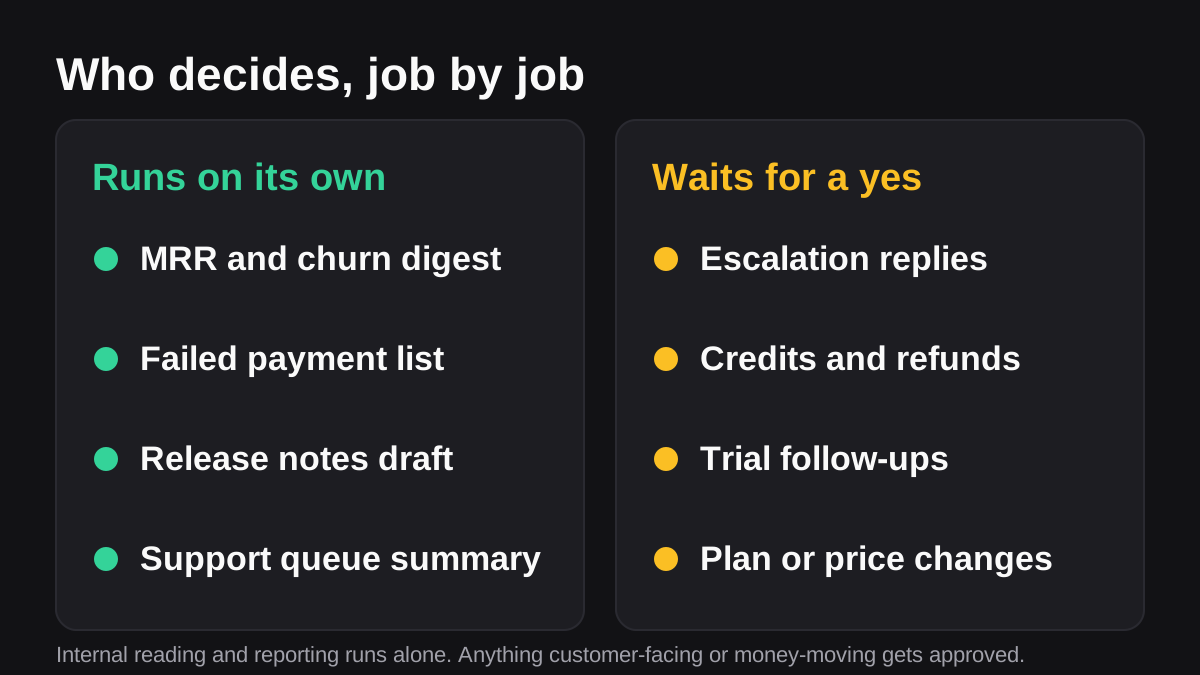
| Weekly MRR and churn digest | Reads billing, adds the reason behind each move and posts to your metrics channel | Low, it is an internal post | Runs on its own |
| Failed-payment watch | Lists accounts with failed invoices and drafts a note to each owner | Low to medium | Report runs on its own, outreach is approved |
| Support escalation brief | Collects ticket history, plan and billing record, and the linked bug | Medium, it informs a reply | Drafted, a person sends |
| Release notes draft | Turns merged work into plain-language notes | Low to medium | Drafted, product finishes |
| Trial follow-ups | Drafts a message from each quiet trial's real usage | Medium, it reaches a prospect | Drafted, the owner approves |
| Plan or price changes | Prepares the change and the customer list | High, it moves money | A person approves every change |
The pattern matches what we see in tasks to delegate to AI first: reading and reporting run on their own, and anything that spends, refunds or sends gets a human yes.
How do you automate a weekly MRR and churn digest?
This is the best first job because it only reads, it posts inside your own channel, and you can check the answer against numbers you already know. The hard part is not the math. It is agreeing on definitions.
Stripe's own documentation is a good example. It defines MRR as the sum of the monthly-normalized value of all your active and past-due subscriptions, excluding taxes, free plans and metered usage products [1]. A subscription that is canceled or marked unpaid counts as churn and drops out of MRR [1]. You can also choose whether to subtract discounts, which Stripe calls a more conservative way to report MRR [1]. If your agent and your board deck use different definitions, the digest will cause arguments instead of ending them.
Here is a process you can follow:
- Write down your definitions. MRR, new, expansion, contraction, churn, active subscriber. Settle the discount and trial rules once [1].
- Pick the sources. Usually billing for revenue, your analytics tool for activation and your support tool for the story behind a cancellation.
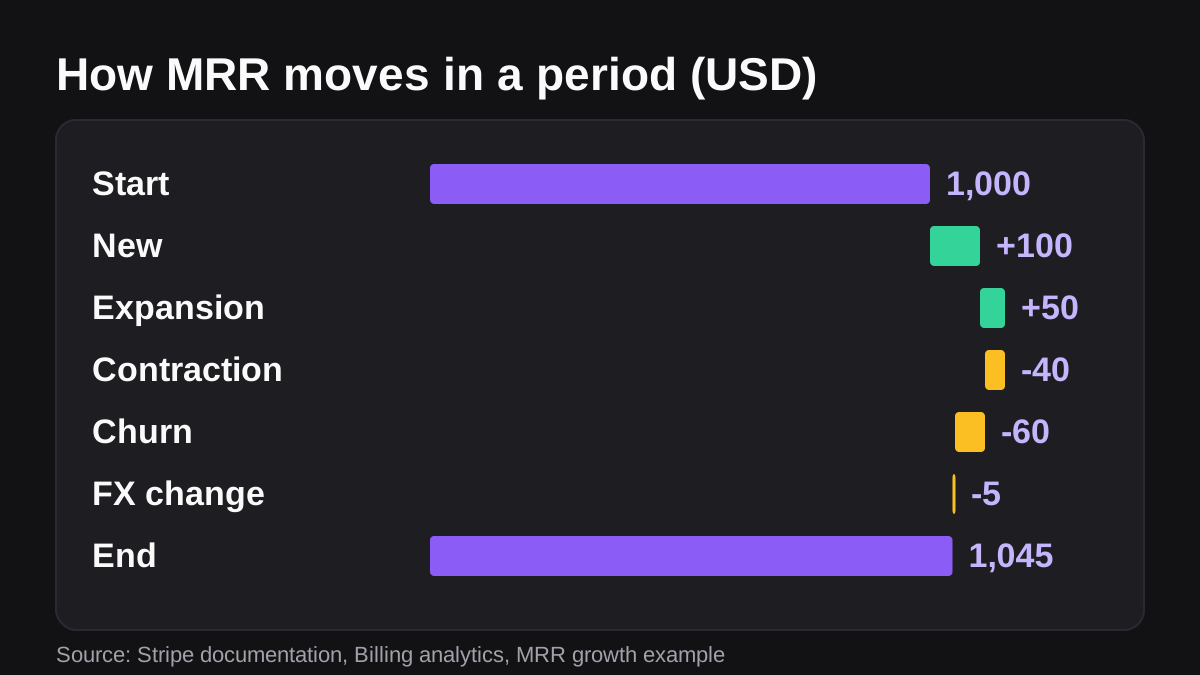
- Set the layout. Start of period, new, expansion, contraction, churn, end of period, then a short paragraph of reasons.
- Run it for two weeks next to your own numbers. Fix every difference before anyone relies on it.
- Schedule it before standup, in the channel where the team already reads metrics.
- Review a sample each month. Pick three accounts and trace them back to the source rows.
The layout in step three mirrors the way Stripe explains MRR growth. Its worked example starts at 1,000 USD, adds 100 USD of new MRR and 50 USD of expansion, subtracts 40 USD of contraction, 60 USD of churn and a 5 USD currency effect, and ends the period at 1,045 USD [1]. A digest that shows that bridge tells the team why the number moved, not just where it landed.
Stripe can export a customer-level log too. Its prebuilt Customer MRR changes report records every MRR change per customer, including new subscribers, upgrades, downgrades, reactivations and churn [1]. That is exactly the raw material an agent needs to say which accounts caused a move. Our guide to automating recurring reports in Slack covers the scheduling and posting side in more detail.
What should you automate around failed payments and churn?
Not all churn is a decision. Some customers leave because a card expired. Stripe describes automatic retries as a way to reduce involuntary churn, and notes that many failed payments are recoverable [2]. For new Stripe accounts, Smart Retries is on by default and configured for up to 8 retries within 2 weeks [2]. If a bank returns a hard decline code, such as a lost or stolen card, Stripe cannot retry until you get a new payment method [2].
That split tells you where an agent is useful. The retry engine handles the timing. A person, or an agent working for a person, handles the human part: finding the accounts that are stuck, working out which are worth a personal note, and drafting that note.
A weekly failed-payment job can:
- List every account with a failed invoice and how many attempts have been made so far.
- Separate the ones waiting on a retry from the ones that need a new card.
- Rank them by monthly value and add the account owner's name.
- Draft a short, polite message for each one that needs a new payment method.
- Post the list to your finance or customer success channel and hold the messages for approval.
Nothing is sent without a yes, and nobody has to open the billing dashboard to find out who is at risk. If you want the same pattern for overdue invoices on annual contracts, see how to automate overdue invoice reminders politely.
How can agents help support and product without hurting customers?
Support and product share one problem: the answer lives in three places. A customer escalates, and someone has to read the ticket history, check the plan and billing record, and find the linked bug and its real fix date. That gathering can take twenty minutes before a reply is written.
An agent can assemble that brief in a minute and draft the reply. A person should read it and send it, because the reply carries your voice, a promise about timing and sometimes a credit. Our post on AI for customer support triage explains which parts of a support queue are safe to automate and which are not.
Release notes are the product-side version. GitHub can already generate release notes from merged pull requests, group them into categories by label, exclude some by label or author, and list contributors [5]. That gives you a raw changelog. An agent adds the missing step: reading what shipped and writing a plain-language version customers understand. Treat the output as a draft for product to finish.
Where the agent should not decide
Keep these with a person:
- Prices, plan changes, discounts and refunds.
- Anything a customer reads that makes a promise, such as a fix date or a credit.
- Account deletions and data exports.
- Anything that touches production systems or customer data beyond read access.
What risks come with giving an AI agent access to your billing and support tools?
Real ones. The OWASP Gen AI Security Project calls the core problem excessive agency: damaging actions taken in response to unexpected, ambiguous or manipulated model output, caused by too much functionality, too many permissions or too much autonomy [6]. Its two main fixes are plain. Require a human to approve high-impact actions before they are taken, and limit permissions to the minimum necessary, for example giving a read-only use case only read access [6].
For a small SaaS team that translates into a short list:
- Start read-only. Billing and support access should be read access until a job proves itself.
- Scope each connection. Give the agent the channels and tools it needs and nothing else.
- Gate anything outward. Customer messages, refunds and plan changes wait for approval.
- Keep a trail. You should be able to see what the agent read, what it drafted and who approved it. We cover the details in AI audit trails: what to log.
- Review on a schedule. NIST's AI Risk Management Framework is a voluntary framework for managing AI risk across the lifecycle [4]. You do not need a program on day one, but a monthly look at what the agent did and what went wrong is a sensible habit.
If you want the longer version, read is it safe to give an AI agent access to your company tools.
What can an AI employee like Wopie do for a SaaS team?
Wopie is an AI employee that takes jobs in a Slack or Teams channel, reads your connected tools, produces finished work and pauses anything sensitive for human approval. The SaaS page shows the jobs teams hand over most often: the weekly MRR and churn digest, a fully briefed escalation reply, release notes from shipped work and follow-ups for trials that went quiet. Internal jobs post on their own, and customer-facing ones wait for your approval, as described in approval gates and audit trail.
A fair way to try it is to give it one job. Put the weekly digest in your metrics channel, compare it with your own numbers for two weeks, and only then add escalations. You can see how pricing works before you start.
An agent is the wrong tool for some work. If the process is undefined, if every case is a special case, or if the job is one a person only does once a quarter, write it down first or leave it with a person. Automating a bad process just makes it faster.
What to do next
Use this checklist this week:
- List the five things your team does every Monday before the real work starts.
- Circle the ones that read from two or more tools and only produce a summary.
- Write one-paragraph definitions for MRR, churn and active customer, and keep them next to the report.
- Pick the weekly digest as the first job and run it beside your own numbers for two weeks.
- Decide, in writing, which actions always need a human yes: replies, credits, refunds, price changes.
- Review what the agent did after the first month, then add one job.
Lean does not mean fewer people doing everything. It means the people you have spend their week on decisions, not on gathering. Start with the digest, keep a human on every outward step, and add work as trust builds.
Bring Wopie onto your team.
It owns the recurring work and checks with you before anything goes out. Your first $100 of work is on us.
Hire for freeSources
- [1]Analytics · Stripe Documentation · accessed Nov 10, 2026
- [2]Automate payment retries · Stripe Documentation · accessed Nov 10, 2026
- [3]2025: The year the Frontier Firm is born · Microsoft WorkLab, Work Trend Index Annual Report · accessed Nov 10, 2026
- [4]AI Risk Management Framework · National Institute of Standards and Technology (NIST) · accessed Nov 10, 2026
- [5]Automatically generated release notes · GitHub Docs · accessed Nov 10, 2026
- [6]LLM06:2025 Excessive Agency · OWASP Gen AI Security Project · accessed Nov 10, 2026