AI for customer support triage: what to automate and what to keep human
AI support ticket triage works best on sorting, routing and flagging. Here is what to automate, what to keep human, and how to roll it out safely in six steps.
By the Wopie team · October 31, 2026 · 10 min read
Listen to this article· 13 min
AI support ticket triage means using AI to read each incoming ticket, label what it is about, judge how urgent and how upset the customer is, and send it to the right person or queue. You can automate most of that sorting safely. What you should keep human is anything that needs judgment, empathy or the authority to spend money or make a promise.
The short answer is to automate the reading and routing, and keep people on the decisions and the difficult conversations. Start with triage rather than replies, because a wrong label is cheap to correct while a wrong reply reaches a customer. This guide shows what to automate, what to keep human, a six-step rollout and the traps to avoid. It is general information, not legal advice.
What is AI ticket triage, and what does it actually do?
Triage is the sorting you already do by hand every morning. Someone opens the queue, works out what each ticket is, decides what is urgent and hands it to a person who can deal with it. AI does the same reading, faster and at any hour.
Zendesk's help center gives a clear picture of the usual building blocks. Its intelligent triage classifies a ticket by topic, by sentiment, by language and by entities such as product names [1]. Sentiment runs on a five-point scale from very positive to very negative [1]. Language detection covers approximately 150 languages [1]. Those labels can then drive workflows for routing, deflection and prioritization, so that high-risk tickets get attention quickly [1].
There are limits worth knowing before you plan around any tool. In Zendesk's case, classification applies to tickets started with a public comment and uses the subject and the first public comment [1]. The classifications are available on Suite and Support Professional plans and above, and using them in workflows requires the Copilot add-on [1]. Other helpdesks have their own rules. Check the fine print on plans, languages and what the model actually reads.
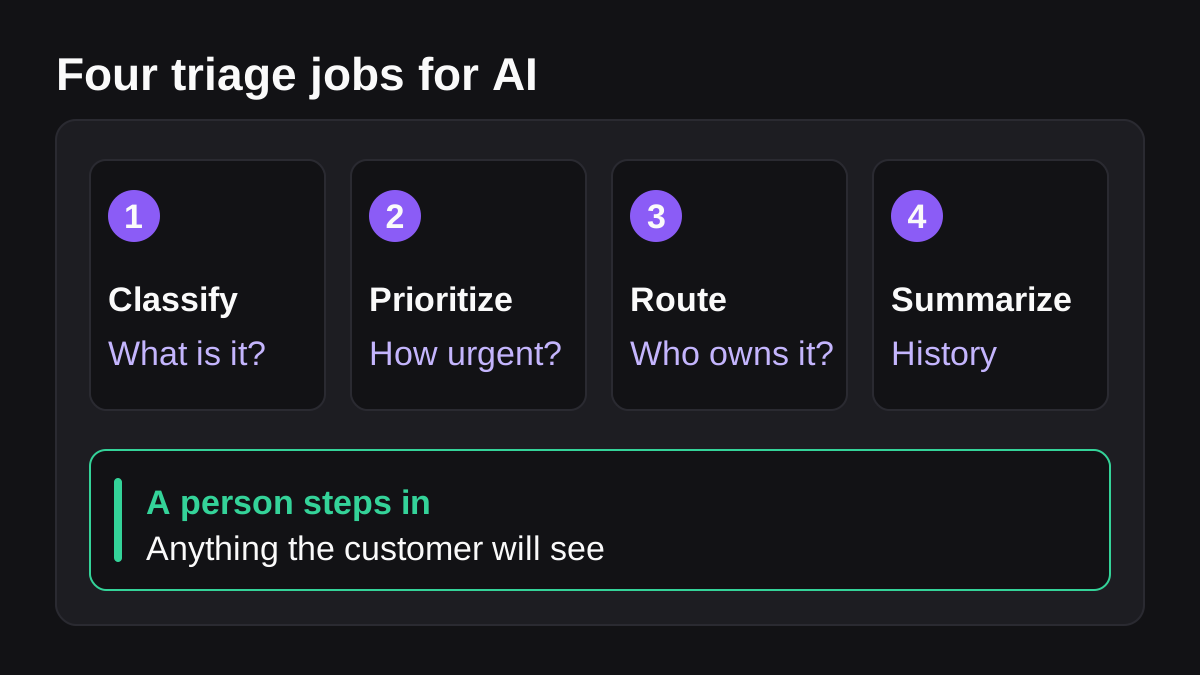
So a triage system does four jobs:
- Classify the ticket: billing, bug, how-to, cancellation, account access.
- Prioritize it, using customer importance, sentiment and the cost of waiting.
- Route it to the right team, language or senior agent.
- Summarize the history, so the person who picks it up does not start from zero.
Notice that none of these four jobs sends a word to the customer. That is why triage is the best first project.
What should you automate in support triage?
Automate work that is repetitive, rule-like and reversible. If a human would do it the same way a hundred times in a row, and a mistake can be fixed in a minute, it is a good candidate.
Classification and tagging
Reading a ticket and applying a topic label is the clearest win. It replaces the manual sorting that Zendesk lists among the reasons for using classification, which is to reduce manual sorting and guide agents [1]. It also gives you data you never had: once every ticket has a topic, you can finally count why customers contact you.
Routing to the right team
Routing follows from classification. Zendesk's examples are plain. Route tickets with a billing topic to the billing team. Route a ticket to a Spanish-speaking team when Spanish is classified. Route to the relevant team when a specific product is detected [2]. These rules are easy for a person to read and check.
Flagging urgent and unhappy customers
Sentiment is useful for catching trouble early. Zendesk's escalation example is to use an SLA policy to escalate tickets when very negative sentiment is classified, and you can also assign such tickets to senior agents or notify a manager [2]. A rule-based keyword filter misses tone. A model that reads the whole message does better, though you should still check its flags against real outcomes.
Summaries and context for the agent
Even when a person must handle the ticket, AI can save their first five minutes. A short summary of the thread, the customer's plan, their last three tickets and the likely cause lets the agent start with the answer in hand. This is about helping people, which customers also tend to accept. In Zendesk's 2025 CX Trends research, 73% of agents said an AI copilot would help them do their job better [5].
Simple deflection, with a safety net
Some questions have one right answer in your documentation: where to find an invoice, how to update a profile. Zendesk's deflect workflow sends a link, for example to a refund policy when a refund topic is classified [2]. The design detail worth copying is that the ticket is set to Solved but the conversation stays open in case the topic was misclassified [2]. That is a safety net, and every deflection should have one.
What should you keep human in customer support?
Keep a person on anything where being wrong is costly or where the customer needs to feel heard. A practical dividing line is this: the AI may prepare, label and suggest, but a named person decides and speaks.
| Situation | Automate or keep human | Why |
|---|---|---|
| A "where is my invoice" question with a documented answer | Automate, with a safety net | One right answer, low risk, easy to reopen |
| Tagging a ticket as billing, bug or how-to | Automate | Reversible and checkable |
| A very negative or angry message | Flag by AI, handle by a person | The customer needs empathy and judgment |
| A refund, credit or exception | Keep human | Money moves, and policy needs interpretation |
| A legal, safety, privacy or compliance request | Keep human | The cost of a wrong answer is high |
| A new problem that matches no known category | Keep human | The AI has no good pattern to follow |
| A long troubleshooting chain across tools | Keep human, with AI notes | Context shifts at every step |
| A key account or a customer who has contacted you many times | Keep human, with AI summary | The relationship matters more than speed |
The CFPB, writing about banking chatbots, makes the underlying point well. Chatbots may be useful for resolving basic inquiries, but their effectiveness wanes as problems become more complex [3]. The same report describes customers stuck in "doom loops" when an issue falls outside a chatbot's limited capabilities [3]. It also notes that chatbots built on large language models sometimes have trouble providing accurate and reliable information [3].
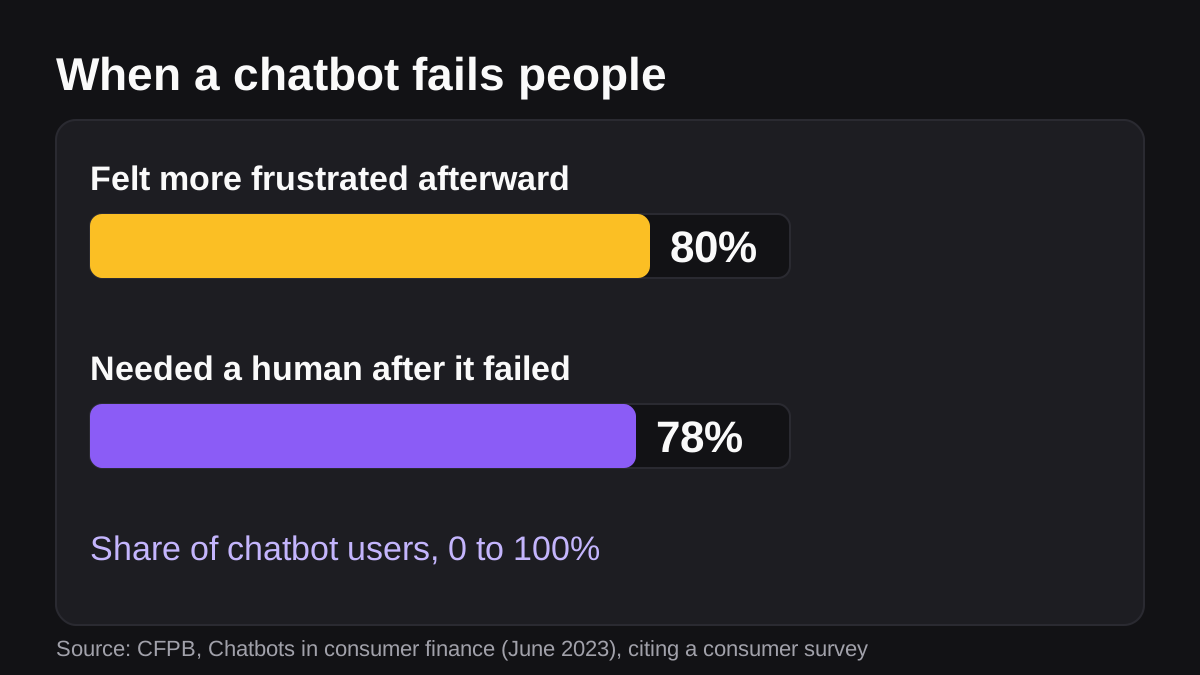
The CFPB cites a survey in which 80% of consumers who used a chatbot felt more frustrated afterward, and 78% needed to reach a human after the chatbot failed to help [3]. That report is about consumer finance, so treat the numbers as a warning rather than a measure of your own customers. Still, the pattern applies anywhere: a bot that cannot hand over to a person makes things worse.
Customers do not hate automation. They hate being trapped. In Zendesk's research, 67% of consumers said they are willing to hand tasks such as order tracking to AI [5]. The same report says 63% would switch to a competitor after just one bad experience [5]. Both facts point the same way: automate the routine tasks and make sure the human route is always there.
How do you roll out AI ticket triage in six steps?
Treat it like onboarding a new hire: narrow scope, close supervision, then more trust as results come in. Our guide to onboarding an AI agent like a new team member covers that mindset in more detail.
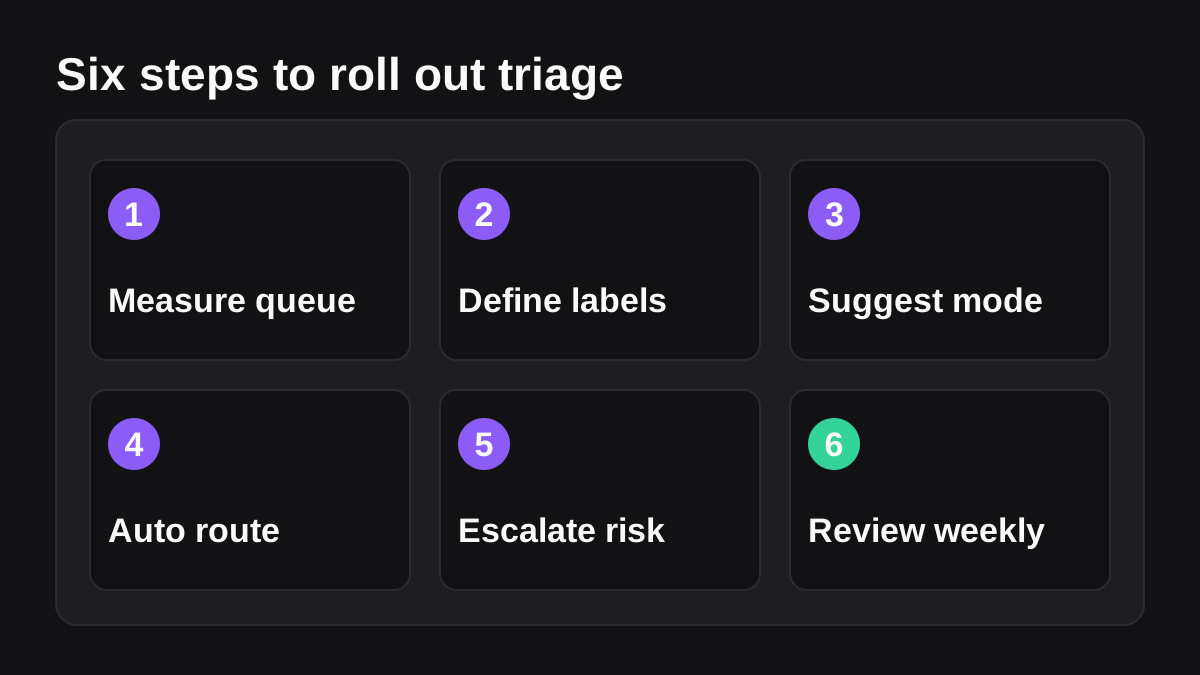
- Measure your queue first. Pull a month of tickets and count them by type, team and time to first reply. Without a baseline you cannot tell whether triage helped.
- Define your categories and priorities in writing. Write the labels, what each means and who owns it. Define priority explicitly, for example by customer tier and the impact of a delay. A model cannot follow rules you have not written down. Our post on writing an SOP an AI agent can follow shows the format.
- Run in suggestion mode. Let the AI propose a label, priority and owner while a person applies them. Compare its suggestions with your agents' choices on a few hundred tickets. Where they disagree, find out whether the AI or the agent was right.
- Turn on automatic routing for the safe categories. Pick the labels where agreement is highest and a mistake is easy to fix, such as billing versus how-to. Leave everything else in suggestion mode.
- Add escalation rules for risk. Send very negative sentiment, key accounts, legal words and repeat contacts to a senior person or manager. Make sure at least one person owns the escalation queue each day.
- Review weekly, then widen. Check misrouted tickets, reopened deflections and customer complaints. Fix the rules, then add the next category. NIST describes its AI Risk Management Framework as a voluntary resource to help organizations build trustworthiness into the design, use and evaluation of AI systems [6]. The habit of evaluating results on a schedule is the part to borrow.
What goes wrong with AI ticket triage?
Most failures come from a short list of causes.
- Silent misrouting. A ticket labeled wrongly sits in the wrong queue and nobody notices. Fix it with a weekly sample check and a reopen rate for deflected tickets.
- No way out to a person. This is the doom loop the CFPB describes [3]. Always show a visible route to a human, and make sure a person is actually behind it.
- Over-trusting the labels. Sentiment and topic are estimates. Zendesk itself notes that its sentiment model is tuned for customer service, so an issue alone does not make a ticket negative [1]. Use labels to prioritize attention, not to decide outcomes for a customer.
- Treating vendor numbers as your numbers. Salesforce's survey of 3,075 service professionals found that 40% of case resolution interactions involving AI are completed entirely autonomously, and that 70% of organizations with AI agents report measurable value within 60 days [4]. Those are survey results from organizations that already use AI agents. Your queue, your documentation and your customers are different, so measure your own.
- Forgetting the language and plan limits. Some features work only on certain plans, tickets or languages [1]. Test with your real tickets, in your real languages.
- Skipping ownership. If nobody owns the rules, they rot. Name one person to maintain categories and review misses.
Where does Wopie fit in support triage?
Wopie is an AI employee that takes jobs in a Slack or Teams channel, reads your connected tools, produces finished work and pauses anything sensitive for human approval. For triage, a job you could give it is a daily or hourly one: read the new tickets, group them by topic, flag the ones that look urgent or angry, and post a short summary in your support channel with a proposed owner for each. A person approves anything that changes a customer's record or sends them a message. You can see which tools it connects to on the integrations page, and how approval gates and the audit trail work on the security page.
If your support team lives in Slack, the Slack page describes how jobs are given in a channel. The principle of keeping a person on sensitive steps is covered in our guide to human in the loop AI. And if triage is your first project, our post on which jobs to give an AI employee first helps you decide where it sits among your other tasks.
What to do next
Use this checklist this week:
- Export a month of tickets and count them by topic, owner and first reply time.
- Write down five to eight categories, with a one-line definition and an owner for each.
- Define what makes a ticket urgent: customer tier, sentiment, deadline or money at stake.
- List the situations that must always go to a person, such as refunds, legal requests and angry customers.
- Run the AI in suggestion mode for two weeks and compare its labels with your agents' labels.
- Turn on automatic routing for one safe category only.
- Make sure every automated reply shows a clear way to reach a person.
- Put a weekly review in the calendar to check misroutes, reopened tickets and complaints.
AI triage is not about replacing the people who answer your customers. It is about getting each ticket in front of the right one sooner, with the context to help straight away.
Bring Wopie onto your team.
It owns the recurring work and checks with you before anything goes out. Your first $100 of work is on us.
Hire for freeSources
- [1]Automatically classifying tickets with intelligent triage | Zendesk help · Zendesk · accessed Oct 31, 2026
- [2]Intelligent triage use cases and workflows · Zendesk · accessed Oct 31, 2026
- [3]Chatbots in consumer finance | Consumer Financial Protection Bureau · Consumer Financial Protection Bureau (CFPB) · accessed Oct 31, 2026
- [4]State of Service: AI Agents Edition | Salesforce · Salesforce · accessed Oct 31, 2026
- [5]Zendesk 2025 CX Trends Report: Human-Centric AI Drives Loyalty · Zendesk · accessed Oct 31, 2026
- [6]AI Risk Management Framework | NIST · National Institute of Standards and Technology (NIST) · accessed Oct 31, 2026