AI audit trails: what to log when AI does real work
An AI audit trail is a record of what an AI agent did, for whom and who approved it. Here is what to log, how long to keep it and what to leave out.
By the Wopie team · November 7, 2026 · 10 min read
Listen to the summary· 1 min
An AI audit trail is a time-ordered record of what an AI system did, on whose behalf, with which data, and who approved it. If an AI agent sends an email, updates a CRM record or prepares a payment, the audit trail is how you answer the question every manager eventually asks: what exactly happened here, and why?
Most small teams do not have one yet. They have chat history, a few app logs and a vague memory of who said yes. That is fine for a pilot and a problem the first time something goes wrong. This guide covers what to log when AI does real work, what to leave out, how long to keep records and how to check that your trail would actually hold up. It is general information, not legal advice.
What is an AI audit trail, and how is it different from a chat history?
A chat history records a conversation. An audit trail records consequences. When you ask an agent to chase overdue invoices, the chat shows your request and its reply. The audit trail shows that it read twelve open invoices from your accounting tool, drafted three reminders, that Priya approved two and rejected one, and that two emails went out at 9:14 on Tuesday.
The distinction matters because chat is written for people to read in the moment, while a trail is written to be searched later, often by someone who was not there. NIST's guide to log management describes the aim as practical guidance on developing, implementing and maintaining effective log management across an organization [7]. That guide dates from 2006 and does not mention AI, but its core idea carries over: logging is a process you design, not a switch you flip.
AI agents add a twist. Ordinary software does the same thing every time, so the code explains the behavior. An agent decides what to do as it goes. That is why OpenAI's paper on governing agentic systems suggests deployers give users a ledger of actions the agent took, and notes that it is not possible to simply ask the agent to retroactively justify its behavior, because that is likely to produce confabulated reasoning [6]. Your record needs to come from the system around the agent, not from the agent's own story.
Why do you need an AI audit trail?
There are four practical reasons, and only one of them comes from regulation.
Finding mistakes. When an agent updates 40 CRM records wrongly, you need to know which 40. Without a trail you check every record by hand.
Accountability. A named approver beside each sensitive action means a person owns the decision. Our guide to human in the loop AI explains why approval only counts when someone has the context to do it properly. The trail is the proof it happened.
Security. The FTC's guide for businesses advises you to maintain central log files of security-related information, so you can spot and respond to attacks [8]. It lists signs such as multiple log-in attempts from unknown users or computers [8]. An agent that holds credentials to your tools is one more account to watch.
Regulation. The EU AI Act requires high-risk AI systems to technically allow for the automatic recording of events, called logs, over the lifetime of the system [1]. Whether a tool you use counts as high risk depends on how it is used, so ask a lawyer. Even when the rule does not apply, it shows where regulators expect the habit to go.
What should you log when an AI agent does real work?
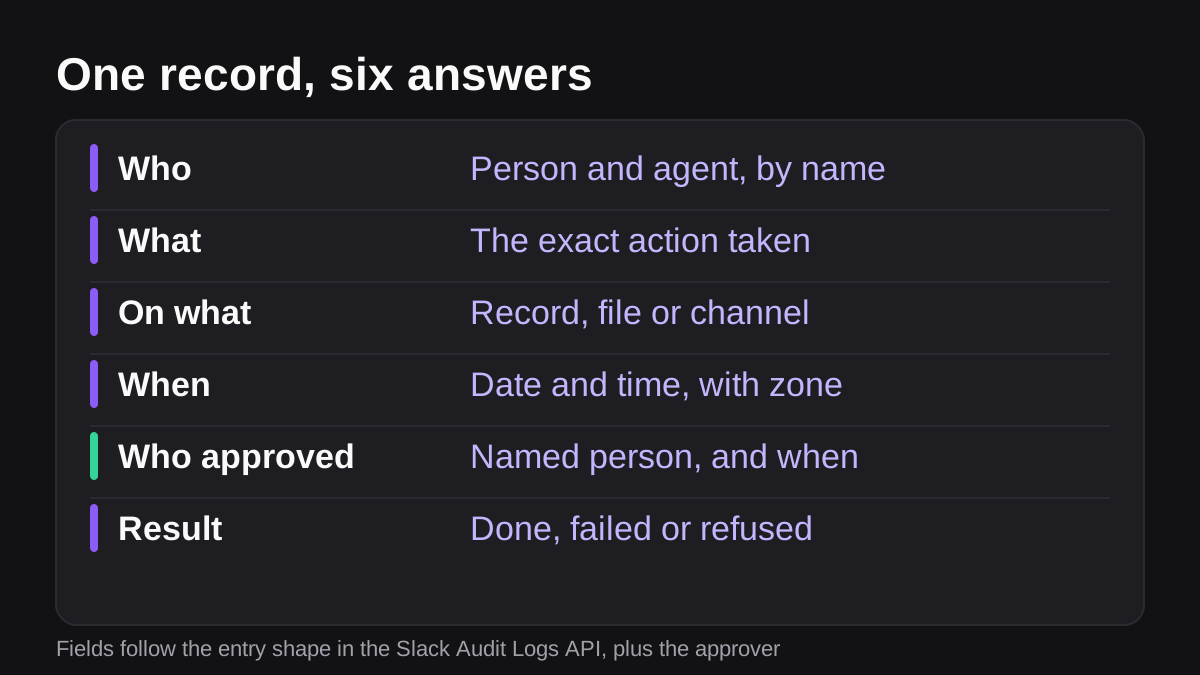
Start from six questions: who, what, on what, when, who approved and the result. Each record should answer all of them without anyone needing to dig through other systems. The fields below are our recommendations, and the evidence for each comes from real logging systems, as noted.
- Who or what acted. Name the agent, and the person it was acting for. OpenAI's paper floats giving each agent instance a unique identifier that carries information about its user-principal [6]. Even without that, record both names.
- What it did. The exact action in plain words, such as "sent email" or "changed deal stage", not just "API call".
- What it acted on. The record, file, channel or customer. Slack's Audit Logs API follows this pattern: each entry has an action, an actor, and an entity the action was taken on, identified by an ID [5].
- When, and in what context. A timestamp with a time zone, plus the workspace, channel or job it ran in. Slack entries also carry context such as the IP address and session ID [5].
- Who approved it. The approver's name, the time and what they saw. If the action needed no approval, record the rule that said so.
- What happened. Succeeded, failed or was refused. Log the refusals as well. A pattern of blocked requests is often the first sign that something is misconfigured or being abused.
Two more fields are worth adding for agents specifically.
- Why. A short, system-captured reason: the job request it was serving, and the sources it read. OpenAI's paper says it may be important to give the user the agent's reasoning so the action has proper context [6].
- Inputs it used. A reference to which document or record the agent read, not a copy of it.
What does a log entry look like in practice?
Here is the sort of line a small finance team might want, written out so it reads aloud well. On a Tuesday at 9:14 a.m. Eastern, the invoice agent, acting for Priya Shah in the finance channel, sent a payment reminder to a customer about invoice 1042. The draft was approved by Priya at 9:12. The email tool returned success.
That one sentence holds the who, what, on what, when, approver and result. If your logs cannot be turned into a sentence like that, they are missing something.
What should you leave out of an audit trail?
More logging is not always better. This is the point most guides skip.
GDPR's principles ask that personal data be adequate, relevant and limited to what is necessary for the purposes it is processed for [9], and kept in identifiable form for no longer than necessary [9]. A trail that stores a full copy of every email, invoice and customer record the agent touched creates a second pile of sensitive data that you now have to secure, search and eventually delete.
OpenAI's paper makes the same trade-off in a different setting. It notes that retaining sensitive agent session data can create privacy risks, and that monitoring can push people to self-censor [6]. The FTC's guide likewise advises keeping sensitive data only as long as it is necessary, with a written records retention policy that says what you keep, how you secure it and how long you keep it [8].
A workable rule for small teams:
- Log references, not contents. Record the invoice number, not the invoice.
- Mask secrets. Never write passwords, tokens or full card numbers to a log.
- Keep message text out by default. Slack's own Audit Logs API does not expose message content [5], which is a sensible default to copy.
- Restrict who can read it. Treat the trail as sensitive in its own right.
How long should you keep AI audit logs?
There is no single answer. It depends on your industry, your contracts and your country. Three data points help you set a floor.
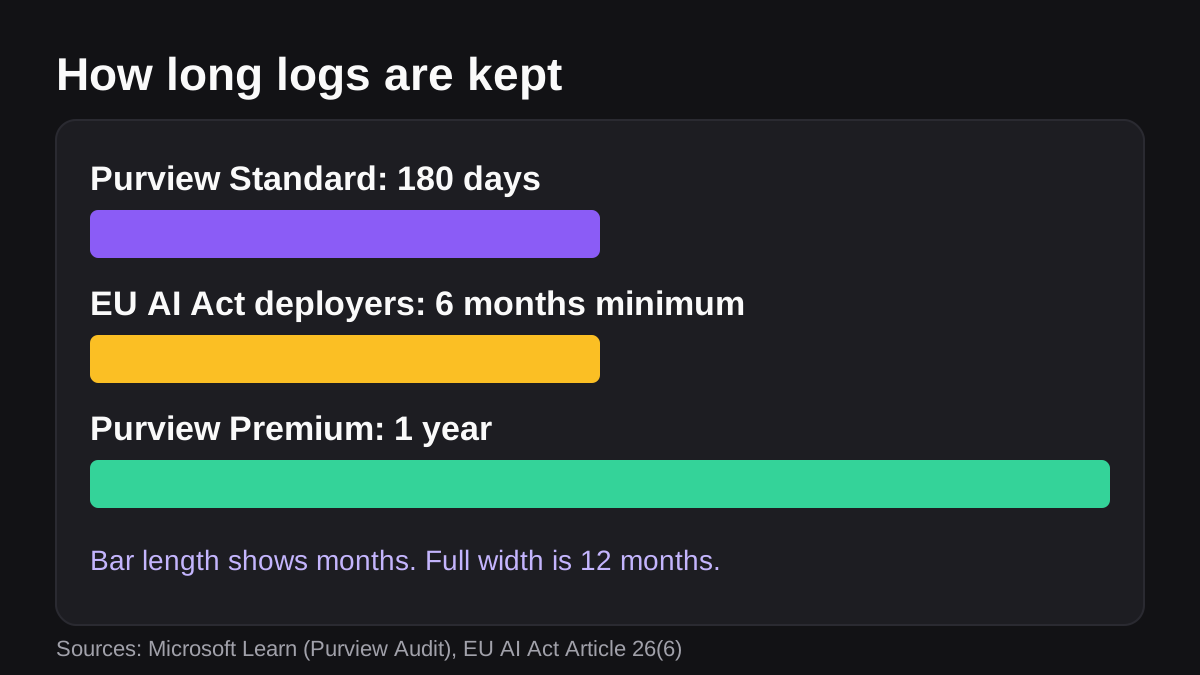
The EU AI Act says that deployers of high-risk systems must keep automatically generated logs for a period appropriate to the intended purpose, with a minimum of at least six months unless other law provides otherwise [2]. Providers have a matching six-month minimum, and data protection law can set a different period [3].
Microsoft gives a practical benchmark from the tools many teams already use. Microsoft Purview's unified audit log in the Standard tier keeps records for 180 days, which means you can search activity from the past six months [4]. The Premium tier supports retention up to one year, and up to 10 years with an add-on license [4]. Microsoft also notes that records generated by non-user entities, such as service principal actions and application activity, are retained for a fixed one year that you cannot configure [4]. That matters if your AI runs through an app identity.
| Source | Retention it describes | What it means for you |
|---|---|---|
| EU AI Act, deployers of high-risk systems [2] | At least six months | A sensible minimum even for lower-risk AI |
| Microsoft Purview, Standard [4] | 180 days | Enough to search the past half year |
| Microsoft Purview, Premium [4] | Up to one year, or 10 years with an add-on | For finance, legal or long investigations |
A simple policy: keep action records for at least six months, longer for finance and anything touching customer money, and delete on a schedule once the purpose has passed. Write it down, as the FTC suggests [8], and check it with whoever advises you on tax and employment law.
Where do the logs live in Slack and Microsoft Teams?
If your agent works in a chat tool, the chat platform keeps part of the trail for you, but not all of it.
Slack. The Audit Logs API is read-only and lets you monitor audit events across an Enterprise organization, for example to feed a security information tool [5]. Slack says its features are only available to workspaces on an Enterprise plan, and the app that reads it must be installed by the organization's Owner [5]. Entries include an actor, an action, an entity and context, and an optional app field when an app triggered the event [5]. The API returns event data but does not say whether an action was appropriate and does not expose message content [5]. In short, it tells you what happened in Slack, not whether the agent's work was right.
Microsoft Teams. Microsoft Purview's unified audit log captures thousands of user and admin operations across dozens of Microsoft services [4]. Audit (Standard) is on by default for organizations with the appropriate subscription [4]. The Premium tier adds properties for Teams events, such as an app access context on messages [4].
Neither platform replaces the agent's own record. Chat logs show messages and admin events. They do not know that your agent read invoice 1042, drafted a reminder and waited for approval. You need that record from the tool that runs the agent, kept alongside the platform logs.
How do you set up an AI audit trail in five steps?
- List the actions. Write down everything your AI can do in each connected tool: read, create, update, send, pay, delete.
- Choose the fields. Use the six questions from earlier. Add why and inputs for anything sensitive.
- Decide where records live. Keep them somewhere the agent cannot edit, and separate from the tool it is acting on.
- Set retention and access. Pick a retention period, name who can read the trail and write it in your policy [8].
- Review it. Once a month, sample ten records. Can you tell who, what, when, approver and result for each? OpenAI's paper notes that people may not have time to read every log, and describes using automated monitoring to review them at scale, with its own costs and risks [6]. Start with the sample and add automation later.
For pointers on turning these decisions into written rules for the agent, see our guide to writing SOPs for AI agents.
What a good trail lets you do
- Answer "who approved this?" in under a minute.
- List every record an agent changed in a given week.
- Show that sensitive actions waited for a named person.
- Prove an action was refused, and why.
- Delete old records on schedule without breaking the rest.
Where does Wopie fit?
Wopie is an AI employee that takes jobs in a Slack or Teams channel, reads your connected tools, produces finished work and pauses anything sensitive for human approval. Its security page describes approval gates and an audit trail as part of the design, so each request and approval is recorded. You can see which integrations it connects to, and you can see how it works inside Slack or Microsoft Teams.
Whatever tool you pick, ask the vendor to show you a real record: one entry, with the actor, action, target, approver, time and result. If they cannot, assume you will be reconstructing events from screenshots.
What to do next
Use this checklist this week:
- List every action your AI tools can take, and who they act for.
- Check where each action is recorded today. Fill the gaps.
- Confirm each record shows who, what, on what, when, approver and result.
- Remove anything that stores copies of customer data you do not need.
- Set a retention period of at least six months and write it down.
- Name who can read the trail, and who reviews it monthly.
- Run one test: pick last week's AI work and trace it from request to result using only the records.
An audit trail will not stop an AI making a mistake. It makes the mistake findable, fixable and owned by a person, which is what lets you give an agent more work with confidence.
Autonomous, not unsupervised.
Approval gates, scoped access and a full audit trail. See how Wopie keeps people in control.
See how Wopie stays safeSources
- [1]Article 12: Record-Keeping | EU Artificial Intelligence Act · EU Artificial Intelligence Act (artificialintelligenceact.eu) · accessed Nov 7, 2026
- [2]Article 26: Obligations of Deployers of High-Risk AI Systems | EU Artificial Intelligence Act · EU Artificial Intelligence Act (artificialintelligenceact.eu) · accessed Nov 7, 2026
- [3]Article 19: Automatically Generated Logs | EU Artificial Intelligence Act · EU Artificial Intelligence Act (artificialintelligenceact.eu) · accessed Nov 7, 2026
- [4]Learn about auditing solutions in Microsoft Purview | Microsoft Learn · Microsoft Learn · accessed Nov 7, 2026
- [5]Using the Audit Logs API · Slack (docs.slack.dev) · accessed Nov 7, 2026
- [6]Practices for Governing Agentic AI Systems · OpenAI · accessed Nov 7, 2026
- [7]SP 800-92, Guide to Computer Security Log Management · National Institute of Standards and Technology (NIST) · accessed Nov 7, 2026
- [8]Protecting Personal Information: A Guide for Business · Federal Trade Commission (FTC) · accessed Nov 7, 2026
- [9]Art. 5 GDPR - Principles relating to processing of personal data · General Data Protection Regulation (gdpr-info.eu) · accessed Nov 7, 2026