Is it safe to give an AI agent access to your company tools?
Are AI agent security risks manageable? Yes, if you limit access, gate risky actions and keep logs. Here are the main risks and a six-step plan.
By the Wopie team · November 4, 2026 · 10 min read
Listen to this article· 13 min
Is it safe to give an AI agent access to your company tools? It can be, but only if you treat the agent like a new contractor and not like a trusted insider. The main AI agent security risks come from what the agent can reach, what it can change without asking, and what it reads from the outside world. You control all three.
Safe use comes down to four habits. Give the agent the narrowest access that gets the job done. Make anything that sends, spends or deletes wait for a person. Assume that text from outside your company may try to steer the agent. Keep a log you can read. The rest of this guide explains why, what the research says, and how to set it up in six steps. It is general information, not security or legal advice.
What are the real risks of giving an AI agent access to your tools?
A chatbot that only answers questions can embarrass you. An agent that can read your inbox, update your CRM and message customers can do damage. The difference is access. OWASP, the open security community behind widely used risk lists, calls the underlying problem "excessive agency": an AI system that can take damaging actions after an unexpected, ambiguous or manipulated output from the model [2].
OWASP names three root causes [2]:
- Excessive functionality. The agent has tools it does not need.
- Excessive permissions. Those tools can reach more of your systems than the task requires.
- Excessive autonomy. The agent takes high-impact actions without anyone checking or approving them.
Notice that none of these is about the AI being clever or evil. They are about how much you handed over. The model will sometimes be wrong, confused or misled. Your job is to make sure that when it is, the damage is small.
Why does access matter more than the model?
The UK National Cyber Security Centre describes tool-using AI systems this way: an attacker who steers the system effectively gains the access that its tools provide [1]. So the same mistake costs very different amounts depending on the permissions behind it. A summarizer that can only read one channel and a "do anything" agent with an admin token fail in very different ways.
What is prompt injection, and can it really happen to us?
Prompt injection is the best known attack on AI systems. OWASP splits it into two kinds. In a direct injection, a user's own input changes how the model behaves in ways nobody intended. In an indirect injection, the model takes in outside content, such as a web page or a file, and that content contains instructions [3].
Here is a plain example. Your agent reads a supplier email as part of a task. Buried in the email, in white text, is a line telling the agent to forward the latest price list to an outside address. If the agent treats that line as an instruction and is allowed to send email, you have a leak. Nobody hacked your network. The agent simply read something and obeyed it.
Is there a fix for prompt injection?
Not a complete one, and the NCSC is blunt about it. Its technical leadership explains that language models make no distinction between data and instructions, so prompt injection may never be fully mitigated the way SQL injection can be [1]. It recommends treating the model as an "inherently confusable deputy" and aiming to reduce both the risk and the impact [1]. It adds that if a system's security cannot tolerate the remaining risk, a language model may be a poor fit for that use case [1].
NIST's research arm backs this up. In a public red-teaming competition, more than 400 participants made over 250,000 attack attempts against 13 frontier models, and at least one successful attack was found against every target model [4]. The sensible reading is not panic. It is that you should not rely on the model to protect itself.
What should you take from that?
Limit what a fooled agent can do. The NCSC recommends deterministic safeguards that sit outside the model and cap what the system can do [1]. It also cites a principle worth remembering: a model's privileges should drop to those of the least trusted party whose content it processes. So an agent that reads external email should not also hold privileged tool access [1].
How common are AI security failures in real companies?
Common enough to plan for. IBM's 2025 Cost of a Data Breach research, run with the Ponemon Institute, found that 13% of organizations reported a breach of an AI model or application. Of those, 97% said they lacked proper AI access controls [5]. Another 8% did not know whether they had been compromised [5].
Policy gaps show up as well. Among breached organizations, 63% either had no AI governance policy or were still developing one [5]. One in five organizations reported a breach linked to "shadow AI", meaning AI tools used without approval, and high levels of shadow AI added an average of $670,000 to breach costs [5]. Only 37% had policies to manage AI or detect shadow AI [5].
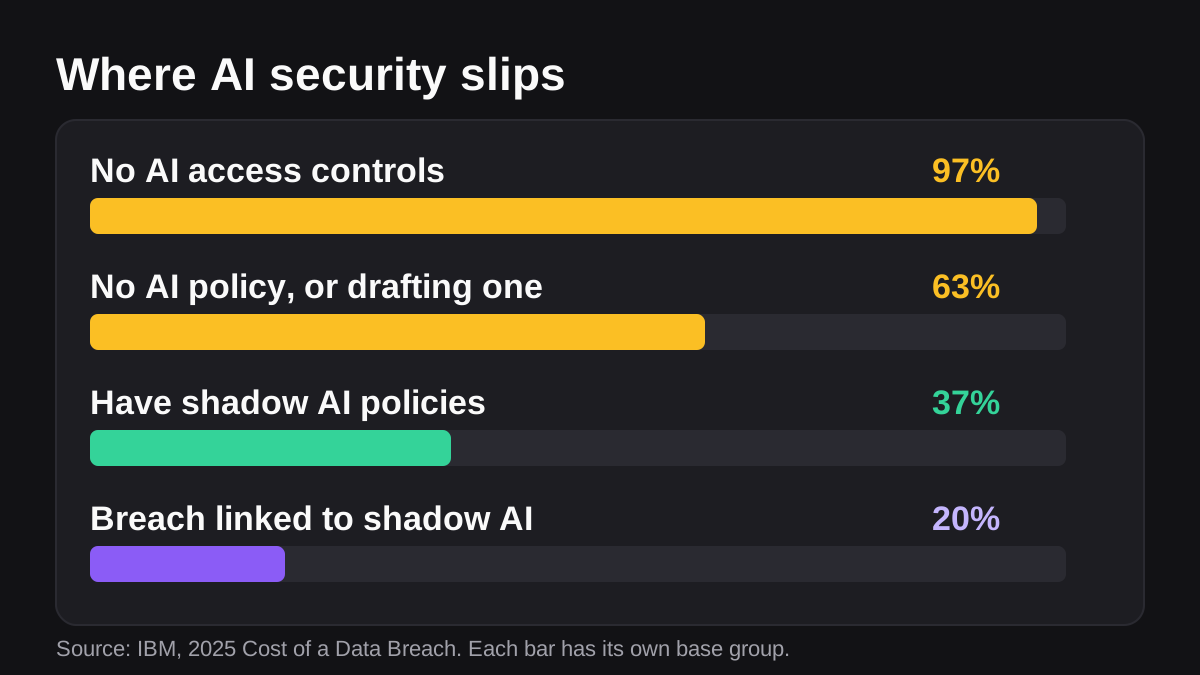
Read these numbers carefully. They do not say agents are unsafe. They say that most of the pain came from missing basics: no access controls, no policy, no visibility. Those are fixable on a small team without buying anything.
For more on keeping a person in charge of the risky steps, see our earlier post on what human in the loop AI means.
How do you give an AI agent access without handing over the keys?
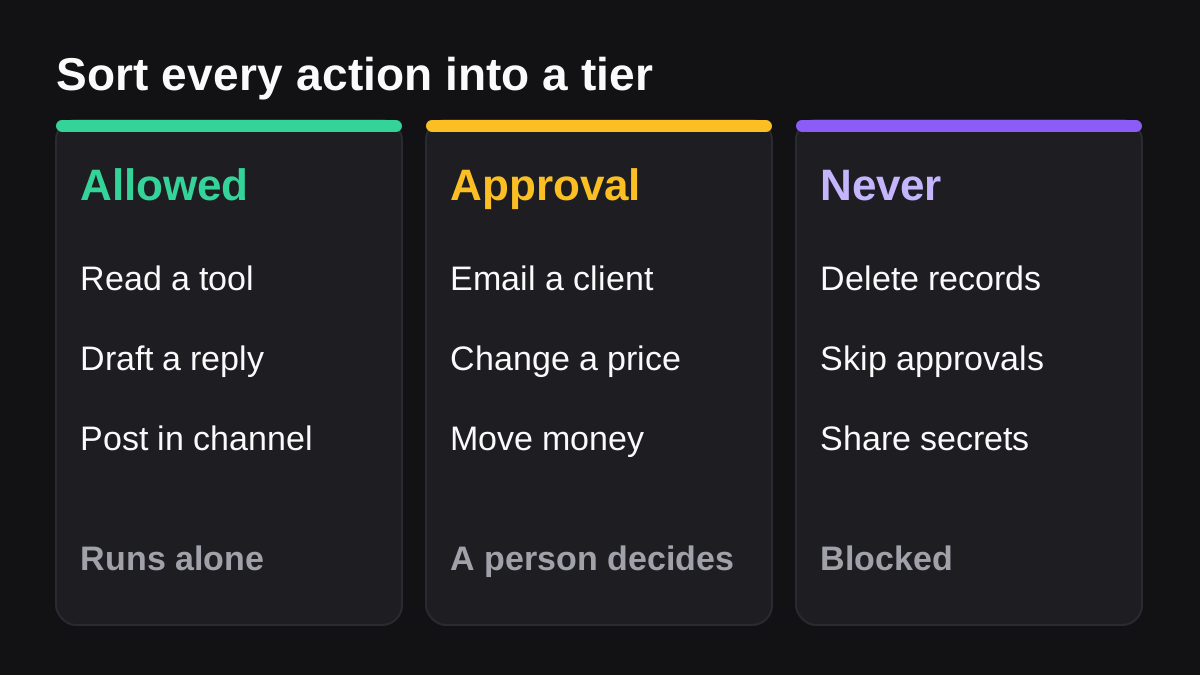
Use three tiers for every action the agent might take. It is easy to explain to your team.
| Tier | What it covers | Example | Who decides |
|---|---|---|---|
| Allowed | Low-risk reads and drafts | Read a report, draft a reply, post in a channel it belongs to | The agent, within its scope |
| Approval | Anything outside the company, or anything that spends money or changes live records | Email a customer, change a price, move money | A named person, every time |
| Never | Irreversible or out of scope | Delete records, skip approvals, share secrets | Nobody: it is blocked |
This lines up with OWASP's advice. Its prevention list for excessive agency says to minimize the tools the agent has, minimize what each tool can do, avoid open-ended tools such as ones that run arbitrary shell commands, minimize permissions on downstream systems, and require a human to approve high-impact actions before they are taken [2]. It also says to check every downstream request against a security policy in ordinary code, rather than relying on the model to decide [2].
What about the apps you connect it to?
Your chat platform already has controls, so use them. Slack's guidance says every app should have only the minimum permissions it needs, and it sorts scopes into three tiers: always allowed, requires approval, and restricted [6]. Admins can turn on Require App Approval so members can only install pre-approved apps, and Slack recommends regular audits of installed apps' scopes, including checks for overly permissive scopes and apps that have not been updated in a long time [6].
Microsoft makes a similar point for Teams and Microsoft 365. By default, users can consent to apps for permissions that do not need administrator consent [7]. Microsoft recommends allowing user consent only for apps from verified publishers, and it offers an admin consent workflow so people can request approval for apps they cannot consent to themselves [7]. One detail catches people out: changing the consent settings affects only future consents, and existing grants stay in place until you revoke them [7]. So review what is already connected, not just what you connect next.
How do you set up a safe AI agent in six steps?
You can do this in an afternoon. The order matters, because each step shrinks the damage from the next thing that goes wrong.
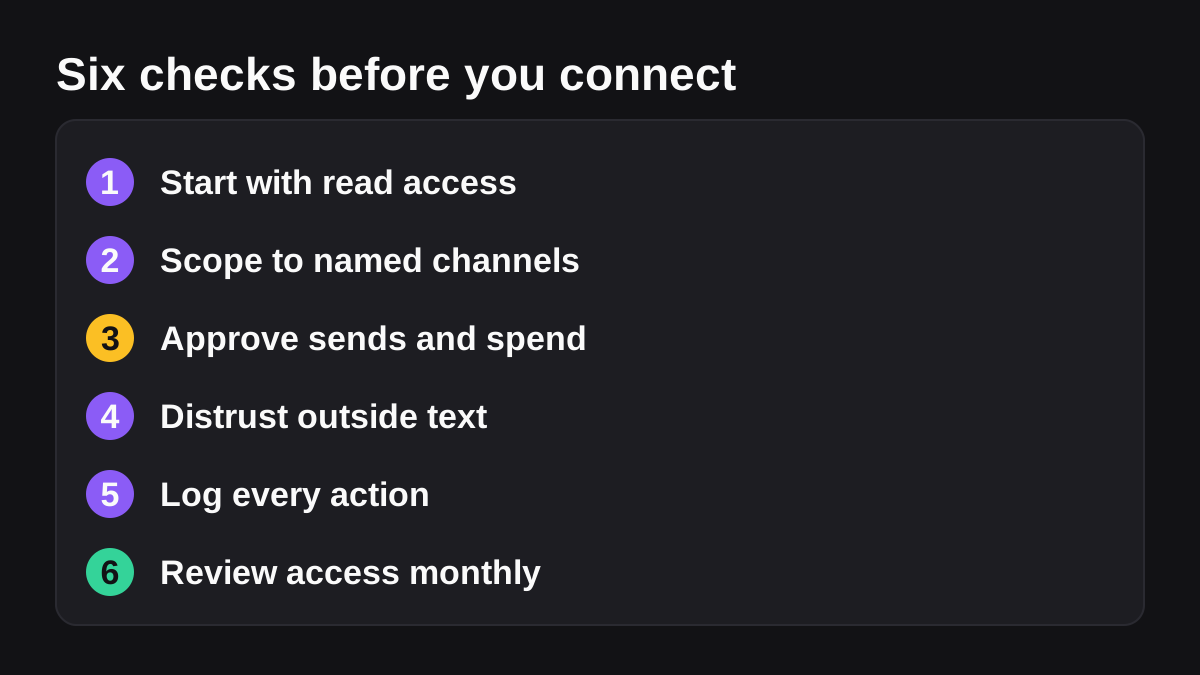
- Start with read access. Connect the agent to one tool with read-only rights. Let it prove itself on drafts and reports before it can change anything. This follows the least privilege principle OWASP recommends [3].
- Scope it to named places. Give access to specific channels, folders and accounts, not the whole workspace. Use a dedicated account for the agent, not a person's login with all of their rights [2].
- Put approval on sends and spend. Anything that leaves the company, spends money or changes a live record waits for a named person to approve. OWASP says to keep a human in the loop for privileged operations [3]. Write down who approves what. Our guide on writing an SOP an AI agent can follow shows how to describe those rules.
- Treat outside text as untrusted. Decide which sources the agent reads that you do not control: customer emails, web pages, shared documents. Keep the agent that reads them away from powerful tools, following the NCSC principle above [1]. OWASP also suggests clearly separating and labeling untrusted content [3].
- Log everything it does. The NCSC says teams should record enough to spot suspicious activity, potentially including full model inputs and outputs, tool use and API calls. It also notes that failed tool or API calls can reveal the early stages of an attack [1]. OWASP lists logging and monitoring as measures that limit damage even though they do not prevent the problem [2].
- Review access on a schedule. Once a month, look at what is connected, what each connection can do, and what the agent actually used. Remove anything unused. Slack recommends regular audits for exactly this reason [6].
If you want a fuller picture of how to bring an agent in gradually, our post on onboarding an AI employee like a new team member covers a staged rollout.
What should you ask an AI vendor before you connect anything?
Whether you build your own agent or buy one, ask the same questions. Good vendors answer them plainly.
- What can it read, and can I limit that to named channels or folders?
- What can it change, and which actions stop and wait for a person?
- Where are my tool credentials stored, and does the model ever see them?
- What is logged, and can I export the log?
- Is my data used to train models, and can I have it deleted?
- What do your security documents actually claim, and what are they careful not to claim?
That last question is a good test. Be wary of a vendor that says it can "stop" prompt injection. The NCSC says buyers should prefer vendors who can explain how they reduce the risk, rather than ones who promise to eliminate it [1].
For what it is worth, this is how we approach it at Wopie. Wopie is an AI employee that takes jobs in a Slack or Teams channel, reads the tools you connect, and pauses anything sensitive for approval. Its security page says it only sees channels it has been invited to, pauses external sends and risky actions for human approval, never runs deletions, keeps credentials encrypted and away from the model, and records every request, output and approval in an audit trail. It also states its compliance status carefully: SOC 2-ready controls and ISO 27001-aligned policies, not certifications. You can check the connectors it supports on the integrations page before you decide. Use the same checklist on us as on anyone else.
When is an AI agent the wrong choice?
Sometimes the honest answer is not yet. Skip or delay an agent when the work involves data you are legally forbidden to expose, when a single wrong action would be catastrophic and cannot be undone, or when nobody on your team has time to review approvals. The NCSC's point applies here: if the leftover risk is more than the task can tolerate, a language model may be the wrong tool [1].
A rubber-stamp approval also does not count as control. If people click approve on forty requests an hour without reading them, you have the look of oversight without the substance. Keep the number of approval requests small by restricting what the agent can do in the first place, so the ones that remain deserve attention.
What to do next
Spend thirty minutes on this today.
- List every AI tool anyone on your team already uses, including ones nobody approved. IBM's figures suggest unsanctioned use is where costs climb [5].
- For each, write down what it can read and what it can change.
- Remove access that no job needs.
- Choose one workflow, such as a weekly report, and run an agent on it with read-only access and approval on any send.
- Check the log after a week. Widen access only where the log shows a real need.
Start small, keep the approvals, and read the log. That is most of what safe AI agent use takes.
Autonomous, not unsupervised.
Approval gates, scoped access and a full audit trail. See how Wopie keeps people in control.
See how Wopie stays safeSources
- [1]Prompt injection is not SQL injection (it may be worse) · National Cyber Security Centre (UK) · accessed Nov 4, 2026
- [2]LLM06:2025 Excessive Agency - OWASP Gen AI Security Project · OWASP Gen AI Security Project · accessed Nov 4, 2026
- [3]LLM01:2025 Prompt Injection - OWASP Gen AI Security Project · OWASP Gen AI Security Project · accessed Nov 4, 2026
- [4]Insights into AI Agent Security from a Large-Scale Red-Teaming Competition · NIST CAISI Research Blog · accessed Nov 4, 2026
- [5]IBM Report: 13% of Organizations Reported Breaches of AI Models or Applications, 97% of Which Reported Lacking Proper AI Access Controls · IBM Newsroom · accessed Nov 4, 2026
- [6]Security best practices · Slack Developer Docs · accessed Nov 4, 2026
- [7]Configure How Users Consent to Applications - Microsoft Entra ID | Microsoft Learn · Microsoft Learn · accessed Nov 4, 2026