How marketing agencies use AI employees to deliver client reports
AI for marketing agencies: how an AI employee builds weekly client reports from ad and analytics data, what stays human, and how to roll it out safely.
By the Wopie team · November 8, 2026 · 11 min read
Listen to the summary· 1 min

AI for marketing agencies works best on the recurring client deliverable: the weekly or monthly performance report. An AI employee pulls each client's numbers from their ad accounts and analytics, writes the report in your template, flags anything odd, and waits for the account lead to approve it before anything reaches the client.
That is a narrow claim, and it is the honest one. AI does not replace the strategy call or the client relationship. It takes over the assembly: opening four dashboards, copying numbers into a template, and writing the same paragraph with different figures. This guide shows what the job involves, where the data comes from, how to set it up, and where a person must stay in charge.
What do agencies actually use AI for first?
Most agencies start with reporting, because it is the most repetitive deliverable they own. Every retainer expects an update on a schedule. Each one is built from the same few sources, in the same layout, with new numbers and a short explanation.
Four jobs come up again and again:
- The weekly client report. Spend and results from the ad platforms, sessions and conversions from analytics, compared with last week and with the target.
- The campaign audit before a call. A ranked list of what is working and what to cut, ready before the client asks.
- The results deck. A quarter's numbers turned into a story for a renewal or a review.
- The status update. What shipped, what slipped and what you need from the client.
These are the same four jobs described on Wopie's page for agencies. They share three traits that make them good candidates. They repeat on a schedule. They read from systems you already use. And the output is a document a person can check in a few minutes.
If you are choosing where to begin, the guide to which jobs to give an AI employee first applies directly. Pick one client and one deliverable. The weekly report is usually the right one.
Where does the report data come from?
A client report is a join across a few systems. The good news is that the main ones all expose their numbers through documented reporting interfaces, so nobody has to export spreadsheets by hand.
| Source | What you can pull | What the documentation says |
|---|---|---|
| Google Analytics | Sessions, conversions, revenue | The Data API runs standard, pivot, batch and realtime reports, and lets you automate reporting [4] |
| Google Ads | Spend and results from campaign down to keyword | Reports are built with the Google Ads Query Language, using search or streaming calls [7] |
| Meta Ads | Spend and results by ad account, campaign, ad set and ad | The Insights API is an edge on each ad object, and a plain request returns basic metrics for roughly the past 30 days [5] |
| Looker Studio | An existing client dashboard as a PDF | A scheduled email sends the report as a PDF attachment, with a preview and a link [2] |
Each row can be read on its own. The Google Analytics Data API covers reports you can use to build dashboards and connect analytics data to other business applications [4]. The Google Ads API lets you shape a report by naming the resource you want and the metrics to return [7]. Meta's Insights API lets you set time ranges, attribution windows and breakdowns on each request [5].
Why not just schedule the dashboard?
Scheduled dashboards are a fine first step, and you should use them where they do the whole job. Google's Looker Studio can email a report as a PDF on a schedule [2]. But there are limits worth knowing before you build a client process on top of them.
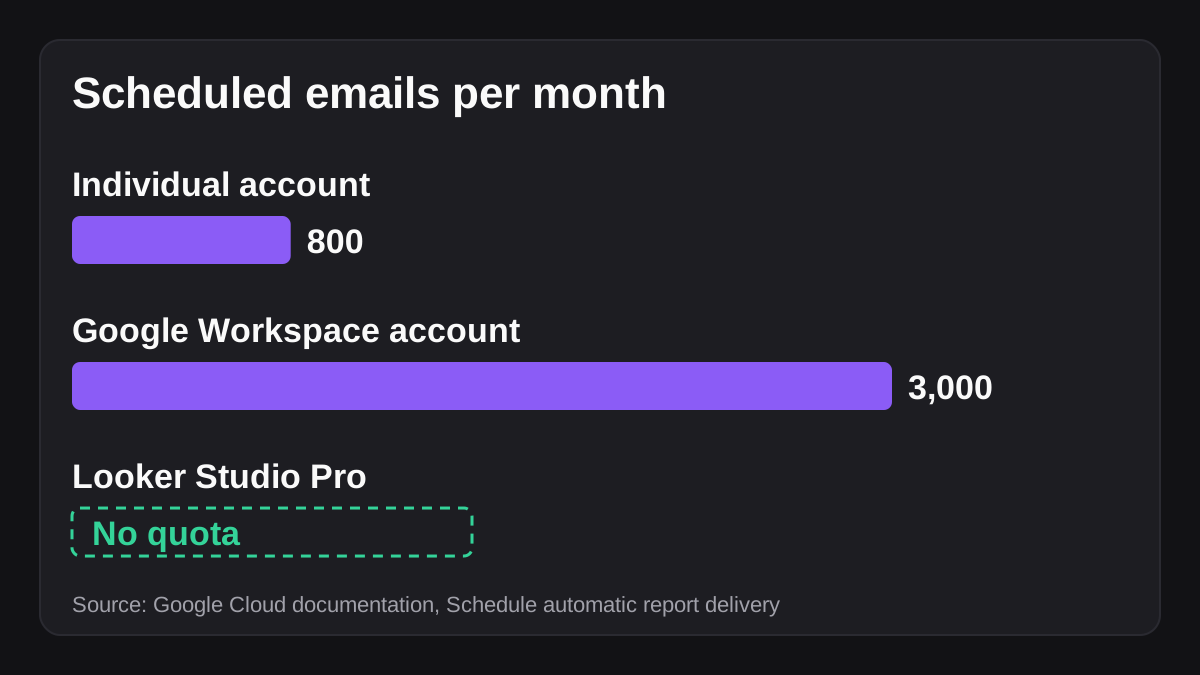
Without a Pro plan, a report can have one schedule, sent at most once a day [2]. A schedule can include up to 50 recipient addresses [2]. Individual accounts can send 200 emails a day and 800 a month, and Google Workspace accounts can send 500 a day and 3,000 a month, while Pro accounts have no quota [2]. By default the PDF uses the report's default filters, and you cannot add or remove controls for a schedule [2]. If any recipient is restricted by your administrator, the schedule will not send [2].
For an agency with a handful of clients, those limits may never matter. The bigger gap is different. A dashboard shows numbers. It does not write the paragraph that says why spend went up, which campaign to cut, or what you plan to do next week. That written part is what clients value, and it is what takes the time.
How does an AI employee build a client report?
Think of the work as a short sequence, the same one a good junior analyst follows. An AI employee does it the same way, with a person checking at the end.
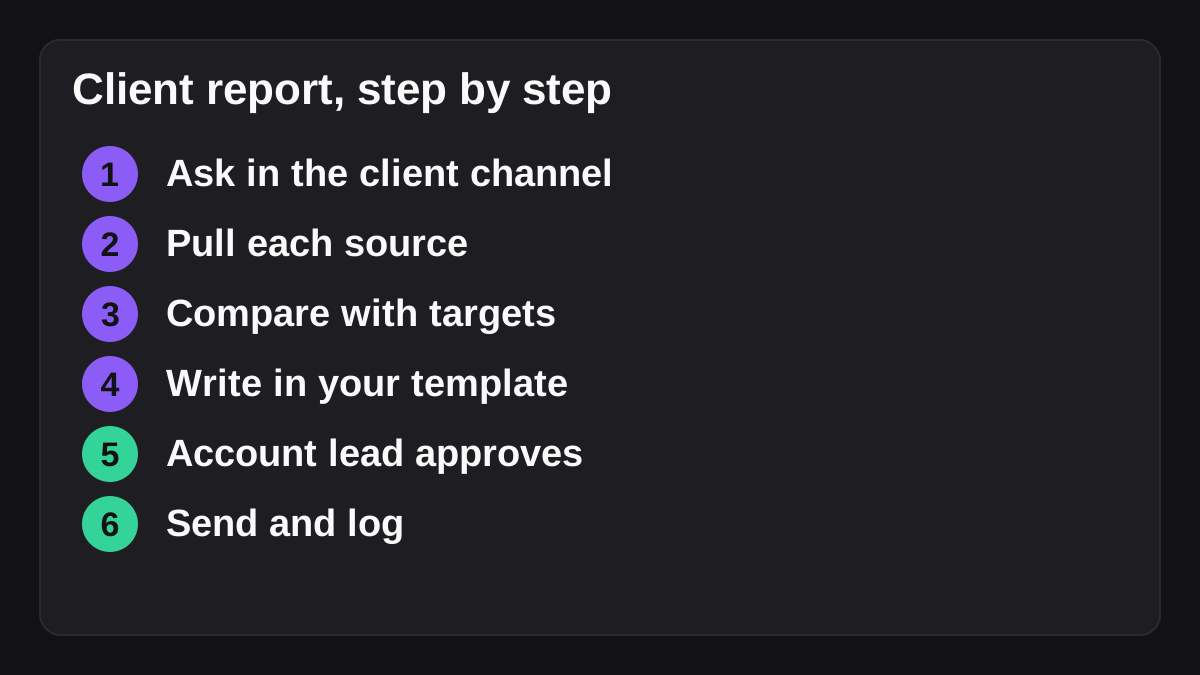
- Ask in the client's channel. Someone writes the job once: "Build this week's report for Acme from their ad accounts and analytics, every Friday at 3." The channel tells the agent which client this is.
- Pull the numbers from each source. It reads spend and results from the ad platforms and sessions and conversions from analytics, for that client's accounts only.
- Compare with last week and with targets. A number alone means little. The report should say what changed and against what. Targets can live in a sheet the agent reads.
- Write it into your template. The output is the finished document, in your layout and the account lead's voice, with the unusual items called out near the top.
- Hold it for approval. The account lead reads it, fixes anything that needs a human view and approves it.
- Send, and log. Only after approval does the report go out, and the decision is recorded.
This is the same pattern Wopie follows. It is an AI employee that takes a job in a Slack or Teams channel, reads the tools you connect, produces finished work and pauses anything sensitive for human approval. The pieces are covered in more detail in the guide to how a weekly HubSpot pipeline report is automated, which follows the same read, compare, write and approve shape for a sales team.
What should the report contain?
Fixed rows make a report easy to read and easy to check. A reasonable one-page layout:
- Headline: one sentence on how the week went against target
- Spend and results by channel, with the change from last week
- The three biggest movers, with a short reason each
- What you changed this week
- What you plan to do next week
- Anything you need from the client
Keep the same order every week. A client who knows where to look will read it. A report that changes shape each time gets skimmed.
What should always stay with a person?
AI employees make mistakes, and a client report is a document with your name on it. Be clear in advance about what a person owns.
Anything that reaches the client. A report, an email or a message to the client should wait for the account lead. This is the single most useful rule, and it costs a minute per report.
Anything that changes live spend. Recommending a pause is fine. Pausing a live campaign should need a yes from someone who understands the client's goals.
The explanation behind a number. A model can see that conversions fell. It may not know the client changed their pricing page on Tuesday. The account lead knows, and that context belongs in the report.
Claims about what AI did. The US Federal Trade Commission has been clear that existing law still applies. In announcing a set of enforcement actions in 2024, its chair said that "there is no AI exemption from the laws on the books" [1]. Among the cases, the FTC alleged one company marketed itself as offering "the world's first robot lawyer" but could not back up its claims [1]. If you describe your AI-assisted service to clients, describe it accurately.
| Task | Who owns it | Why |
|---|---|---|
| Pulling numbers from the platforms | AI employee | Repetitive, and the sources are documented [4][5][7] |
| First draft of the report | AI employee | Same layout every week |
| Spotting what changed | AI employee, then person checks | Models can miss context |
| Explaining why it changed | Account lead | Needs knowledge of the client |
| Sending to the client | Account lead, after approval | Your name is on it |
| Changing bids, budgets or pausing ads | Person, always | Live money |
The NIST AI Risk Management Framework is a voluntary framework meant to help organizations manage the risks AI can pose to individuals, organizations and society [3]. You do not need to adopt it formally to take one idea from it: decide in advance who is accountable for AI output, and write their name down. For a longer look at this, see what human in the loop AI means and how approval gates and the audit trail work in practice.
How do you keep each client's data separate?
This is the question agency owners ask second, right after "will it sound like us". Your clients trust you with their ad accounts and their numbers. A report that leaks one client's spend into another's is a serious breach of that trust.
Build the separation into the setup, not into people's memory:
- One connection per client. Each client's ad accounts and analytics are connected separately, with the narrowest access that lets the report work. Read-only is enough for reporting.
- One channel per client. The channel is the context. A request made in the Acme channel should only ever touch Acme's data.
- One template per client. Layout, tone and the targets sheet are all per client.
- A check on every report. The account lead confirms the client name and the date range before approving. It takes seconds and catches the mistakes that matter.
If a client works with you in a shared Slack channel, know the rules of that space. In Slack Connect, only the organization that owns a channel can invite or remove other organizations and manage posting permissions [6]. Messages from bots and apps are visible to everyone in the channel [6]. So decide deliberately whether the agent's work in front of a client appears in the shared channel, or whether drafts go to an internal channel first and only the approved report goes out. Most agencies will want the internal route.
Wopie's security page explains how access and approvals are handled. This guide is general information and not legal advice, so check your client contracts and privacy obligations with a qualified adviser.
What does it cost, and when is it the wrong tool?
Be honest with yourself about both.
On cost, count the time you spend today. Take the number of clients, multiply by how long each weekly report takes, and add the prep before client calls. That is your baseline. Wopie lists its plans on the pricing page, including a free starting credit, so you can measure a real report against your own baseline rather than trusting anyone's average. I have not quoted an industry average for time saved, because the figures published online mostly come from vendors with something to sell.
It is the wrong tool in a few cases:
- The scheduled dashboard already does the job. If a client only wants a PDF of a dashboard each week, schedule it and move on [2].
- The data is thin or messy. If tracking is broken, a fast report just spreads bad numbers faster. Fix the tracking first.
- The report is mostly judgement. A strategy review is a human conversation. AI can prepare the numbers, not the advice.
- You have no named reviewer. Without someone accountable, do not start.
How do you roll it out in four weeks?
Go slowly, with one client. The goal is to learn what your reports need, not to prove a point.
- Week one: pick the client and write the template. Choose a friendly client with clean tracking. Write down the layout, the targets and the account lead's usual tone. Use your last three reports as examples.
- Week two: run it in parallel. Let the agent build the report while someone builds the usual one. Compare them. Note every difference, and fix the cause in the instructions rather than in the output.
- Week three: let the agent lead. The agent builds the report, the account lead reviews and edits, and you track how long the review takes.
- Week four: decide. If the review is quick and the edits are small, add a second client. If not, adjust the template or the data and run another week.
Writing the instructions down is most of the work. The guide to writing an SOP an AI agent can follow shows how, and the one on onboarding an AI employee like a new team member covers the first weeks.
What to do next
Start with one report. You can widen it once the first one is reliable.
- Pick one client and one recurring deliverable, usually the weekly report.
- List the two or three sources behind it, and check you can connect each one read-only.
- Write the layout, the targets and the tone down on one page.
- Name the account lead who approves every report before it is sent.
- Decide where drafts appear: an internal channel first, the client channel only after approval.
- Agree in advance that nothing changes live spend without a person saying yes.
- After four weeks, compare the time spent and the number of edits with your baseline.
If you want to try it on one client, you can connect your tools in Slack or Teams and give it the first job in a channel. The aim is simple: the report arrives finished, a person approves it, and your team spends the hour on the client instead of the spreadsheet.
Bring Wopie onto your team.
It owns the recurring work and checks with you before anything goes out. Your first $100 of work is on us.
Hire for freeSources
- [1]FTC Announces Crackdown on Deceptive AI Claims and Schemes · Federal Trade Commission · accessed Nov 8, 2026
- [2]Schedule automatic report delivery · Google Cloud Documentation (Looker Studio) · accessed Nov 8, 2026
- [3]AI Risk Management Framework | NIST · National Institute of Standards and Technology (NIST) · accessed Nov 8, 2026
- [4]Google Analytics Data API Overview · Google for Developers · accessed Nov 8, 2026
- [5]Ads Insights API · Meta for Developers · accessed Nov 8, 2026
- [6]Slack Connect guide: Work with external organizations · Slack Help Center · accessed Nov 8, 2026
- [7]Reporting Overview · Google Ads API, Google for Developers · accessed Nov 8, 2026