AI automation ideas for ecommerce operations teams
Ecommerce operations automation that pays off first: stock alerts, refund prep, order exceptions and daily reports, plus what to keep human.
By the Wopie team · November 9, 2026 · 10 min read
Listen to the summary· 1 min

Ecommerce operations automation works best when you start with the repeated checking work: stock levels, order exceptions, refund prep and the daily numbers. These jobs follow the same steps every day, they read data from tools you already use, and a mistake is easy to catch if a person approves anything that touches a customer or your money. This guide gives you a ranked list of ideas, a way to pick the first one, and a clear line for what to keep human.
The size of the market explains why this is worth doing. The US Census Bureau estimated quarterly ecommerce sales at $340.2 billion in the second quarter of 2026, which was 17.1% of total retail sales [1]. More orders mean more tickets, more returns and more stock to track. If your team still checks all of that by hand, the work grows faster than your headcount.
What counts as ecommerce operations work?
Operations is everything that happens between a customer clicking buy and the money, the parcel and the reply all landing correctly. For a small or mid-sized store that usually means five areas:
- Inventory: knowing what is in stock, what is running low and what to reorder from which supplier.
- Orders and fulfillment: spotting orders that are stuck, held or late.
- Returns and refunds: checking policy, issuing the refund and replying to the customer.
- Payments and reconciliation: matching orders to payouts and fees.
- Reporting: one clear view of yesterday, so the team can act before the store gets busy.
Almost every task in those areas has the same shape. Someone opens three tabs, copies numbers, compares them to a rule, and then writes a short note or makes a small decision. That shape is exactly what automation is good at. Our ecommerce page lists the same four recurring jobs that stores hand over first: the daily sales report, refund replies with the full order, promo audits and low-stock alerts with the reorder drafted.
Which ecommerce operations should you automate first?
Rank each task on three questions. How often does it repeat? How many tools does it touch? What is the worst thing that happens if it goes wrong? Jobs that repeat daily, touch several tools and carry little risk go first. Jobs that move money or message a customer can still be automated, but only with a person approving the final step.
| Idea | What it does | Risk if wrong | How to run it |
|---|---|---|---|
| Daily sales and exceptions report | Pulls orders, refunds and top products and posts a summary before the store opens | Low, it is an internal post | Fully automatic |
| Low-stock alert with a reorder draft | Compares stock with sell-through and drafts the supplier order | Medium, a wrong quantity costs cash | Draft automatically, a person approves the send |
| Refund and return prep | Gathers the order, payment and policy and drafts the reply | High, money and customer messages | Draft automatically, a person approves |
| Late or stuck order watch | Flags orders held, unfulfilled or past the promised ship date | Low to medium | Alert automatically, a person decides |
| Promo audit | Matches promo spend to real orders and margin | Medium, pausing spend affects sales | Report automatically, a person pauses |
| Payout reconciliation | Matches orders, fees and payouts and lists differences | Medium, finance records | Report automatically, finance reviews |
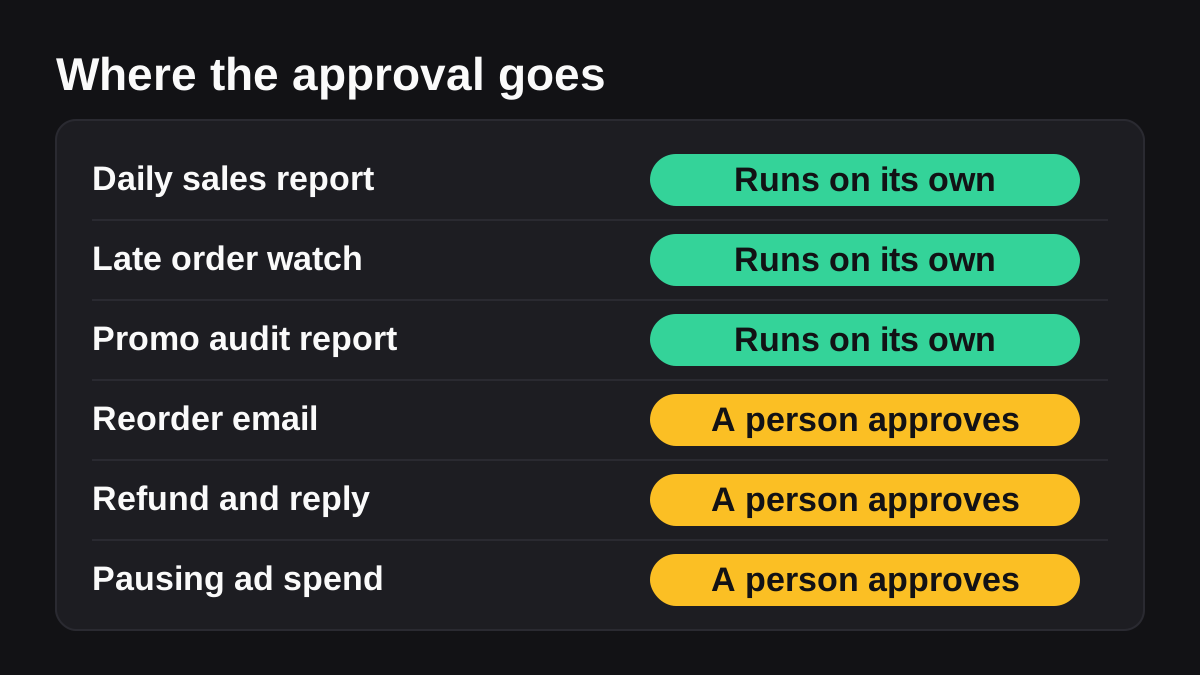
Notice the pattern. Reading and reporting can run on their own. Anything that spends, refunds or sends needs a human yes. That is the heart of human in the loop AI, and it is also the safest way to start.
How do you automate stock alerts and reorders?
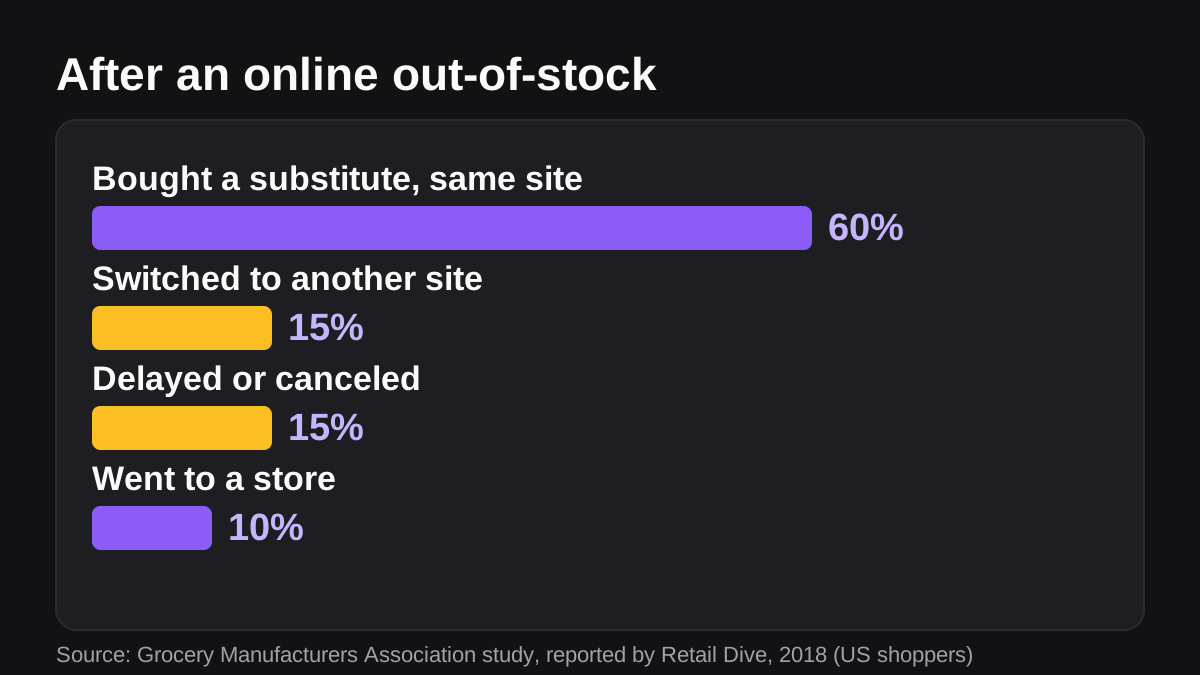
Stockouts are quiet losses. The customer does not complain, they just leave. A Grocery Manufacturers Association study reported by Retail Dive found that, of US shoppers who hit an out-of-stock online, 15% switched to another site, 60% bought a substitute from the same merchant, about 10% went to a physical store and about 15% delayed or canceled the purchase [8]. That study is from 2018 and covered grocery, so treat the exact split as a rough guide for your own category. The direction still holds: a stockout leaks some sales to someone else.
Basic stock alerts are a good fit for built-in tools. Shopify Flow, which is free to install on the Basic, Grow, Advanced and Plus plans, runs workflows built from triggers, conditions and actions [5]. Its triggers include a product variant inventory quantity change, a variant going out of stock and a variant coming back in stock [6]. That covers "tell me when something drops below a number."
What a rule cannot do is decide how much to order. That needs sell-through, supplier lead times and a quantity grouped by supplier. Here is a process you can follow:
- Set a threshold per product, based on how many days of cover you want, not a flat number.
- Pull the last 30 days of sales for each product that falls below its threshold.
- Work out remaining cover, which is stock on hand divided by average daily sales.
- Group the reorder list by supplier, with a suggested quantity and a note on any product that is trending up or down.
- Draft the supplier email, with the list attached.
- Hold it for approval. A person checks the quantities against cash and supplier terms, then sends.
Steps one to five are the repeated digging. Step six is the judgment. You can have an AI employee such as Wopie draft the reorder list and the supplier email in a Slack channel and wait for your yes before anything is sent. Read more about the approval gates and audit trail if you want to see how that control works.
How do you automate refunds and returns safely?
Returns are the most expensive repeated task in the building. The National Retail Federation projected total retail returns of $849.9 billion in 2025, estimated that 19.3% of online sales would be returned, and found that 9% of all returns are fraudulent [2]. Even if your own rate is far lower, every return needs a person to check the order, the policy and the payment before replying.
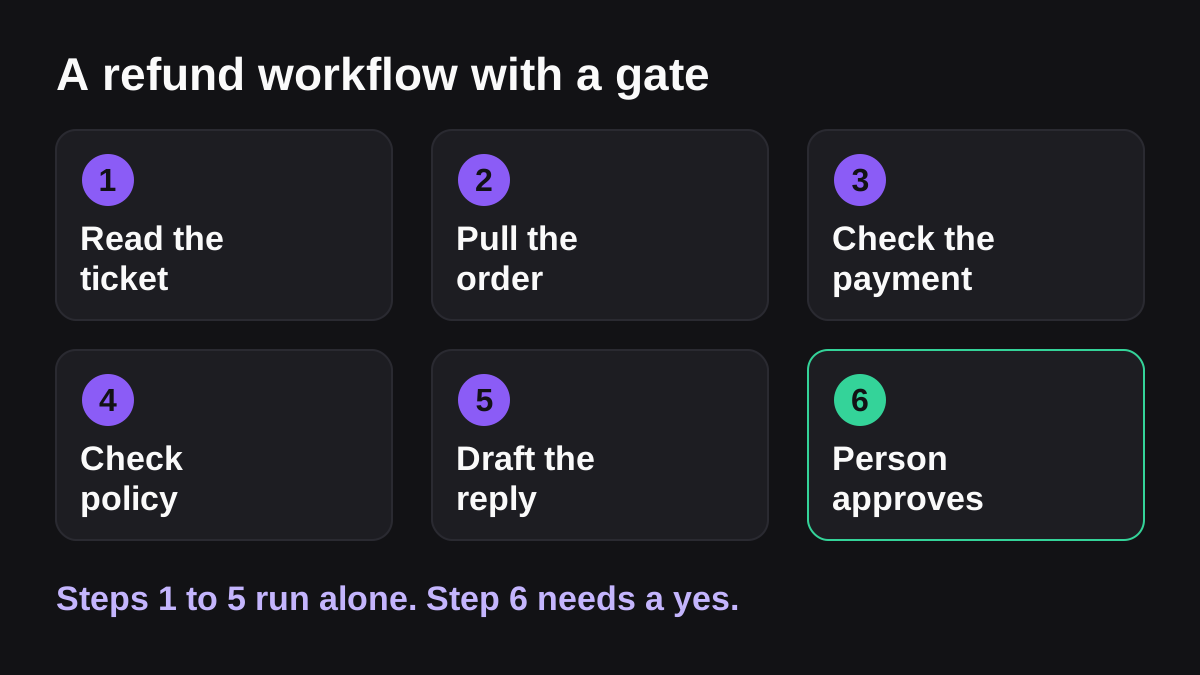
That checking is where the time goes, so that is what to automate. A good refund workflow does the research and leaves the decision visible:
- Read the ticket and the customer's earlier contacts in your support tool.
- Pull the order, its fulfillment status and its delivery status from your store.
- Check the payment and what is actually refundable.
- Check your policy, such as the return window and the item condition rules.
- Draft the reply with the refund amount your policy allows.
- Wait for approval. A person reads the draft and presses the button.
Two facts about payments make step three worth automating. Stripe's documentation says you cannot refund more than the original charge in total, that refunds can only go back to the original payment method, and that Stripe's processing fees from the original transaction are not returned [4]. It also says the customer typically sees the credit about 5 to 10 business days later, depending on the bank [4]. A reply that explains this up front prevents the "where is my refund?" follow-up ticket.
There is also a legal clock. For orders placed by internet, the FTC's Mail, Internet, or Telephone Order Merchandise Rule says that if you do not state a shipping time, you need a reasonable basis to ship within 30 days [3]. If you cannot ship on time you must seek the customer's consent to the delay, and for most payment methods you must refund the correct amount within seven working days after an order is canceled [3]. This is general information, not legal advice, so check the rule and your own terms with a lawyer. The practical point is that late and canceled orders create deadlines, and a daily watch for orders past their promised date is cheap insurance.
For the support side of this work, see our guide to AI for customer support triage.
What can Shopify Flow do, and where do you need more?
If you run Shopify, start with Flow because it is already there. Beyond stock triggers, Flow can react to an order being created, paid or fulfilled, to a refund being created, and to returns being requested, approved, declined or processed [6]. Its actions include adding or removing order tags, holding a fulfillment order, canceling an order, updating an order note and sending an internal email [7]. That is enough to build rules such as "tag every order over a set value for a manual look" or "email the warehouse when a return is approved."
Flow is a rule engine, so it works best when the rule is clear. Here is how the two approaches compare in daily use.
| Question | Rule-based workflow tool | AI employee working in a channel |
|---|---|---|
| What sets it off? | An event in your store, such as an order or a stock change | A request in a Slack or Teams channel, or a schedule |
| What can it read? | Data inside the store and connected apps | Your store, payments, support, ads and spreadsheets in one pass |
| What does it produce? | An action, such as a tag or an email | Finished work, such as a report, a reply draft or a reorder list |
| Who approves? | You decide in advance in the rule | A person approves the sensitive step when it comes up |
| Best for | Simple, predictable rules | Jobs that need reading across tools and writing |
You do not have to choose one. Use rules for the simple triggers and an agent for the jobs that need judgment and several tools. Our guide to Slack Workflow Builder versus AI agents explains the same split for chat-based workflows.
How do you set up a daily store report that people read?
The daily report is the best first project because it is read-only. It also teaches you whether your data is clean. Build it like this:
- Choose the five numbers your team looks at every morning, such as orders, revenue, refunds, top products and any stock under threshold.
- Name the source for each number, such as your storefront for orders and your payment processor for payouts and fees.
- Add a comparison, usually the same day last week, so a number has context.
- Add an exceptions list: orders held, unfulfilled past the promised date, or refunds above a set size.
- Post it in one channel at the same time every day, before the store opens.
- Review it for a week against what your team already knows, and fix any definition that is off.
Keep the definitions written down. "Revenue" can mean gross sales, net of refunds or cash received, and the report is only useful if everyone means the same thing. Our guide to the weekly cash flow report shows how to reconcile the payments side.
What should you keep human?
Automation is the wrong tool when the situation is new, emotional or risky. Keep these with a person:
- Unusual refunds and exceptions. A policy covers the normal case. A valued customer, a damaged high-value item or a suspected fraud case needs judgment.
- Anything that changes prices or pauses ad spend without a person deciding.
- Sensitive customer conversations, such as a complaint that mentions safety or a legal threat.
- Supplier negotiations. A draft email is fine. The relationship is not.
- Final sign-off on money. Refunds, discounts and payouts should have a named approver.
A useful test: if the output were wrong and nobody noticed for a day, what would it cost? If the answer is "very little," automate it fully. If the answer is "real money or a lost customer," add an approval step and keep the log of who approved what. Our guide to which jobs to give an AI employee first covers this triage in more depth.
What to do next
Use this checklist to start without overreaching:
- List your weekly repeated tasks and note how long each one takes and which tools it touches.
- Pick one read-only job, usually the daily sales and exceptions report.
- Write the definitions of each number and name the source.
- Run it for a week next to your usual process and compare.
- Add one gated job, such as the low-stock reorder draft or refund prep, with a named approver.
- Review the log monthly and retire anything nobody reads.
If you want a worked path, the ecommerce page shows these jobs and the tools they connect to, and the integrations list shows what you can connect. Costs are explained before each job starts, and you can see the plans on the pricing page.
The sensible way to think about ecommerce operations automation is as a new team member who does the digging, writes the first draft and then waits for you. Start with reading and reporting, add drafts that need your yes, and keep the money and the customer relationship in human hands.
Bring Wopie onto your team.
It owns the recurring work and checks with you before anything goes out. Your first $100 of work is on us.
Hire for freeSources
- [1]Monthly Retail Trade - Quarterly Retail E-Commerce Sales Report · U.S. Census Bureau · accessed Nov 9, 2026
- [2]2025 Retail Returns Landscape · National Retail Federation, with Happy Returns, a UPS company · accessed Nov 9, 2026
- [3]Business Guide to the FTC's Mail, Internet, or Telephone Order Merchandise Rule · Federal Trade Commission · accessed Nov 9, 2026
- [4]Refund and cancel payments · Stripe Documentation · accessed Nov 9, 2026
- [5]Shopify Flow · Shopify Help Center · accessed Nov 9, 2026
- [6]Triggers in Shopify Flow · Shopify Help Center · accessed Nov 9, 2026
- [7]Actions in Shopify Flow · Shopify Help Center · accessed Nov 9, 2026
- [8]Online out-of-stocks cost $22B in sales · Retail Dive · accessed Nov 9, 2026