The real cost of context switching for small teams
The cost of context switching is mostly hidden: it takes about 23 minutes to resume interrupted work. Here is what research says and how to cut it.
By the Wopie team · October 26, 2026 · 9 min read
Listen to this article· 11 min
The cost of context switching is the time and focus you lose every time you jump from one task, tool or conversation to another. It is rarely visible in a calendar, but it is large. Gallup reports that when people were interrupted and resumed the work the same day, it took on average 23 minutes and 15 seconds to get back to it [1].
For a small team, that adds up fast, because everyone wears several hats and the same few people get pinged all day. This guide explains what the research says, where the switching comes from, how to measure it on your own team, and five steps to reduce it. It is general information, so adapt it to how your team works.
What is context switching, and why does it cost so much?
Context switching means moving your attention from one piece of work to another. You stop writing a proposal to answer a chat message, then open a spreadsheet, then go back to the proposal. Each move forces your brain to drop one set of details and load another.
The cost is not the few seconds the move takes. It is the time to get back to where you were. In Gallup's account of researcher Gloria Mark's work, interrupted work was resumed the same day in 81.9 percent of cases, and it took on average 23 minutes and 15 seconds to resume it [1]. People typically handled about two other tasks before they returned to the original one [1].
Here is a simple illustration using that figure. Three interruptions in a morning, at 23 minutes and 15 seconds each, comes to 69 minutes and 45 seconds before anyone has finished the thing they started [1]. Treat that as an illustration, not a prediction. Your own numbers will differ with the kind of work and the kind of interruption.
Is all switching caused by other people?
No. Gallup reports that about 44 percent of interruptions were self-initiated, and that people interrupted themselves almost as much as they were interrupted by outside sources [1]. Checking one more inbox, peeking at a dashboard or opening a chat tab "just to see" all count. That is useful news, because part of the problem is within your own control.
How much time do small teams lose to switching?
No one number covers every team, so look at several signals that point the same way. Microsoft's Work Trend Index found that 68 percent of people say they do not have enough uninterrupted focus time during the workday, and 62 percent say they spend too much of the day searching for information [2]. It also found that the average employee spends 57 percent of their time communicating in meetings, email and chat, and 43 percent creating documents, spreadsheets and presentations [2].
The 2025 report adds that employees are interrupted every 2 minutes by meetings, emails or pings, based on about 275 pings per day over an eight-hour workday [3]. Chats sent outside the 9 to 5 workday were up 15 percent year over year, with an average of 58 messages per user arriving before or after hours [3]. And 80 percent of the global workforce says it lacks enough time or energy to do the work [3].
Tool sprawl feeds the same pattern. Asana says the average employee uses 10 different apps every day [4]. Slack's State of Work report, as quoted by Slack, found that 56 percent of knowledge workers say switching between apps makes it harder to get essential work done, and 68 percent spend at least 30 minutes a day switching between apps [5]. At five working days a week, 30 minutes a day is 2.5 hours a week for the people in that group, and that is only the app hopping, not the time to recover afterward [5].
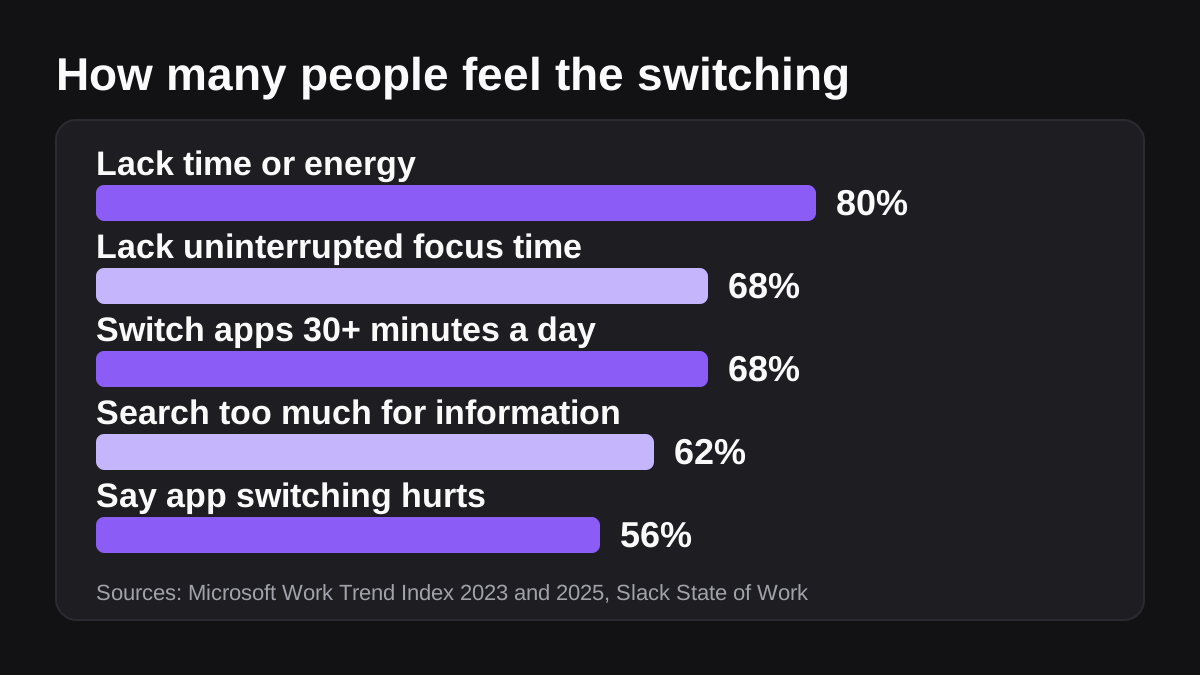
A caution on the data: several of these are survey results and company telemetry, not controlled experiments, and some come from vendors that sell collaboration software. Use them as direction, then measure your own team.
Why are small teams hit hardest?
Small and mid-sized teams have fewer specialists and fewer buffers. Four patterns show up again and again.
- One person, many roles. The same operations lead handles invoicing questions, hiring admin and the weekly report, so every request lands on them.
- Chat as the default channel. When anything can be sent as a message, everything is. Messages arrive in the middle of focused work.
- Manual bridges between tools. A person copies a figure from the CRM to a sheet, then from the sheet into a slide. Each hop is a switch.
- Chasing. Asking for status, waiting for a reply and asking again fills the gaps between real tasks. Asana calls the wider category work about work, and says it accounts for 60 percent of time spent at work [4]. Our guide to finding the busywork that eats your week shows how to size it on your team.
How do you measure your own switching cost?
You do not need software. A shared sheet and one day of honest tallying will tell you more than any average. Follow these steps.
- Pick a typical day. Avoid launch days and holidays. Ask three to eight people to take part, and explain that you are looking for habits to remove, not people to blame.
- Tally switches. Each time someone changes task or opens a different tool to do a different job, they add a tick. Add a second column for pings that interrupted them.
- Note the trigger. A short code is enough: P for a person, S for self, A for an alert or automatic notification, M for a meeting.
- Mark the recovery. For the three worst interruptions, write down how long it took to get fully back into the task. Use a rough estimate.
- Add it up. Total the ticks, the codes and the recovery minutes. The pattern tells you what to fix first.
- Share it back. Show the combined numbers to the team and agree on one change to try.
Count the share of switches that were self-started, because Gallup's figure of about 44 percent gives you something to compare against [1]. If yours is much higher, the fix is habits. If it is much lower, the fix is how work reaches people.
What can you do to reduce context switching?
Start with the cheapest changes. Most of them cost nothing and take a week to try.
Cut the pings
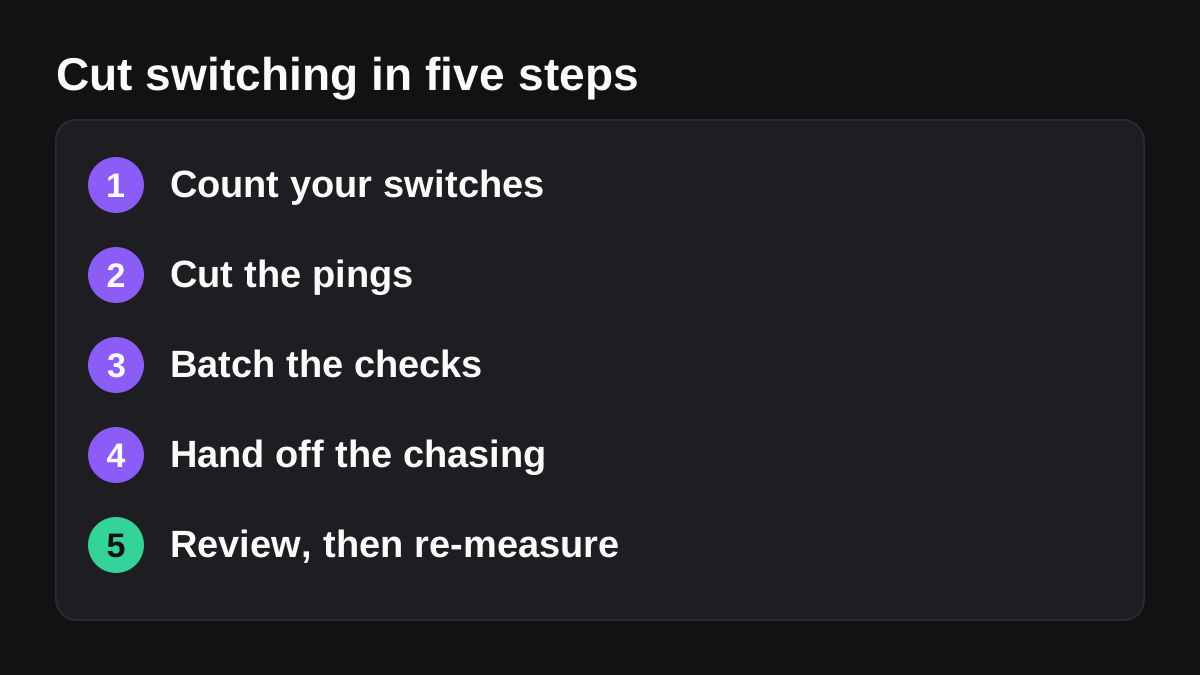
Turn off alerts that do not need a reply within the hour. Move non-urgent requests into one channel or form so they are read in a batch. Agree on what counts as urgent, and what to do when something is. Given that Microsoft found interruptions arriving about every 2 minutes on average [3], even removing a third of the pings changes a day.
Batch the checks
Pick two or three times a day to read chat and email, and protect longer blocks in between. Say so in your status. Because Gallup found that people interrupt themselves almost as often as others interrupt them [1], closing the tab matters as much as muting the phone.
Write the stopping point down
When you must leave a task, spend one minute writing the next step and where the key file is. It makes the return faster and is a good habit for handing work to a colleague. This is practical advice, not a measured result, so test it on yourself.
Put recurring jobs on a schedule
If a person asks for the same update every Monday, make it arrive on its own. Slack says Workflow Builder helps you automate everyday tasks in Slack, and that workflows built to start on a schedule will start automatically [6]. For fixed steps, that is often all you need. Our comparison of Slack Workflow Builder versus AI agents explains when to use which.
Reduce the tool hopping
Each extra app adds places to check and places to copy between. Asana's figure of 10 apps in an average day is a prompt to ask which ones are really needed [4]. Where two tools hold the same data, choose one as the source of truth and link to it.
Where can an AI employee help, and where is it the wrong tool?
Some switching comes from jobs that need judgment across several tools, so a fixed rule cannot do them. Examples include a weekly pipeline summary that needs numbers from the CRM and notes from a deal thread, or a month-end pack that pulls from billing and the bank. A person doing that job opens five tabs, copies, formats and checks.
This is where an AI employee can help. Wopie takes a job in a Slack or Microsoft Teams channel, reads your connected tools, produces the finished work and pauses anything sensitive for human approval. You can see how it fits in Slack and Teams. The point is that the person reviews one finished result instead of visiting five tools.
| Source of switching | Better fix | Why |
|---|---|---|
| Constant non-urgent pings | Batch and mute | Costs nothing, and the person stays in control |
| Same update every week | Scheduled workflow | Fixed steps are cheap and predictable |
| Copying data between tools | Single source of truth, or an AI employee | Removes the person as the bridge between systems |
| Chasing status from people | Posted summary or an AI employee | One compiled page instead of many replies |
| A hard customer conversation | Keep it human | Judgment and relationships matter more than speed |
What should stay human?
Keep people on anything with legal, tax or employment consequences, sensitive conversations, and one-off decisions. Anything that leaves the company should be approved by a named person, which is what the approval gates and audit trail are for. AI is also the wrong tool for a task nobody understands yet. Fix the process first, then hand it over. Our post on which jobs to give an AI employee first lists the tests to apply, and the pricing page explains how credits work.
How do you know switching is going down?
Choose two or three numbers before you change anything and check them again after a month.
| Measure | How to count it | Good sign |
|---|---|---|
| Switches per day | The same tally sheet, on a similar day | Falling, with quality holding |
| Pings per day | Notification counts from chat tools | Fewer, and fewer after hours |
| Recovery time | Your own rough estimate for the worst interruptions | Shorter |
| Finished tasks per week | A simple count from your task list | Rising |
| Team mood | A one question check in each Friday | People say they can finish things |
Hours saved only matter if they go somewhere. Decide up front whether the time goes to customer work, deeper analysis or simply a calmer week. If after-hours chat stays high [3], the problem may be how the team works, not the tools.
What to do next
Use this checklist to start this week.
- Pick a typical day and run the tally with three to eight people.
- Count the share of switches that were self-started, and the share that came from alerts.
- Turn off alerts that do not need an answer within the hour.
- Agree on two or three times a day to check chat and email.
- Write the next step before you leave any task.
- Move one weekly update onto a schedule.
- Choose one job that touches several tools and give it to a workflow or an AI employee, with a named person approving the output.
- Run the tally again in a month and compare.
You will not remove switching completely, and you should not try. The aim is that the switches that remain are the ones you chose.
Bring Wopie onto your team.
It owns the recurring work and checks with you before anything goes out. Your first $100 of work is on us.
Hire for freeSources
- [1]Too Many Interruptions at Work? · Gallup Business Journal · accessed Oct 26, 2026
- [2]Work Trend Index | Will AI Fix Work? · Microsoft WorkLab · accessed Oct 26, 2026
- [3]2025: The year the Frontier Firm is born · Microsoft WorkLab (Work Trend Index Annual Report) · accessed Oct 26, 2026
- [4]How Work About Work Gets in the Way of Real Work · Asana · accessed Oct 26, 2026
- [5]Take control of your time with these simple Slack tips · Slack · accessed Oct 26, 2026
- [6]Guide to Slack Workflow Builder · Slack · accessed Oct 26, 2026