Slack Workflow Builder vs AI agents: which do you need?
Slack Workflow Builder vs AI agents: what each does well, where each breaks, and a simple test for choosing, with a comparison table and a pilot plan.
By the Wopie team · October 18, 2026 · 10 min read
Listen to this article· 12 min
Slack Workflow Builder and an AI agent solve different problems, so the real question in "slack workflow builder vs ai" is not which is better. It is which fits the job in front of you. Use Workflow Builder when the steps are the same every time. Use an AI agent when the job needs reading, judgment or work across several tools. Use both when a job has a fixed frame and one messy step.
Here is the working test. If you can write the steps on a card and they never change, build a workflow. If you would have to say "it depends" while writing them, you probably need an agent. Anthropic draws the same line: workflows run through predefined code paths, while agents decide their own steps and tool use [4].
This guide explains what each one does, where each one fails, how they compare, and how to choose. It ends with a plan for trying an agent without taking on risk. It is general information, not security or legal advice.
What is Slack Workflow Builder?
Workflow Builder is Slack's built in automation tool. Slack describes it as a way to automate everyday tasks and processes in Slack, and workflows can connect to other apps [1]. It is a paid feature, included in the Slack Pro, Business+ and Enterprise subscriptions [2].
Every workflow starts with a trigger. A workflow can start on a schedule, from a shared link, or from a Slack action such as an emoji reaction, someone joining a channel or a new channel being created [1]. Slack's product page adds that some workflows run at a set date and time, while others run when someone picks them from the shortcuts menu [2].
After the trigger come steps. Slack names three kinds: connector steps that act in third party services and need authentication, conditional branches, and custom steps that admins can restrict [1]. Slack lists plug and play connectors for Salesforce and more than 70 other apps [2].
It is also easy to start. By default, anyone can build a workflow [1], and Slack says 80% of the people who build workflows are not technical [2]. That figure is Slack's own internal data, so treat it as a vendor claim.
What has changed recently
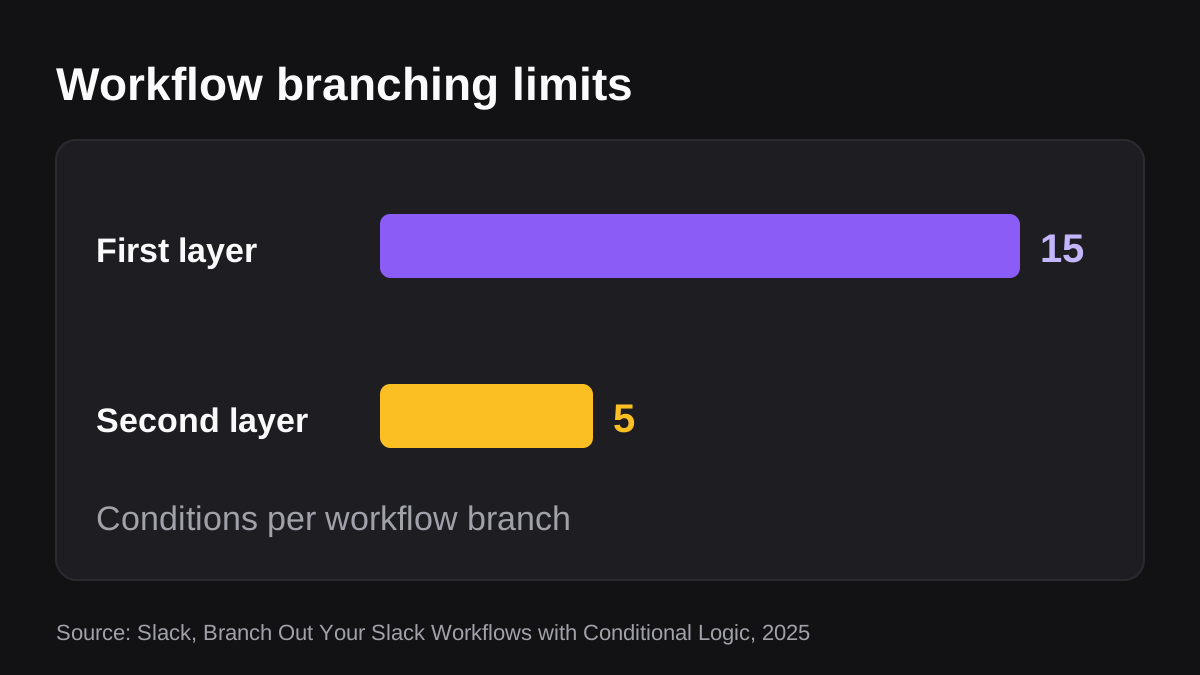
Workflow Builder is no longer only a fixed chain. Slack added conditional logic that lets a workflow change path based on set conditions, with up to 15 conditions and a second layer of up to 5 more [3]. It also has a "Generate AI response" step, where you write a prompt in plain language and can connect knowledge sources from Slack, and it can build a workflow from a plain language description of what you need [2].
So a modern workflow can branch and can call an AI model for one step. That helps. It does not turn the workflow into an agent, because you still decide the path in advance.
What is an AI agent in Slack?
An AI agent is given a goal and works out the steps. Slack's developer documentation describes agents as autonomous, goal oriented AI apps that can reason, use tools and keep context across conversations in Slack [5]. They go beyond simple question and answer bots by planning actions, calling outside systems and iterating on results [5].
Anthropic puts the difference in one sentence. In agents, the model dynamically directs its own process and tool use and stays in control of how it finishes the task [4].
A concrete example: you ask for "last week's pipeline report for the leadership channel". An agent reads the CRM, notices two deals moved stage, checks the notes behind them, writes the summary, builds the sheet and returns finished work. You did not write those steps. The agent chose them.
Slack has also opened its platform to agents from other companies. When it announced the feature in 2024, Slack said its agent API came with a contract stating that the data cannot be exported, stored or used for model training [7]. Check what any agent you add is allowed to do with your data.
If you want the wider picture, our guide to AI agents vs AI assistants vs automation tools covers the three categories in detail.
Slack Workflow Builder vs AI agents: how do they compare?
Each row below reads on its own, which helps if you are listening instead of reading.
| Question | Workflow Builder | AI agent |
|---|---|---|
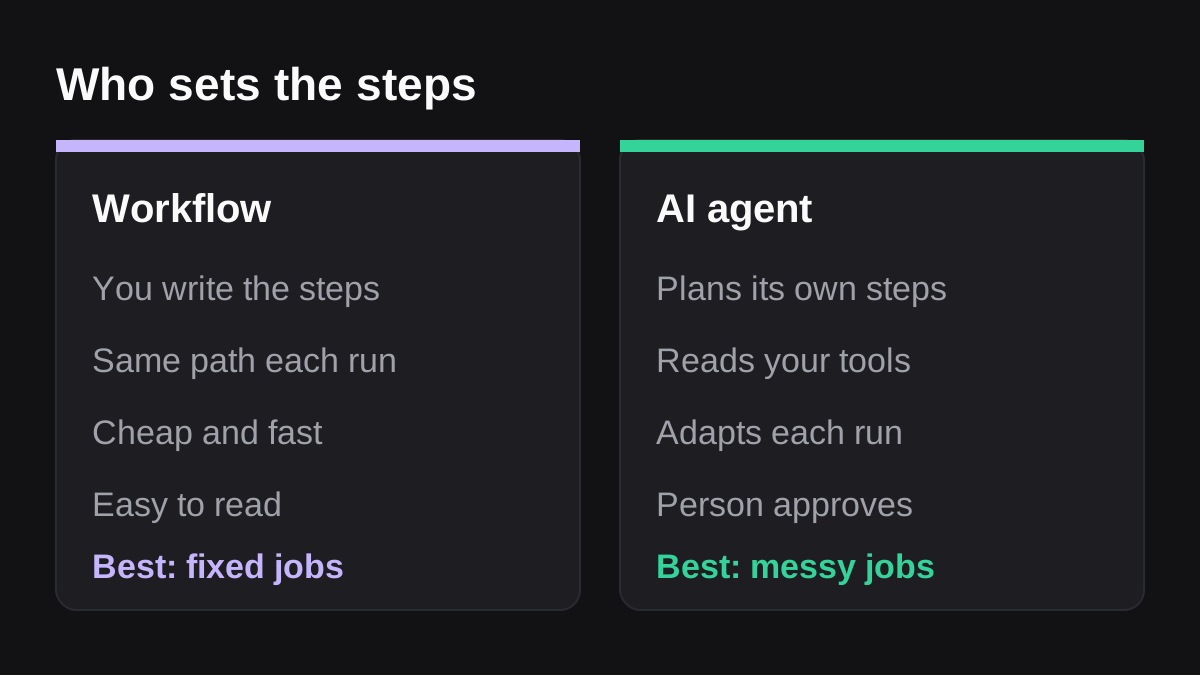
| Who decides the steps? | You, in advance [4] | The agent, toward your goal [4] |
| What starts it? | A trigger, such as a schedule, a link or a Slack action [1] | A request in a channel, or a schedule you set |
| What can it use? | The connectors and steps you add [1] | Tools it chooses from those you connect [4] |
| What happens with messy input? | It follows the steps it has, or fails | It reads the situation and adapts, and can still be wrong |
| Cost and speed | Cheap and predictable | Higher cost and more latency, in exchange for flexibility [4] |
| Easiest to audit? | Yes, you can read every step | Needs logs of what it read, drafted and did |
| Best for | Identical, repeating tasks | Varied, multi step work across tools |
The cost row deserves a second look. Anthropic notes that agentic systems often trade latency and cost for better task performance, and that agents can compound errors [4]. That is the price of flexibility. For work that is the same every time, you should not pay it.
When should you use Slack Workflow Builder?
Choose a workflow when the job is predictable and the output is the same shape each time. Anthropic's guidance is to find the simplest solution that works and only add complexity when you need it [4]. A workflow is often that simple solution.
Good fits:
- A recurring reminder. Post a "submit your timesheet" nudge every Friday at 3 p.m.
- A request form. Someone fills in a form for a laptop, a purchase or time off, and the answers land in a channel or a sheet.
- Simple routing. If the request type is "billing", notify the finance channel. Slack lists triaging, routing and approvals as uses for conditional logic [2].
- Welcome messages. Greet someone when they join a channel, using a Slack action as the trigger [1].
The strengths are speed, low cost and clarity. You can read every step, so you can explain exactly what it did and why. That matters when someone asks.
Where Workflow Builder runs out
It starts to strain when the input is messy or the answer depends on context. A branch can test a field. It cannot judge whether a customer message sounds angry, whether two deals look suspicious together or what mattered most in this week's numbers. You would need a branch for each case, and the limits on conditions arrive quickly [3].
It also breaks quietly when the world changes. Rename a field, move a channel or swap a tool, and the workflow keeps following steps that no longer match. Someone has to notice.
When should you use an AI agent?
Choose an agent when the job crosses tools, depends on judgment, or changes from run to run. Anthropic says agents suit open ended problems where you cannot hardcode a fixed path [4].
Good fits:
- Weekly reports from live data. The agent reads the CRM, the billing system and the tracker, decides what changed, and writes the summary.
- Chasing and following up. Reading who is overdue, checking the history, and drafting a message that fits each person.
- Triage. Reading a new ticket or request, tagging it, deciding where it goes and drafting a reply for a person to check.
- Prep work. Pulling together the context for a meeting, a renewal or a month end pack from several places.
Slack says agents can work with limited oversight, iterating "without constant human intervention", and recommends designing around trust, transparency and bounded autonomy [5]. That last phrase is the one to keep. The more an agent can do, the more you need to bound it.
What can go wrong with an agent
Agents are more flexible, so they have more ways to be wrong. They can misread a record, take a wrong step and build on it, or touch something they should not. Anthropic recommends extensive testing in sandboxed environments and appropriate guardrails, because of cost and compounding errors [4].
NIST's AI Risk Management Framework is a voluntary framework for managing the risks AI poses to individuals, organizations and society [6]. You do not need the full document to use its core idea: decide who is responsible, test before you trust, and keep watching after you launch.
For a small team, the practical rules are short:
- Give the agent only the channels and tools the job needs.
- Require a person's approval before anything leaves the company or changes a record.
- Keep a log of what it read, drafted and did.
- Start with work where a mistake is cheap to fix.
Can you use Workflow Builder and an AI agent together?
Yes, and for many teams this is the right answer. Use the workflow for the frame, which is the trigger, the form and the routing. Use the agent for the step in the middle that needs reading and judgment.
Take a weekly pipeline update. A scheduled workflow starts the job every Monday at 8 a.m. That part is the same every time. The agent reads the CRM, writes the summary and builds the sheet. The report goes to a person for approval, and only then is it posted to the leadership channel.
You can also do it the other way round. A workflow can call an AI step to summarize one message inside a fixed process, using the "Generate AI response" step [2]. That is a good place to start if you only need a small piece of judgment, such as a two line summary of a request before it is routed.
The test is simple. Keep the parts that never change as rules. Give the agent only the parts that do.
How do you choose? A five question test
Work through these in order for any job you want to automate.
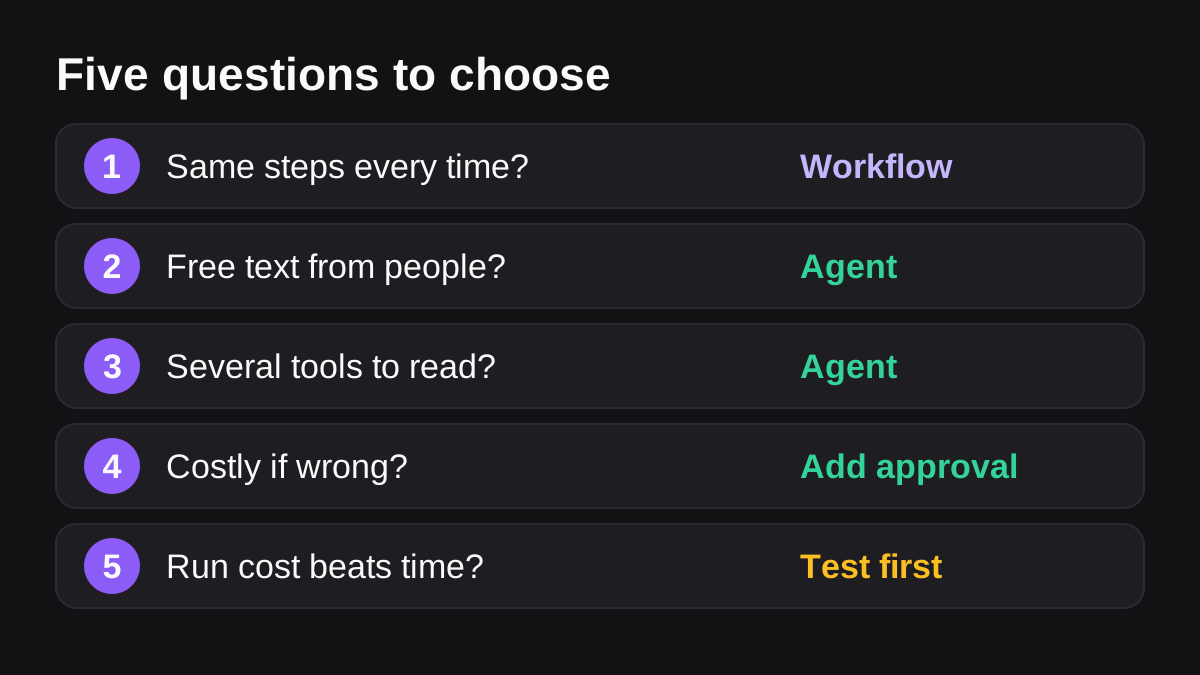
- Are the steps identical every time? Yes: build a workflow. No: keep going.
- Does the input arrive as a form, or as free text from people? A form fits a workflow. Free text, emails and notes point to an agent, or to an AI step inside a workflow.
- Does the job read more than one tool? One or two simple connectors suit a workflow. Reading across several systems and deciding what matters suits an agent.
- Could a mistake reach a customer, a payment or a record? If so, add approval before the final action, whichever you choose. That is a rule, not an option.
- Does the cost of a run beat the time it saves? Agents cost more per run [4]. Check the numbers on a small sample before you scale.
How do you try an AI agent safely?
If you are new to agents, run a small pilot. Pick one job, set the rules and review every result for the first few weeks.
- Pick a job that already hurts. A weekly report or a follow up round that takes a person an hour or more is ideal.
- Write down what good looks like. Describe the finished output, the sources it should use and what it must never do.
- Limit access. Invite the agent to one channel and connect only the tools that job needs.
- Turn on approval. A person checks the draft before it is sent or saved.
- Review the log. Read what it did for the first few runs and tighten the rules where it surprised you.
- Decide with numbers. Compare time saved and errors found with what the job cost you before.
Wopie is built for this pattern. It is an AI employee you brief in a Slack or Microsoft Teams channel. It reads your connected tools, produces the finished work and pauses anything sensitive for a person's approval, with approval gates and an audit trail you can read. You can see how jobs are charged on the pricing page before you start. Our post on what an AI employee is explains the idea in more depth.
What to do next
- List five recurring jobs your team does in Slack.
- Mark each one: same every time, or it depends.
- Build a workflow for the "same every time" jobs this week.
- Pick one "it depends" job for an agent pilot, with approval switched on.
- Name an owner for every workflow and every agent, and put a review date in the calendar.
Do not retire your workflows because agents exist. Slack offers both, workflow steps [2] and agents [5], inside the same product. The best setup is the cheapest tool that does each job reliably, with a person checking anything that matters.
Put an AI employee in your Slack.
Wopie joins your channels like any teammate, owns the recurring work and checks with you before anything sensitive goes out.
See Wopie for SlackSources
- [1]Guide to Slack Workflow Builder · Slack Help Center · accessed Oct 18, 2026
- [2]Slack Workflows: Builder & Automation Tool · Slack · accessed Oct 18, 2026
- [3]Branch Out Your Slack Workflows with Conditional Logic · Slack · accessed Oct 18, 2026
- [4]Building effective agents · Anthropic · accessed Oct 18, 2026
- [5]AI in Slack · Slack developer documentation · accessed Oct 18, 2026
- [6]AI Risk Management Framework · National Institute of Standards and Technology (NIST) · accessed Oct 18, 2026
- [7]Slack now lets users add AI agents from Asana, Cohere, Adobe, Workday and more · VentureBeat · accessed Oct 18, 2026