What is human in the loop AI, and why does it matter for your team?
What is human in the loop AI? A plain guide to approval gates, rubber-stamping risks, what the EU AI Act and GDPR say, and how to set it up for real work.
By the Wopie team · October 24, 2026 · 9 min read
Listen to this article· 11 min
Human in the loop AI means a person reviews, approves or can override what an AI system proposes before it takes effect. The AI does the preparation. A named human makes the call on anything that matters. That is the whole idea, and it is simpler than the jargon suggests.
It matters because AI agents now do real work: sending emails, updating records, preparing payments. A wrong answer in a chat is an annoyance. A wrong action in your accounting or customer system is a problem you have to undo. This guide explains what human in the loop AI is, where laws and standards touch it, why a bad version gives false comfort, and how to set up a good one in five steps. It is general information, not legal advice.
What does human in the loop AI actually mean?
In the strictest sense, the AI proposes, a person approves, and nothing happens until they do. OpenAI's white paper on governing agentic systems describes it this way: some decisions may be too important to delegate to an agent, and requiring a user to authorize those actions proactively is "a standard way to limit egregious failures" of agentic AI [3]. Its example is an agent independently starting an irreversible, large financial transaction [3].
People use three phrases that sound alike, so it helps to separate them. These are common ways of describing the idea, not formal standards.
- Human in the loop. A person decides before the action happens.
- Human on the loop. The AI acts on its own while a person watches, reviews samples and can step in or switch it off.
- Human out of the loop. The AI acts and only logs what it did.
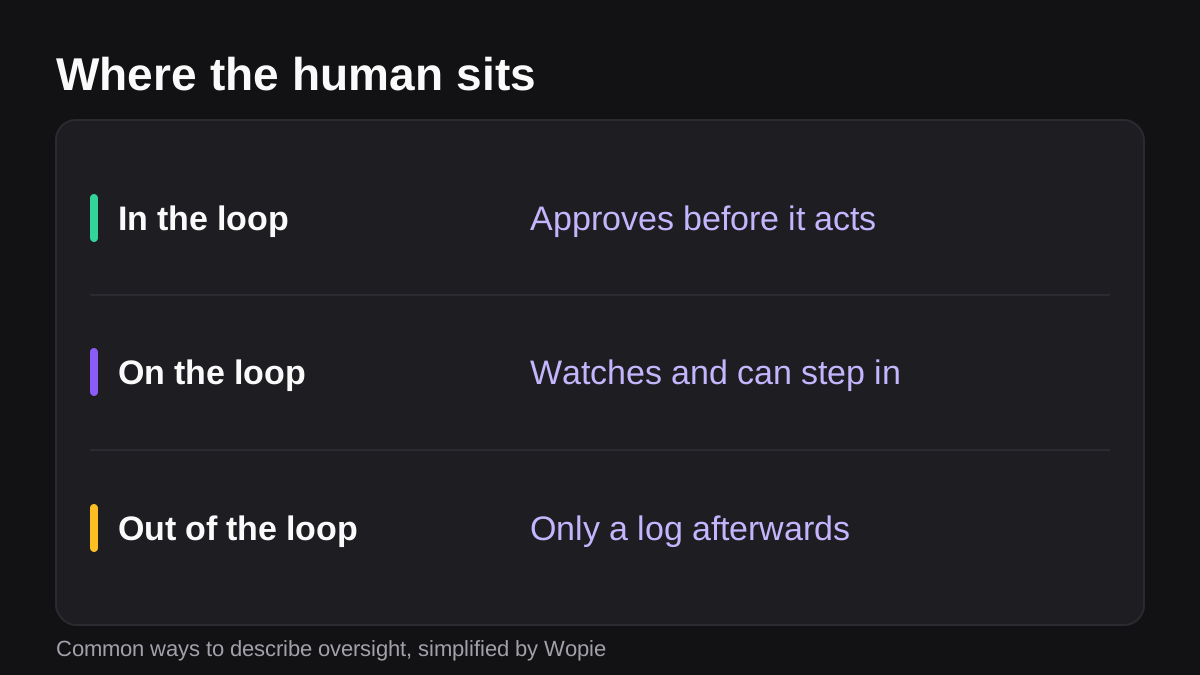
None of these is right everywhere. A summary of last week's tickets can run with a person only watching. A refund, a contract or a message to a customer should wait for a person. The skill is matching the model to the risk of the task, which the rest of this guide covers.
Why does human oversight of AI matter for a small team?
There are three reasons: mistakes, accountability and the law.
Mistakes. AI systems get things wrong, sometimes with confidence. When the work is only text, you can edit it. When the work is an action in a connected system, the damage may already be done. A review step is the cheapest place to catch it.
Accountability. If an agent sends the wrong invoice, someone at your company owns that. OpenAI's paper notes that a human in the loop can serve roles beyond reliability, such as assigning liability [3]. A clear approver means a clear owner.
The law. Rules are moving toward this. You do not have to be a lawyer, but you should know the two big ones.
What do the EU AI Act and GDPR say about human oversight?
The EU AI Act
Article 14 of the EU AI Act is titled Human Oversight. It says high-risk AI systems must be designed so that people can effectively oversee them while in use [1]. The stated aim is to reduce risks to health, safety and fundamental rights [1].
The article lists what oversight measures must let the overseer do [1]:
- Understand the system's capabilities and limits, and watch for anomalies and unexpected behavior.
- Stay aware of the risk of trusting its output too much, which the article calls automation bias.
- Interpret the output correctly.
- Decide not to use the system, or to disregard, override or reverse its output.
- Intervene or halt the system using a "stop" button or a similar procedure.
Note the last two. Oversight is not only the right to say yes. It is the power to say no and the ability to stop the system.
Article 14 covers high-risk systems, and whether a tool you use falls into that category depends on what it is used for [1]. Treat it as a model of good practice even if your use is lower risk.
GDPR Article 22
Article 22 of the GDPR deals with decisions about people. It gives individuals a right not to be subject to a decision based solely on automated processing, including profiling, when it has legal or similarly significant effects [2]. There are exceptions, such as when the decision is needed for a contract or the person gave explicit consent. Even then, the organization must provide at least the right to obtain human intervention [2]. People can also state their view and contest the decision [2].
For a small company, the practical reading is this: if AI helps decide something important about a person, such as a hire, a credit limit or an account closure, plan for a human who can step in.
The NIST framework
On the US side, NIST's AI Risk Management Framework is a voluntary framework meant to help organizations build trustworthiness into the design, use and evaluation of AI systems [6]. It is a useful checklist, not a legal duty.
When does a human in the loop become a rubber stamp?
This is the part most guides skip. Putting a person in the loop does not help if that person cannot or will not really check.
OpenAI's paper names two causes. The user must have enough context to understand what they are approving. And when a user has to approve many decisions, each approval gets made quickly, which reduces their ability to consider each one [3]. The paper asks what practices, such as minimum review times, stop approvals from turning into a "rubber stamp" [3].
The UK regulator makes the same point in law. The ICO says that human involvement must be active, not a "token gesture or rubber stamp" [4]. A reviewer needs real influence over the result before it takes effect, plus the authority and skill to change it [4]. The ICO's example is a manager who was trained to review all scores but mostly looked at high-scoring candidates and only glanced at low-scoring ones before rejecting them. The page treats those rejections as solely automated decisions [4].
That example is worth remembering. It shows how a review step quietly fails: the person looks at the cases that feel important and waves through the rest.
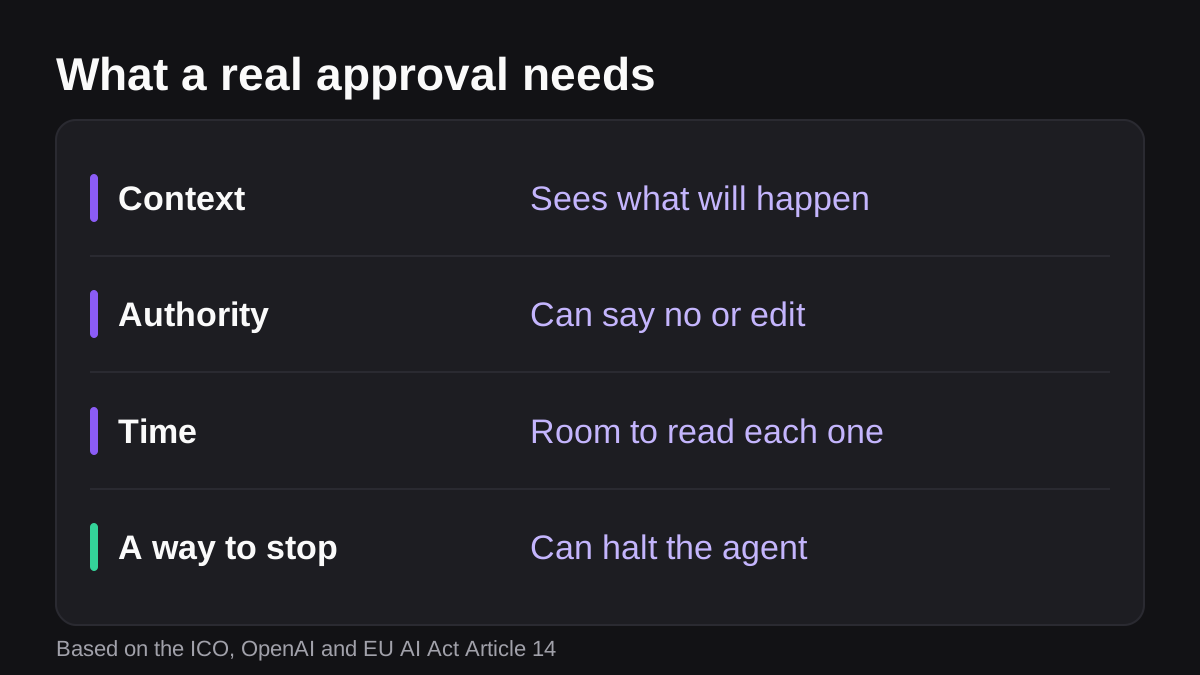
So a good approval has four ingredients:
- Context. The request says exactly what will happen, to what, and why.
- Authority. The approver can say no, edit or stop the action, and nobody punishes them for it.
- Time. The volume is low enough that each request gets a real look.
- A way to stop. There is a clear way to halt the agent, in line with the "stop" button idea in Article 14 [1].
Which actions should always wait for a person?
Not every step needs a gate. Too many gates cause the fatigue described above. Use risk to decide. This table is a starting point, written for small teams, and the decisions are yours.
| Action | Suggested oversight | Why |
|---|---|---|
| Summarizing a thread or drafting an internal report | On the loop: review samples | Low harm, easy to edit |
| Updating a CRM field | On the loop with a log | Easy to reverse |
| Sending an email or message to a customer | In the loop: approve first | You cannot unsend it |
| Issuing a refund or paying an invoice | In the loop: approve first | Money moves and is hard to recover |
| Deleting records or changing permissions | In the loop: approve first | Hard or impossible to undo |
| Decisions about a person, such as hiring or credit | In the loop, with a person who can overrule | GDPR Article 22 and similar rules may apply [2] |
A simple test: ask whether you could undo the action in a minute. If not, gate it. OpenAI's paper makes a related point: actions that can only be reviewed after the fact should be more easily reversible than those that require approval [3].
Why a log is not a substitute for approval
OpenAI describes a ledger of actions taken by the agent as a lighter-touch method than requiring approval, one that gives visibility into a wider range of actions without substantially slowing the system down [3]. Use it for low-risk work. It is not a replacement for a gate on irreversible steps, because by the time you read the ledger the action has happened.
How do you set up human in the loop AI in five steps?
- List what the AI can touch. Write down every tool and every action it could take, such as read a deal, post in a channel, send an email, create a payment.
- Sort actions by reversibility. Mark each as reversible in a minute, reversible with effort, or irreversible. Gate the last two.
- Name an approver for each gate. A role is not enough. Use a person, with a backup for holidays. Accountability needs a name.
- Make the request self-explanatory. The approver should see the exact action, the data it uses and the reason, without opening five tabs. This is the context ingredient that stops rubber-stamping [3].
- Review the gates monthly. If an approver says yes to 99 of 100 requests without edits, either the gate is in the wrong place or the review has become a habit. Move the gate or add a sample check.
You can build this with tools you already own. Microsoft's Power Automate approvals, for example, notify approvers when a flow submits a request, and approvers can respond directly from an Outlook email, a Teams adaptive card or the Power Automate action center [5]. If you use Teams, our guide to automating approvals in Microsoft Teams walks through the options.
Where does Wopie fit?
Wopie is an AI employee that takes jobs in a Slack or Teams channel, reads your connected tools, produces finished work and pauses anything sensitive for human approval. That makes approval a built-in step rather than something you bolt on. You can read how the approval gates and audit trail work on the security page, and see which integrations it connects to. If you are still deciding what to hand over first, see which jobs to give an AI employee first.
Whatever tool you choose, ask the vendor the same questions. Can I see exactly what will happen before I approve? Can I edit or reject it? Can I stop the agent? Is there a record of who approved what and when?
What to do next
Use this short checklist this week:
- Write a list of every action your AI tools can take.
- Mark each action as reversible or not, and gate the irreversible ones.
- Name one approver per gate, plus a backup.
- Check that each request tells the approver what will happen, in plain words.
- Pick one low-risk task to run with a log only, and review the log weekly.
- Put a monthly reminder in the calendar to review approval rates and move gates where needed.
If you want a deeper look at the practice, our post on how to onboard an AI agent like a new team member covers how to extend trust step by step as the agent proves itself.
Human in the loop AI is not about distrust. It is about putting a person where a mistake costs the most, and giving that person the context, time and authority to use the role properly.
Autonomous, not unsupervised.
Approval gates, scoped access and a full audit trail. See how Wopie keeps people in control.
See how Wopie stays safeSources
- [1]Article 14: Human Oversight | EU Artificial Intelligence Act · EU Artificial Intelligence Act (artificialintelligenceact.eu) · accessed Oct 24, 2026
- [2]Art. 22 GDPR - Automated individual decision-making, including profiling · General Data Protection Regulation (gdpr-info.eu) · accessed Oct 24, 2026
- [3]Practices for Governing Agentic AI Systems · OpenAI · accessed Oct 24, 2026
- [4]Meaningful human involvement | ICO · Information Commissioner's Office (UK) · accessed Oct 24, 2026
- [5]Get started with Power Automate approvals - Power Automate | Microsoft Learn · Microsoft Learn · accessed Oct 24, 2026
- [6]AI Risk Management Framework | NIST · National Institute of Standards and Technology (NIST) · accessed Oct 24, 2026