How to build a weekly cash flow report from Stripe and your bank
Build a weekly cash flow report from Stripe and your bank in five steps: pull payouts, match deposits, add bills, check buffer days and review each Monday.
By the Wopie team · November 3, 2026 · 11 min read
Listen to this article· 13 min

A weekly cash flow report from Stripe and your bank is a one-page summary of the money that arrived last week, the money that is due out this week, and how many days of spending your cash can cover. You build it by taking Stripe's payout report, matching each payout to a bank deposit, adding your bills and payroll, and checking the closing balance against a minimum you set.
You do not need a finance system to start. Stripe gives you the reports, your bank or accounting software gives you the other half, and a simple spreadsheet joins them. This guide shows what to pull, how to match it, what the page should contain, and where a person must stay in charge.
Why does a small business need a weekly cash report?
Profit tells you whether the business works. Cash tells you whether it can pay people on Friday. They are different numbers, and the gap between them is where small companies get caught out.
The JPMorgan Chase Institute studied the cash balances of small businesses and measured them in "cash buffer days": the number of days of cash outflows a business could pay out of its cash balance if its inflows stopped [1]. The median small business held 27 buffer days, 25 percent held fewer than 13, and 25 percent held more than 62 [1]. The median varied by industry, from 16 days for restaurants to 47 for real estate [1].
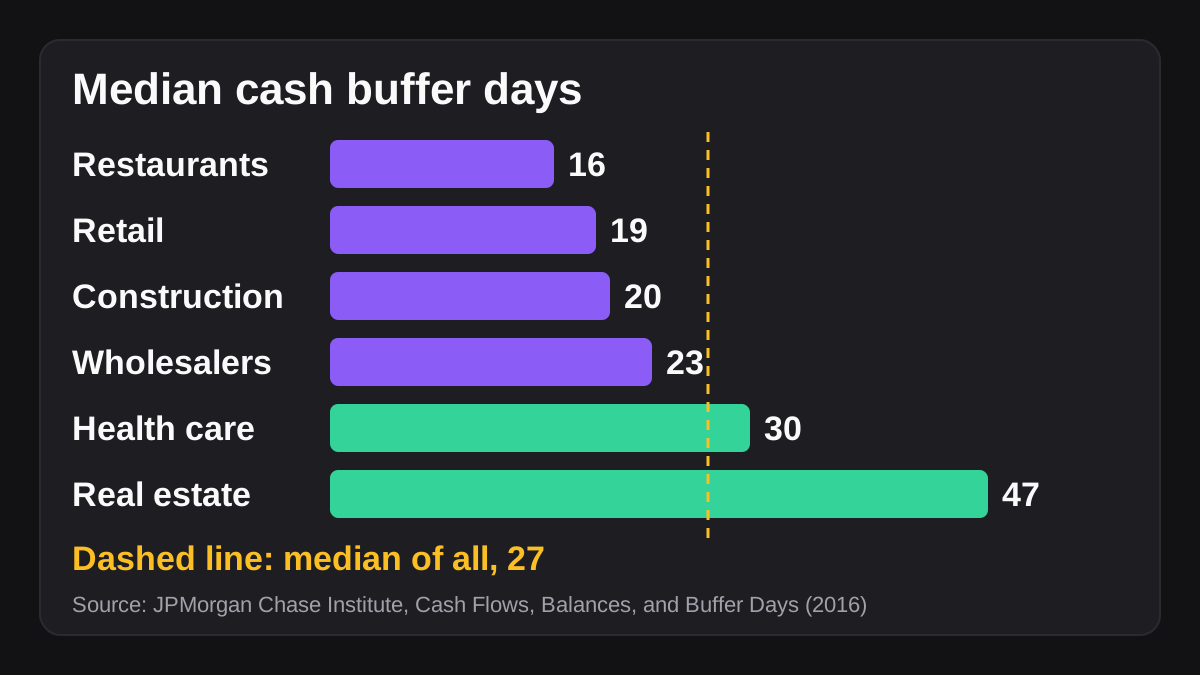
Those figures come from a 2016 report, so use them as a rough guide rather than a current benchmark [1]. The point still holds. Many businesses run with a few weeks of cash at most. A report that shows your position every week gives you time to act: chase a late payment, delay a purchase or talk to your bank before you are short.
A monthly view is too slow for this. By the time a month closes, the tight week has already passed. If you are also working on your close, the guide to speeding up month-end close covers the monthly side.
What data do you need from Stripe and your bank?
You need two sets of facts: what Stripe has collected and paid out, and what your bank account actually shows. The report is the join between them.
What can you pull from Stripe?
Stripe has two reports that matter here, and they answer different questions.
The balance summary report works like a bank statement for your Stripe balance. It shows your starting and ending balance for a date range, along with a summary of activity and payouts [2]. Stripe says your balance includes available, pending and reserved funds where they apply [2]. It does not link payouts to the payments inside them [2].
The payout reconciliation report does that job. If you use automatic payouts, it matches the payouts you receive in your bank account with the batches of payments and other transactions they relate to [3]. You can download an itemized CSV listing every payment, refund, dispute and fee in a payout [3]. It is only available if automatic payouts are turned on, and Stripe notes that you control the timing and amount of instant payouts, so you must reconcile those yourself [3].
Two timing details matter for a weekly report. First, Stripe groups a payout by its estimated arrival date, not the date your bank posts the deposit [3]. Second, data for each day is complete in the balance summary by 12:00 PM the next day in the report's time zone, and Dashboard reports cover only complete days [2]. So run the report after midday, not first thing, and expect a day's lag.
What can you pull from your bank?
Your bank gives you the truth about cash. Pull the transactions for the same week: deposits, card payments, transfers, payroll, rent and tax payments.
If you use QuickBooks Online, connecting your accounts means transactions automatically download, and you can review, categorize and add them on the bank transactions tab [6]. Intuit says the available history runs from 90 days to 24 months depending on the bank [6]. Other accounting tools work in a similar way. A bank feed saves the typing, but someone still has to check the categories.
What else belongs in the report?
Add the cash you know is coming and going that neither source shows yet. Include payroll dates, rent, loan payments, taxes, insurance and software renewals. Add expected customer payments that do not run through Stripe, such as invoices paid by bank transfer.
How do Stripe payouts turn into cash in your bank?
Stripe does not move money to your bank the moment a customer pays. A payment first sits in your Stripe balance as pending, and the transaction's net amount moves from pending to available on its "available on" date [2]. Available funds can then be paid out [2].
Your payout schedule decides when that happens. Stripe offers manual payouts, daily automatic payouts every business day, and weekly or monthly schedules on days you choose [4]. Payouts scheduled on weekends or holidays arrive the next business day [4]. Settlement timing is separate from the payout schedule: Stripe's own example is an account on daily payouts with a three business day settlement timing, which pays out daily from transactions captured three business days earlier [4]. Manual payouts typically take one to four business days to arrive [4].
This is why a weekly report should work from payouts and deposits, not from sales. A strong sales week can show up in your bank account in the following week, or later. Treat the Stripe balance as cash that is on its way, and the bank deposit as cash you can spend.
| Item | What it tells you | Where it comes from |
|---|---|---|
| Stripe starting and ending balance | Funds held at Stripe, available and pending | Balance summary report [2] |
| Payout and its included transactions | What one deposit is made of | Payout reconciliation report [3] |
| Estimated arrival date | When the deposit should land | Payouts page and reconciliation report [3] |
| Bank deposit | What actually arrived | Your bank account or bank feed [6] |
What are the steps to build a weekly cash flow report?
Follow these five steps in order. The first run is the slowest. Once the layout and the checks are set, it gets much quicker.
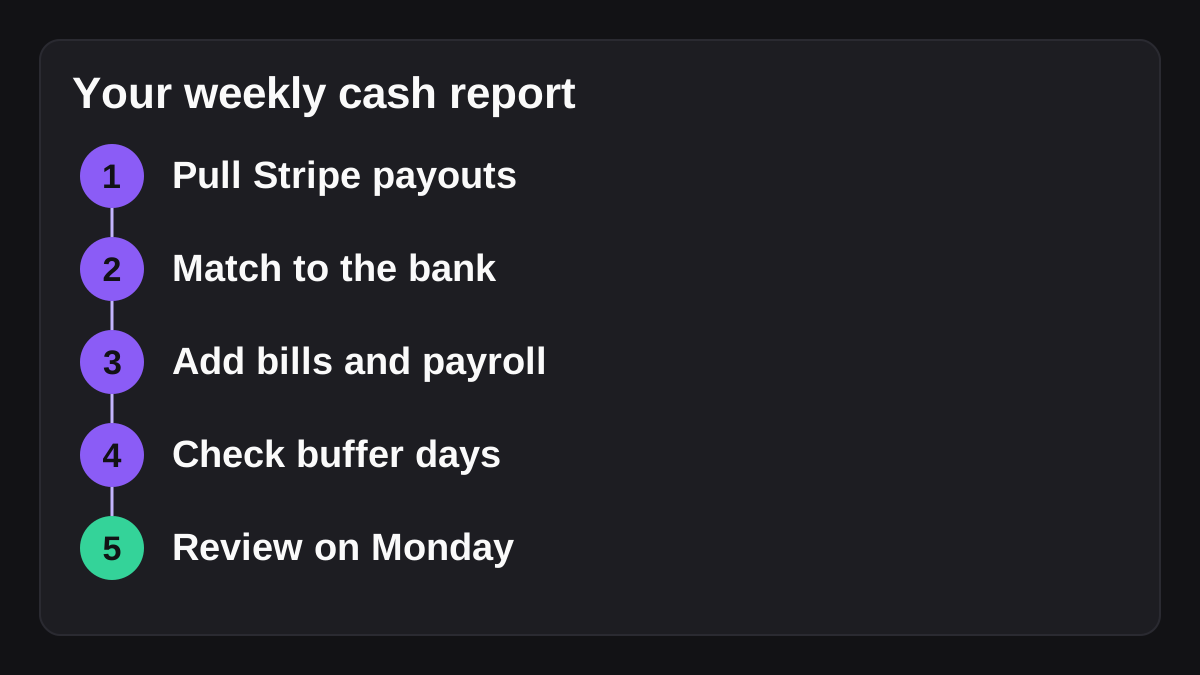
- Pull last week's Stripe payouts. Open the payout reconciliation report for the week, using the estimated arrival dates to set the range, and widen it if you are unsure [3]. Download the summary, and the itemized CSV if you need the detail. Note any failed payouts, which Stripe shows in their own section [3].
- Match each payout to a bank deposit. For every payout, find the deposit in your bank feed. The amounts should agree. Flag anything unmatched: a payout in transit, a timing difference around a weekend, or a deposit that is a different size than expected. Stripe's reports help you match, but you remain responsible for checking the data, particularly for instant payouts [3].
- Add the other cash in and out. Enter the bank transactions that did not come through Stripe, and add the known payments for the coming week: payroll, rent, supplier bills, taxes and loan payments. Use the date the money actually moves, not the invoice date. Slash notes that using accrual figures instead of cash is a common pitfall [5].
- Calculate closing cash and buffer days. Opening cash, plus cash in, minus cash out, gives closing cash. To get buffer days, divide your closing cash by your average daily cash outflow, which is the same idea the JPMorgan Chase Institute uses [1]. Compare the result with a minimum you set in advance. Many businesses also set a minimum cash threshold [5].
- Review it on a fixed day. Send the page to the owner or finance lead, read the variances and decide what to do. Note what changed since last week, and why.
Here is an invented example to show the arithmetic. Suppose you opened the week with $42,000, took in $18,000 in Stripe payouts and $6,000 in transfers, and paid out $30,000. Closing cash is $36,000. If your average spend is $4,000 a day, that is nine buffer days. If your minimum is ten, the report flags the week, and you decide what to do before it becomes a problem.
How should you lay out the page?
Keep it to one page, with the same rows every week:
- Opening cash, from the bank
- Stripe payouts received, matched to deposits
- Other cash received
- Payroll and taxes paid
- Suppliers, rent and other payments
- Closing cash and buffer days
- A short note on anything unusual
Fixed rows make week-to-week changes obvious. A report that changes shape every week is hard to read and harder to trust.
How do you handle the awkward parts?
A few things make weekly cash reports go wrong. Plan for them.
Timing gaps. A payout that arrives on Monday belongs to last week's Stripe activity but this week's bank balance. Pick one rule, such as "cash is counted on the bank deposit date", and apply it every week. Stripe's reports use the estimated arrival date for this reason [3].
Refunds, disputes and fees. Stripe's itemized report breaks a payout into payments, refunds, disputes and fees [3]. Show the net payout in the cash report and keep the breakdown behind it, so you can explain a deposit that is smaller than last week's sales.
Instant and manual payouts. Stripe cannot identify which transactions an instant payout covers, because you control its timing and amount [3]. Reconcile those against your transaction history yourself.
Forecast accuracy. If you look ahead as well as back, expect the near weeks to be more reliable. Slash suggests aiming for a variance under 5 percent in the first four weeks, under 10 percent in weeks five to eight, and under 15 percent in weeks nine to thirteen [5]. That is one vendor's guidance, so adjust it to your business. Test a downside as well: ask what happens if your biggest customers pay a week late.
Currency and platforms. Stripe reports transactions in your settlement currency, after any required foreign currency conversion [2]. If you use Connect or several processors, add one section per source and keep each reconciled separately.
What can you automate, and what should stay with a person?
The collection and matching are repetitive, and they suit automation. The decisions do not.
| Task | Automate it? | Why |
|---|---|---|
| Downloading the Stripe report each week | Yes | Stripe can schedule report exports daily, weekly or monthly [2] |
| Pulling bank transactions | Yes | A bank feed downloads them automatically [6] |
| Matching payouts to deposits | Yes, then review the exceptions | A person checks anything that does not match |
| Drafting the one-page summary | Yes | It is the same layout every week |
| Adding forecast items such as payroll | Draft, then confirm | A person knows about one-off bills and changes |
| Deciding to delay a payment or draw on credit | No | This is a business and relationship decision |
| Sharing the report beyond finance | Only with approval | Cash figures are sensitive |
Stripe lets you schedule report exports daily, weekly or monthly, which gives you the raw file without anyone remembering to click [2]. The harder part is reading it alongside the bank data and writing it up.
Where does an AI employee fit?
That reading and writing step is where an AI employee helps. Wopie takes a job in a Slack channel or Microsoft Teams, reads the finance tools you connect, produces the finished work, such as the weekly cash page with unmatched items listed, and pauses anything sensitive for approval. You can set it so the draft goes to a private finance channel, and nothing is shared more widely until a person says so. See approval gates and the audit trail for how that works.
It is the wrong tool where a saved report or a scheduled export already does the whole job. And it should never move money. Preparing the report is a good delegation. Paying a bill is not. To write the weekly routine down so an agent can follow it, read how to write an SOP an AI agent can follow, and for the idea of approval, see what human in the loop AI means.
NIST publishes a voluntary AI Risk Management Framework intended to help manage the risks AI can pose to people, groups and society [7]. A named reviewer on every AI-prepared report is a sensible habit at any size. That is my own advice rather than a NIST rule. This guide is general information, not accounting or financial advice, so check your own needs with your accountant.
What to do next
Start with one week. You can improve the layout after it works once.
- Choose a day and time for the report, such as Monday after midday.
- Check that your Stripe account uses automatic payouts, so the payout reconciliation report is available to you [3].
- Connect your bank to your accounting software, or download bank transactions for the week [6].
- Copy the fixed rows from the layout above into a spreadsheet.
- Set a minimum number of buffer days, and write it at the top of the page.
- Name the person who reviews the page and decides what to do.
- After four weeks, look at what surprised you, and fix the cause once.
If this is the first time you have watched cash weekly, expect the early reports to be messy. By the fourth, the patterns in your payout timing and your bills will be easy to see, and the page will take a fraction of the time.
Put an AI employee in your Slack.
Wopie joins your channels like any teammate, owns the recurring work and checks with you before anything sensitive goes out.
See Wopie for SlackSources
- [1]Cash Flows, Balances, and Buffer Days | JPMorgan Chase Institute · JPMorgan Chase Institute · accessed Nov 3, 2026
- [2]Balance summary report · Stripe Documentation · accessed Nov 3, 2026
- [3]Payout reconciliation report · Stripe Documentation · accessed Nov 3, 2026
- [4]Receive payouts from Stripe · Stripe Documentation · accessed Nov 3, 2026
- [5]How to Build a 13-Week Cash Flow Forecast | Slash · Slash · accessed Nov 3, 2026
- [6]Connect bank and credit card accounts to QuickBooks Online · Intuit QuickBooks Help · accessed Nov 3, 2026
- [7]AI Risk Management Framework | NIST · National Institute of Standards and Technology (NIST) · accessed Nov 3, 2026