How to follow up every lead within an hour without hiring
Lead follow up automation for small teams: alert the right rep, draft a reply, approve it and log it, so every new lead gets an answer within an hour.
By the Wopie team · October 28, 2026 · 9 min read
Listen to this article· 10 min

Lead follow up automation means a system notices every new lead, tells the right person at once, drafts the first reply, and makes sure nothing sits unanswered. You do not need a bigger sales team to answer every lead within an hour. You need a short routine that runs the same way every time, with a person approving what gets sent.
This guide shows you how to build that routine in five steps, which parts to automate and which to keep human, and what to check before you send a single automated email. Where a rule or figure comes from a source, it is cited. Where it is my own judgment, I say so.
Why does speed to lead matter?
Because most companies are slow, and slow is expensive. A Harvard Business Review study of how companies handle web leads opened with a blunt finding: most companies are not responding nearly fast enough [2].
The best-known numbers come from an older study run by InsideSales.com with a professor from MIT Sloan. It looked at three years of data from six companies, covering more than 15,000 web leads and more than 100,000 call attempts [1]. The odds of reaching a lead fell by more than 10 times in the first hour [1]. The odds of qualifying a lead fell by more than 6 times in the same hour [1]. Comparing a call at 5 minutes with a call at 30 minutes, the odds of contact dropped 100 times and the odds of qualifying dropped 21 times [1].
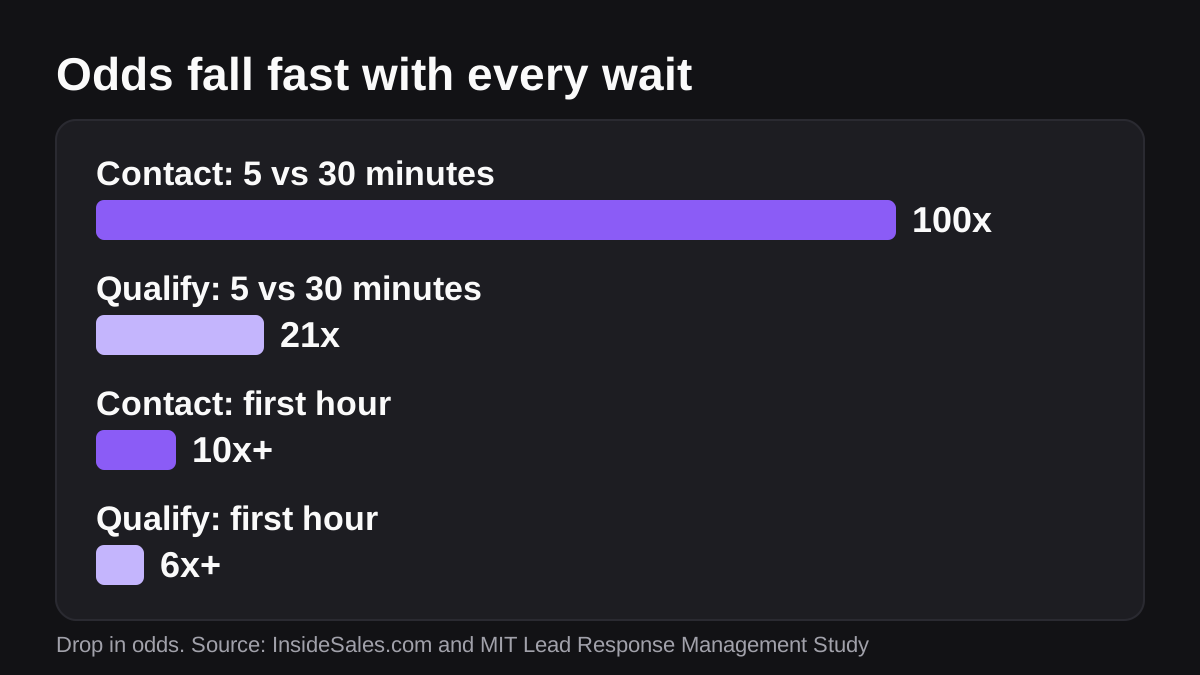
Read those figures with care. The study was run by a sales software vendor, it covered six companies, and it was about phone calls to web leads. The authors say it did not look at close rates, meaning how many leads became customers [1]. So treat it as strong evidence that speed helps you reach people, not as proof that a faster reply wins a set share of deals. It does not claim to be a promise for your business.
The practical lesson is still clear. The first hour matters most, and the first few minutes matter even more. For a small team, a one hour target is realistic. Five minutes is a stretch goal for your best leads.
What does good lead follow up look like?
Good follow up has four parts, and each one can fail on its own.
- Someone knows the lead exists. A form submission that lands in a shared inbox nobody watches is a common way to lose a lead.
- Someone owns it. If two people can reply, often neither does.
- The first reply is useful. It answers the question the lead asked, names a next step and sounds like a person wrote it.
- The next touch is scheduled. Many leads will not reply to the first message. A reminder to follow up again has to exist before you need it.
Only the content of the reply needs human judgment. Spotting the lead, assigning it, drafting a reply, setting the reminder and logging the activity are mechanical. They are exactly the kind of work that gets skipped when a team is busy, and exactly the kind a system does the same way every time.
Which parts should you automate, and which should stay human?
Split the work into three groups. This is my own framework, not a rule from a source, so adjust it to your risk.
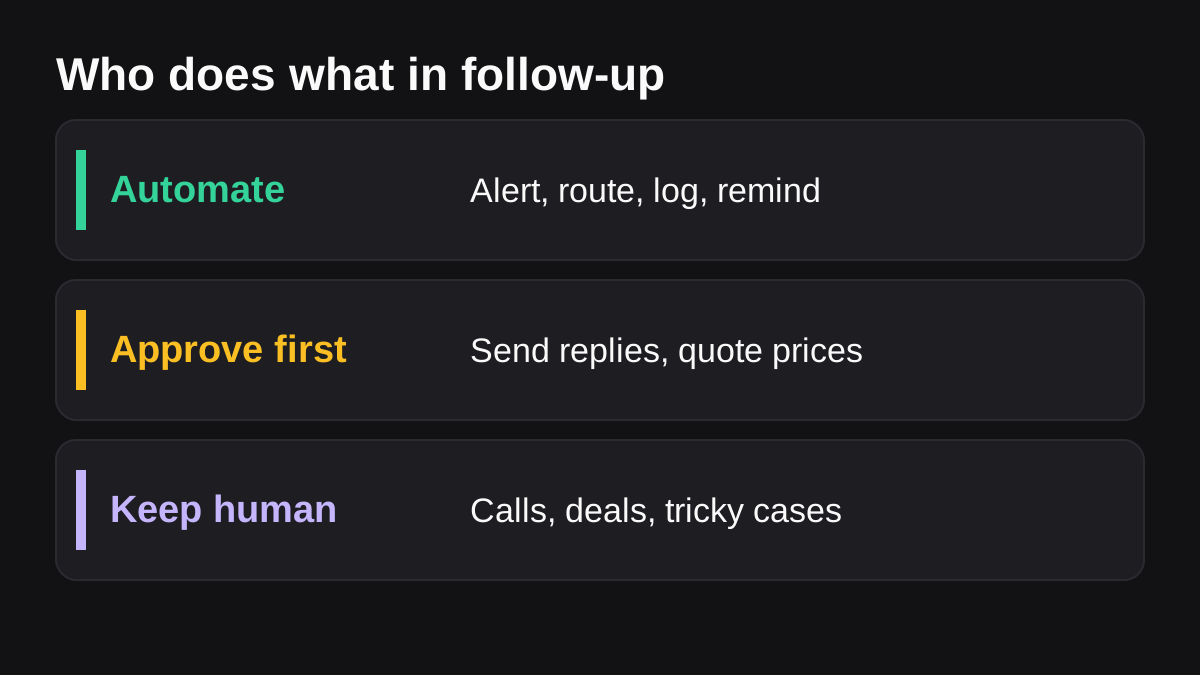
| Group | Examples | Who decides |
|---|---|---|
| Automate | Alert the owner, assign by rule, log the lead, set a follow-up reminder | The rule you wrote |
| Approve first | Sending the first reply, quoting a price, answering a detailed question | A person reads it, then it goes |
| Keep human | Discovery calls, negotiating, anyone upset or high value | A person, start to finish |
The middle row is where most teams go wrong. They either send everything automatically and risk an embarrassing message, or they send nothing automatically and lose the speed. The fix is a draft that is ready and waiting, so approving takes a few seconds. This is the same idea behind human in the loop AI: the machine does the preparation, and a person makes the call on anything that leaves the building.
How do you follow up with every lead within an hour? Five steps
This routine works with whatever CRM and chat tool you already use. The examples use HubSpot and Slack because they are common, and the sources below cover them.
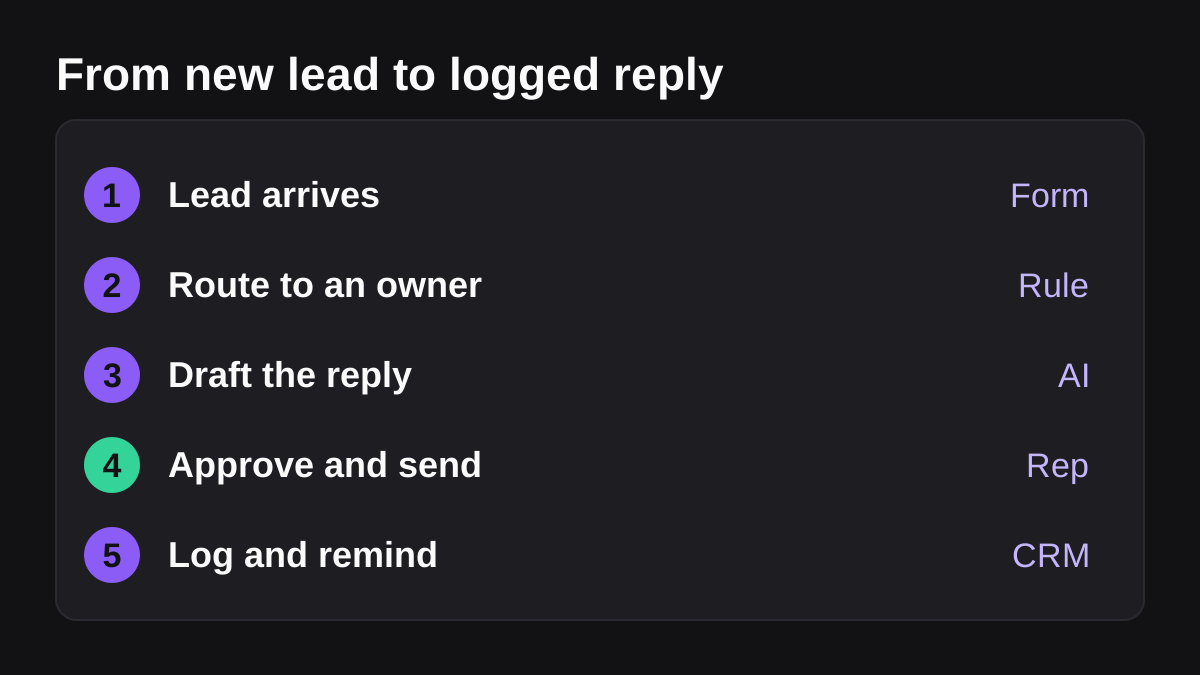
- Capture every lead in one place. Point every form, inbox and chat widget at your CRM, so each lead becomes a record. If a lead can arrive anywhere else, someone will miss it.
- Route it to one owner, and alert them where they already work. Assign by a simple rule, such as territory, product or round robin. Then tell the owner in chat. In HubSpot, a workflow can send an internal notification and create a task [4]. Workflows can also post a Slack notification to a channel, a user or the record owner, with buttons to create a task or log a call [5].
- Draft the reply. Write a short template for each kind of lead, then personalize it with what the lead actually said. A draft takes seconds to read and fix. Writing from scratch takes minutes, and those minutes are the ones you do not have.
- Approve and send. The owner reads the draft in the chat thread, edits it if needed and approves it. Keep the human check on anything that quotes a price, makes a promise or replies to a complaint.
- Log it and schedule the next touch. Record the reply on the CRM record and set a reminder for the follow-up. A lead with no next step is a lead you will forget.
Set a target for step four, for example "first reply within one hour during business hours", and measure it every week. If you do not measure the time from lead to first reply, you will not know whether the routine works.
What triggers the routine?
In HubSpot, enrollment triggers are the criteria that automatically enroll a record in a workflow, such as a form submission [4]. By default a record enrolls only the first time it meets the triggers, so the same lead does not get the same alert twice [4]. Only records that meet the trigger after you turn the workflow on will enter it [4]. Test with a fake lead before you turn it on.
If your leads live in Slack or arrive from tools outside it, Slack's Workflow Builder can start a workflow from a webhook, on a schedule, or when a message is posted with certain keywords [6]. It can then take a Slack step, such as sending a message to a channel [6]. Workflow Builder is available on paid Slack plans [7].
What can go wrong with automated follow-up?
Most failures are small and avoidable.
- The wrong person gets the lead. Test your routing rule with five made-up leads before you rely on it.
- A lead gets the same message twice. This usually happens when two workflows both react to the same form. Keep one owner for each trigger.
- The notification goes unseen. Alerts only work where people look. Private channels will not appear in HubSpot's list until you add the HubSpot app to them, and only people who have mapped their email addresses show up as Slack recipients [5].
- The reply sounds like a robot. Use short sentences, mention one detail the lead wrote, and ask one clear question.
- Your plan does not include the feature. Available workflow actions depend on your HubSpot subscription [4], and sending Slack notifications from workflows needs a Professional or Enterprise subscription [5]. Check this before you design around it.
- Nobody follows up after the first message. Put the reminder in step five, not in someone's memory.
Is automated follow-up email legal?
General information only, not legal advice. In the United States, the CAN-SPAM Act sets rules for commercial email. The Federal Trade Commission's guide says header information such as "From" and "To" must be accurate, subject lines must not mislead, and the message must clearly say it is an advertisement and include your valid physical postal address [3]. It also requires a working way to opt out, and the law gives you 10 business days to stop emailing someone who asks [3]. Each violation can be fined [3]. That guide is an older FTC publication and its dollar figure has since been raised, so check the FTC's current guidance for the amount.
Other countries, and text messages and calls, have their own rules. If you sell in the European Union or the United Kingdom, or you plan to send automated texts, check the local requirements first or ask a lawyer.
When is an AI employee worth using for lead follow up?
Rules in a CRM are good at moving a record and sending an alert. They are less good at reading what a lead wrote and drafting a reply that fits it. That is the gap an AI employee fills. If you want to see how the idea differs from a script or a chatbot, what an AI employee actually is explains it, and Slack workflow builder vs AI agents shows where fixed workflows stop being enough.
Wopie is an AI employee that takes a job in a Slack channel, reads your connected tools, produces the finished draft and pauses anything sensitive for your approval. For lead follow up, that could mean reading a new lead and the history on the account, drafting a reply for the owner, and waiting for a yes before anything is sent. You can see how approvals are handled on the security page, and which tools it connects to on the integrations page.
AI is the wrong tool in a few cases. Do not use it to decide which leads are worth your time without a person checking the logic. Do not let it send messages about pricing, contracts or complaints on its own. And do not use it before you have a routing rule and a target time, because automating a messy process just makes the mess faster. Start by giving it a small, repetitive job, as described in which jobs to give an AI employee first.
What to do next
Use this checklist this week. It should take an afternoon.
- List every place a lead can arrive: forms, inboxes, chat, calls, events.
- Point all of them at your CRM, so each lead becomes one record.
- Write the routing rule in one sentence, and name a backup owner.
- Set an alert in the channel where your team already works.
- Write three short reply templates for your three most common kinds of lead.
- Decide what always needs a human to approve before it goes out.
- Set the target: first reply within one hour in business hours.
- Add a follow-up reminder to every lead record.
- Check the email rules in the FTC guide, and ask a lawyer if you sell abroad.
- After two weeks, measure the time from new lead to first reply, and fix the slowest step first.
If you would rather hand the drafting to an AI employee that waits for your approval, you can see how pricing works before you decide. The first step is the same either way: make sure every lead has an owner and a clock.
Bring Wopie onto your team.
It owns the recurring work and checks with you before anything goes out. Your first $100 of work is on us.
Hire for freeSources
- [1]The InsideSales.com/MIT Lead Response Management Study · InsideSales.com and MIT Sloan (Lead Response Management) · accessed Oct 28, 2026
- [2]The Short Life of Online Sales Leads · Harvard Business Review · accessed Oct 28, 2026
- [3]The CAN-SPAM Act: Requirements for Commercial Emailers · Federal Trade Commission (FTC Facts for Business) · accessed Oct 28, 2026
- [4]Create workflows · HubSpot Knowledge Base · accessed Oct 28, 2026
- [5]Manage notifications in Slack · HubSpot Knowledge Base · accessed Oct 28, 2026
- [6]Build a workflow: Create a workflow in Slack · Slack Help Center · accessed Oct 28, 2026
- [7]Guide to Slack Workflow Builder · Slack Help Center · accessed Oct 28, 2026