What is an AI employee, and how is it different from a chatbot?
An AI employee takes a job, works across your tools and delivers finished work for approval. Here is how it differs from a chatbot, and how to try one safely.
By the Wopie team · October 12, 2026 · 9 min read
An AI employee is software that takes on a recurring job the way a colleague would: you brief it in plain language, it works across your tools, and it hands back finished work. That is the short answer to "what is an AI employee", and it is what separates one from a chatbot. A chatbot answers your question. An AI employee takes the job.
The term is not a technical standard. One business guide calls it "a broader business term" for an AI solution that regularly handles tasks a human employee would otherwise do, and says it may sit on top of a simple assistant or a more autonomous agent [1]. So the label tells you little by itself. What matters is what the product can read, what it can do, and who signs off before anything leaves the company.
This guide explains what an AI employee is, how it differs from a chatbot, an agent and an automation, which jobs suit it, where it goes wrong, and how to try one without losing control. It is general information, not legal or security advice.
What is an AI employee, in plain terms?
Think of the three things a new hire needs: a clear job, access to the tools to do it, and someone who checks the work. An AI employee has the same three parts.
- A job. You describe an outcome, such as "build Monday's pipeline report" or "chase every invoice that is 30 days overdue".
- Access. It reads the systems the job touches: your chat, CRM, billing, helpdesk and documents.
- A checkpoint. It stops for a person before it does anything sensitive.
The business guide from IONOS describes the category as AI-powered software that takes on recurring office tasks, driven by natural-language instructions rather than being tied to one office suite [1]. The same guide is careful about limits. It warns that generative AI "can produce incorrect, incomplete or fabricated information", and says an AI employee should not make independent decisions on legal matters, finances or employees [1].
That is the honest framing. An AI employee is not a person and not a magic box. It is delegated, supervised software that does real tasks end to end.
How is an AI employee different from a chatbot, an agent or an automation?
These words overlap, and vendors use them loosely. Here is a working split, drawing on how IONOS and Slack describe them [1][3].
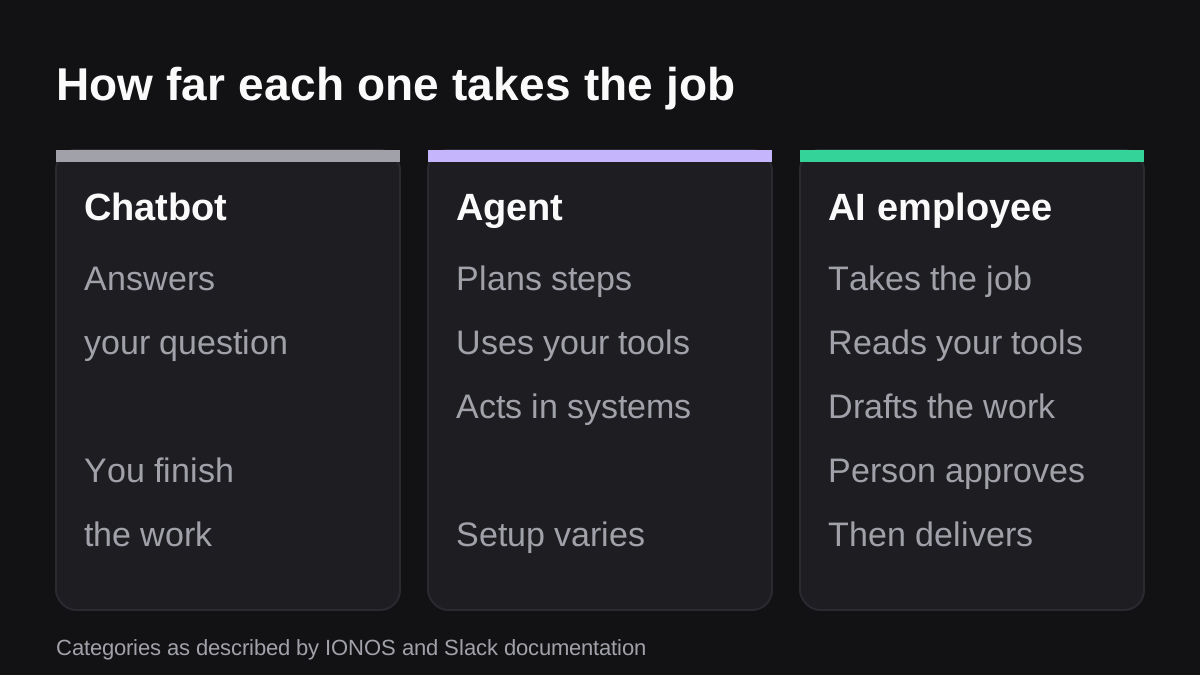
| Type | What it does | Who finishes the job |
|---|---|---|
| Chatbot or assistant | Answers a question or drafts text after a specific instruction [1] | You |
| AI agent | Works toward a goal, breaks it into steps, uses connected tools and acts in other systems [1] | Often you, depending on the setup |
| Automation (rules) | Runs the fixed steps someone wrote in advance | The rule, until the data changes shape |
| AI employee | A role built on an assistant or an agent, handling a recurring job with oversight [1] | It does, and a person approves |
Slack's own documentation draws the line between agents and simple question-and-answer bots in a similar way. Agents go further by planning actions, calling external systems and iterating on results [3]. In other words, the technical ingredient that makes an AI employee possible is the agent. The "employee" part is the packaging: a defined role, access to your tools, and a person in charge.
Why the difference matters in practice
Take a weekly sales report. A chatbot can explain how to build one, or tidy a draft you paste in. An automation can pull a fixed set of fields into a template, until someone renames a field. An AI employee reads the live numbers from your CRM, notices the odd one, writes the summary, attaches the sheet and asks you to approve before it posts to the leadership channel.
You are not buying a smarter answer. You are buying back the hours between the question and the finished deliverable.
Why are companies hiring AI employees now?
Two things are happening at once: teams are stretched, and the software has caught up.
Microsoft's 2025 Work Trend Index reports that 53% of leaders say productivity must increase, while 80% of the global workforce reports lacking the time or energy to do their job [2]. The same report found that 82% of leaders expect to use digital labor to expand their workforce in the next 12 to 18 months [2]. Microsoft also uses the term "agent boss" for someone who builds, delegates to and manages agents to amplify their impact [2].
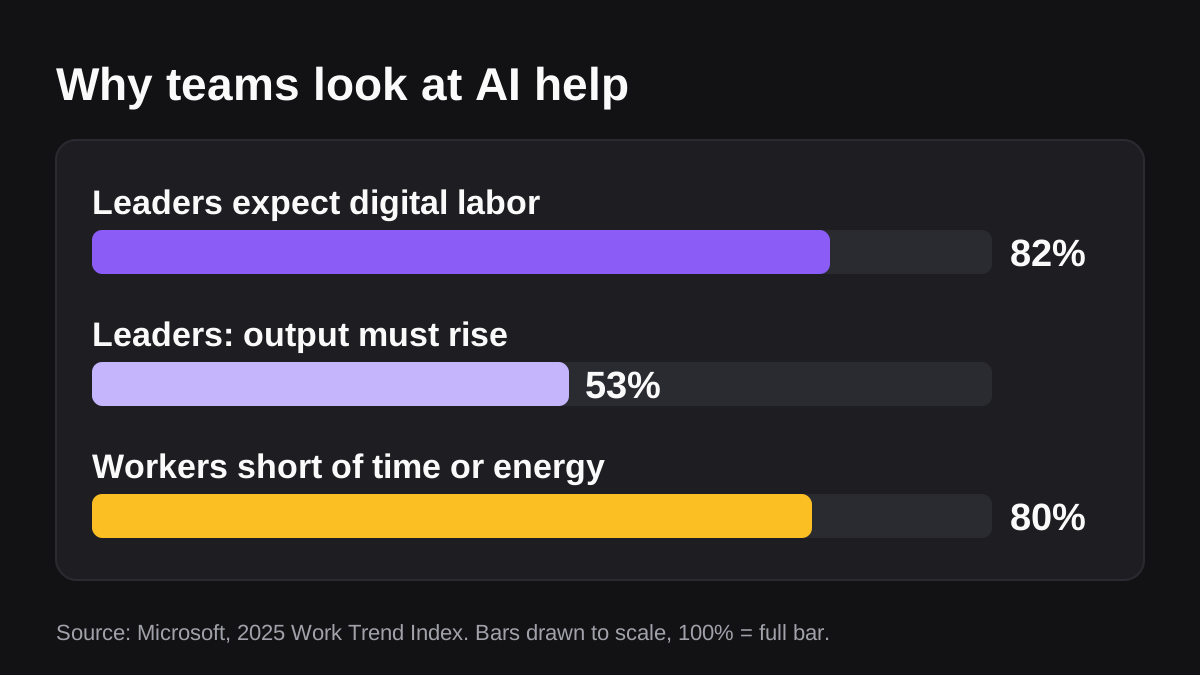
Read those numbers with care. They describe what leaders expect and what workers report, not what any specific tool delivers. They do explain the pull: small teams have the same amount of recurring work as before and fewer spare hours to do it.
For a company of 20 to 200 people, the appeal is practical. You do not have to hire another coordinator to build the same report every Monday. You can hand the report to software, review it in two minutes, and put your own time into the part that needs judgment.
What jobs can an AI employee actually do?
The best first jobs share three traits: they repeat, they touch more than one tool, and the output is easy to check. A few examples from sales, support and finance teams:
- Weekly reports. Pull numbers from the CRM and billing system, write the summary, post it for approval.
- Follow-ups. Draft a message to every lead or overdue invoice, in your tone, with the right context for each person.
- Month-end packs. Gather the figures, reconcile what can be reconciled, and flag what needs a human decision.
- Support triage. Read incoming tickets, tag them, route them and draft replies for review.
- Research before a call. Collect what you know about an account from your own tools into one brief.
The product overview shows the kinds of finished work Wopie produces for jobs like these.
What an AI employee should not do alone
Decisions about hiring, pay, legal positions, tax filings and anything with real safety consequences belong with people. The IONOS guide says hiring, strategy and final approvals still need human judgment [1]. Use the AI employee to prepare the material, not to make the call.
How does an AI employee stay under control?
Control is the whole difference between a useful AI employee and a liability. Four things should be true before you connect it to anything important.
Scoped access
An agent should only see what its job needs. Slack's help center says the data an agent can reach depends on its scopes, and advises you to review them before installing [4]. By default it can access the messages you send it, and adding it to a channel or a direct message extends its access to that conversation [4]. Slack also lets owners and admins require approval before an app is installed [4].
Approval gates
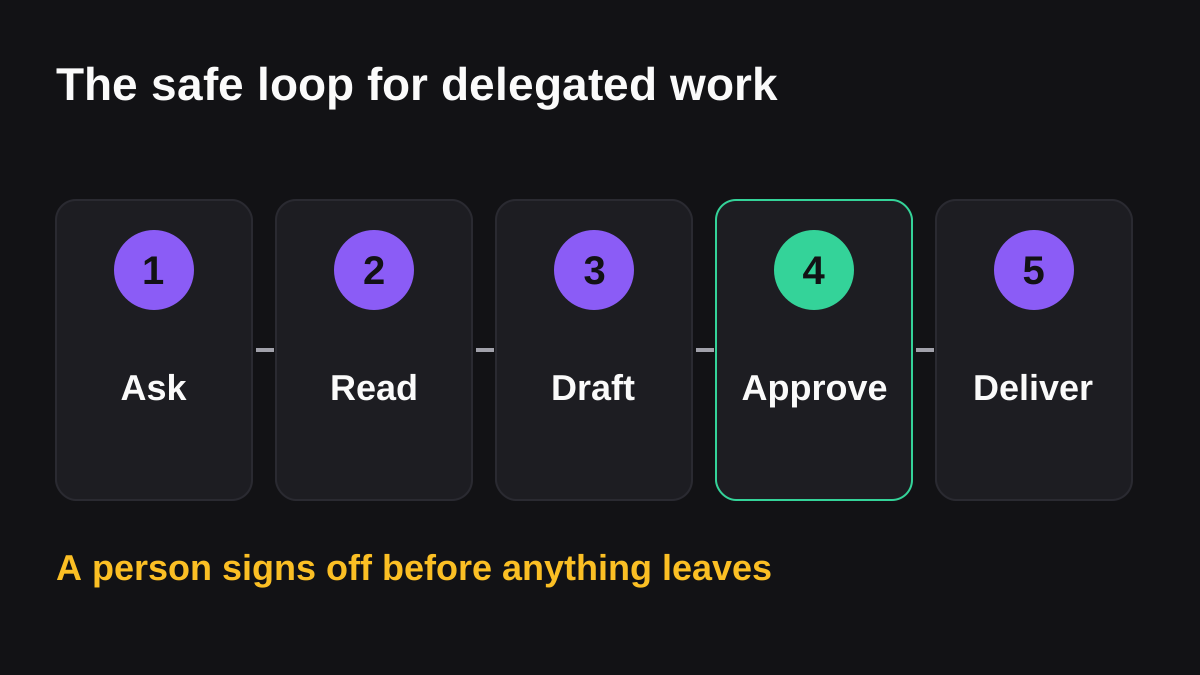
Anything that leaves the company or changes a live system should wait for a person. Slack itself notes that agents use AI and can be wrong, so it advises applying human judgment [4]. The EU AI Act points the same way for high-risk systems. Article 14 says such systems must be designed so people can oversee them, understand their limits, watch for over-reliance on the output, decide not to use it, and stop it [5]. Most small-company uses are not high-risk under that law, but the design principles are a good checklist anyway.
A record of what happened
If you cannot see what was read, drafted and sent, you cannot fix mistakes or answer questions later. Ask for a log of every request, draft, approval and action that you can read and export. Wopie's approval gates and audit trail work this way: sensitive actions pause for a person, and the record is kept.
A framework for the rest
The NIST AI Risk Management Framework is a voluntary framework for managing the risks AI poses to individuals, organizations and society, and it aims to help build trustworthiness into how AI systems are designed, used and evaluated [6]. You do not need to adopt it in full. It is a useful reference when someone on your team asks "who decides what the AI may do?"
What are the risks and limits?
Honesty helps here, because the category attracts hype.
- Wrong output. Generative AI can produce incorrect, incomplete or fabricated information [1]. Summaries can leave out context or rely on stale data [1]. Check the first outputs closely, and keep spot checks going afterward.
- Over-trusting. The more polished the output looks, the easier it is to approve without reading. Article 14 names this tendency as automation bias [5].
- Data handling. Ask where your data is processed and stored, and whether it is used to train models [1]. Slack states that customer data is not used to train third-party large language models, and that data needed for each task is sent at inference time and not retained [4]. Ask every vendor the same question and get the answer in writing.
- Overselling. The label is a broad business term, not a specific technology, so definitions vary by vendor [1]. Be skeptical of any product that promises guaranteed savings, and test it on a real job before you believe the pitch.
- Wrong tool. If a job is rare, strictly rule-based or high-stakes, a spreadsheet, a simple automation or a person may be better.
How do you try an AI employee safely? A step-by-step pilot
- Pick one job. Choose a weekly task that takes someone one to three hours and has a clear right answer.
- Write down what good looks like. Name the inputs, the format of the output, and who approves it.
- Limit access. Connect only the tools that job needs, and prefer read access to start.
- Run it in shadow mode. Have the AI produce the work while a person still does it the old way for two or three cycles, then compare.
- Turn on approvals. Let it post or send only after a named person approves. Keep that gate for anything external.
- Review the log weekly. Look at what it read, what it drafted and what you changed. Fix the instructions, not just the output.
- Expand slowly. Add a second job only when the first one runs without surprises.
Wopie is built around this pattern: an AI employee you brief in a Slack or Microsoft Teams channel, that reads your connected tools, produces the finished work and pauses sensitive actions for approval. You can see how usage is charged on the pricing page before you commit to anything.
What to do next
- List the five recurring tasks that eat the most hours on your team each week.
- Mark which ones touch two or more tools and have an output you can check in minutes.
- Choose one, and write the instructions as if briefing a new hire.
- Decide in advance what the AI may do alone and what needs sign-off.
- Ask any vendor, in writing, what it can read, what it can change, where data goes and what is logged.
- Review the first four weeks of output before you give it anything more.
Hand Wopie the job that eats your week.
Delegate it in a channel. Wopie gathers the context, does the work and waits for your approval. The first $100 of work is on us.
Get started freeSources
- [1]What is an AI employee and how can you use one? · IONOS Digital Guide · accessed Oct 12, 2026
- [2]The 2025 Annual Work Trend Index: The Frontier Firm is born · The Official Microsoft Blog · accessed Oct 12, 2026
- [3]AI in Slack · Slack developer documentation · accessed Oct 12, 2026
- [4]Work with AI agents in Slack · Slack Help Center · accessed Oct 12, 2026
- [5]Article 14: Human Oversight | EU Artificial Intelligence Act · artificialintelligenceact.eu · accessed Oct 12, 2026
- [6]AI Risk Management Framework · National Institute of Standards and Technology (NIST) · accessed Oct 12, 2026