How to speed up month-end close for a small finance team
Speed up month-end close with a fixed calendar, steady reconciliation, standing accruals and sensible automation. Benchmarks, six steps and a checklist.
By the Wopie team · November 1, 2026 · 9 min read
Listen to this article· 11 min

You can speed up month-end close by doing less of it at month end. Fix a calendar, reconcile through the month instead of in one rush, turn your recurring adjustments into a standing list, and let tools prepare the routine work while a person approves it. The aim is a short, predictable routine instead of a scramble.
How fast is fast? A 2026 survey of 624 U.S. finance and accounting professionals found the average close takes 6.2 business days [1]. Single-entity teams averaged 4.7 days, and teams with more than ten entities averaged 8.3 [1]. If you are a small team on one entity and you take more than five days, you have room to improve. This guide shows where the days go, six steps to take them back, and a checklist you can start on this week.
How long should month-end close take?
There is no single right number, because it depends on how many entities, systems and people are involved. The surveys below give you a range to compare against.
Ledge asked 100 finance professionals how many business days their close takes [2]. The answers were spread widely, and half of teams needed more than five days [2].
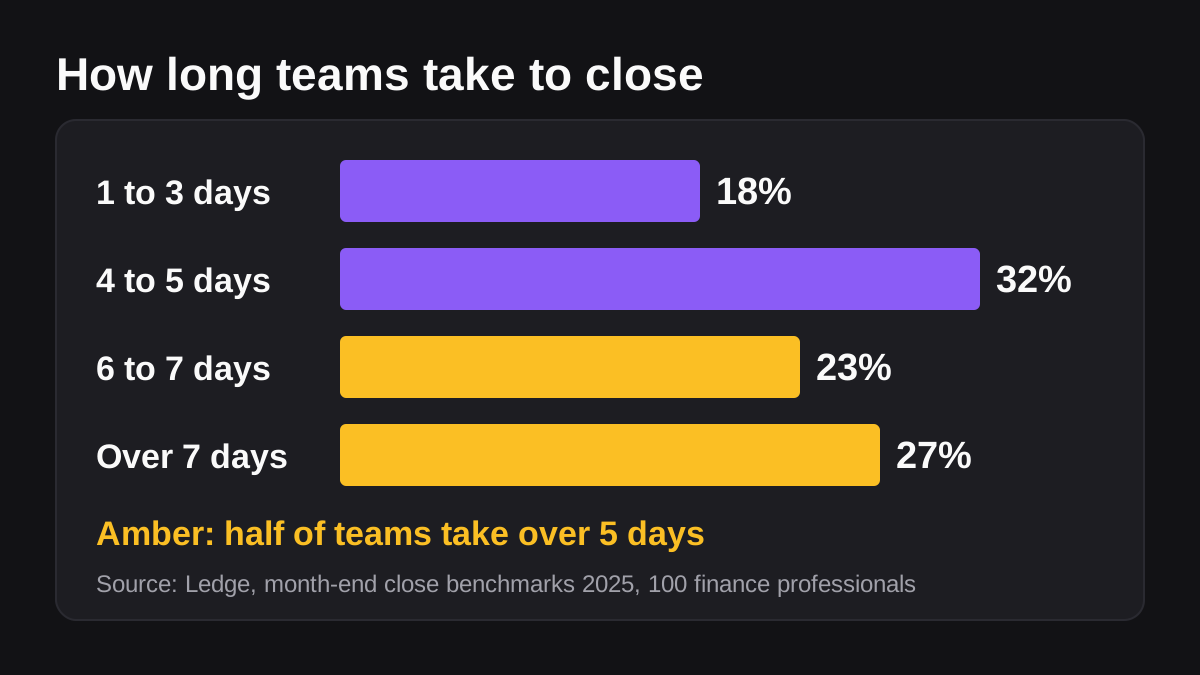
| Business days to close | Share of teams [2] |
|---|---|
| One to three days | 18 percent |
| Four to five days | 32 percent |
| Six to seven days | 23 percent |
| More than seven days | 27 percent |
Treat these as rough guides. Both the Ledge and Vena surveys come from vendors that sell finance software, and the Ledge page does not describe how it recruited respondents [2]. The Vena survey was run by an outside research firm between August 20 and 24, 2026, with a margin of error of about 3.9 percent [1]. Use the numbers to sense where you stand, not to set a target you cannot explain.
A better target is your own number, trending down. If you close in eight days now, six days next quarter is a real win.
Where do the days actually go?
Most of the delay is not accounting skill. It is waiting, matching and fixing.
Ledge asked teams what stops them closing faster. The most common answer, at 56 percent, was dependency on other departments and regions [2]. Half said managing everything in Excel was a blocker, 40 percent pointed to legacy systems that do not connect, 39 percent to complex transactions and 37 percent to being understaffed [2]. Only a small share of the close is judgment. The rest is chasing inputs.
The time sinks Ledge ranked were, in order: reconciling accounts such as banks, credit cards and payment processors, then accruals and provisions, then data corrections and reclassifications, then variance analysis, then departmental submissions and approvals [2]. Cash reconciliation alone took 20 to 50 hours a month on average in that report, and most teams used three to five systems for it [2].
The Vena survey tells a similar story about sources. Teams that pull data from seven or eight systems were far more likely to spend half or more of the close on manual work: 52 percent, against 15 percent of teams using three or four systems [1]. And 37 percent of teams source data from email or shared documents on top of their main system, and those teams averaged 6.8 business days to close against 5.9 for everyone else [1]. Every extra place a number can hide adds time.
What does a slow close cost you?
It costs more than hours. The title of the Vena article gives the headline: 78 percent of finance teams have had to correct numbers after delivering the close [1]. When a close is rushed, the numbers get revised, and people stop trusting the first version. Speed that produces restatements is not speed.
What are the steps to a faster month-end close?
These six steps work on any ledger. Start at step one and do not skip ahead, because each one makes the next easier. The figure shows them in order.
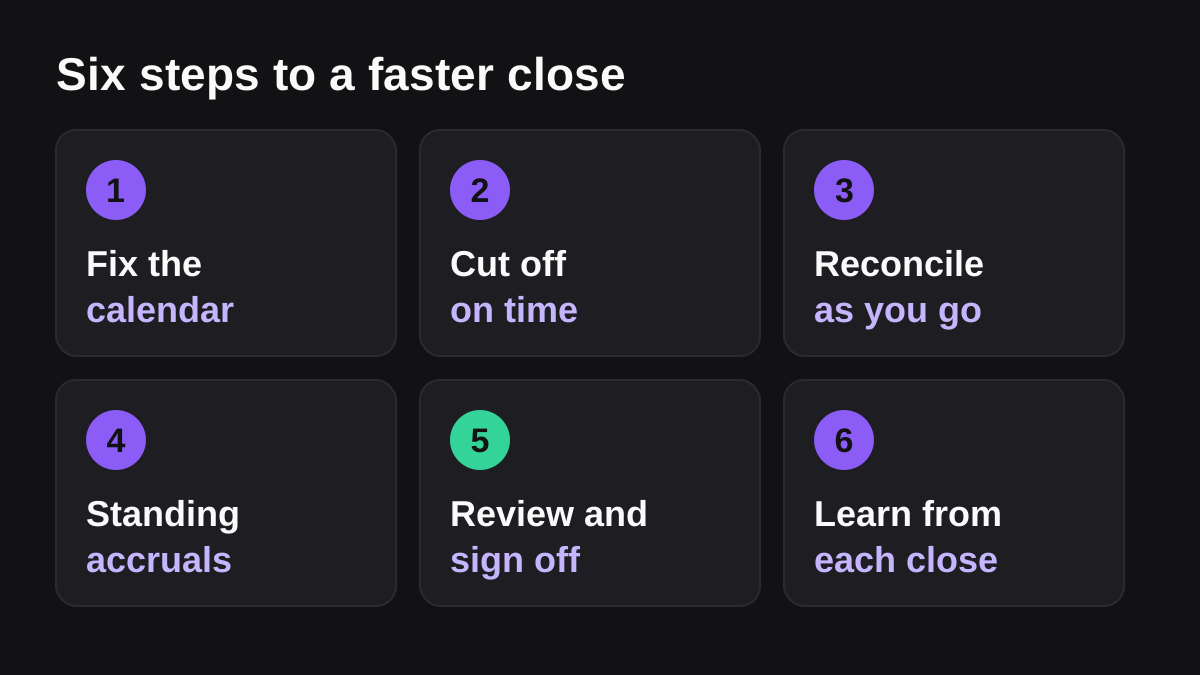
- Fix the calendar. Write a closing schedule that lists every task, its owner and its deadline, ranked by due date [3]. Put the working days on it: day one for cut-off, day two for reconciliations, and so on. A schedule everyone can see turns "when will it be done?" into a date.
- Cut off on time. Set a firm deadline for expense claims, supplier invoices and department submissions, and publish it a month ahead. Late items roll into next month unless they are material. The cut-off is what removes the biggest blocker, which is waiting on other departments [2].
- Reconcile as you go. Do not leave every reconciliation to the last day. Match bank, card and payment processor activity weekly, so month end is a review of a nearly finished job. Spendesk advises closing every month rather than leaving the work to year end, noting that regular monthly reconciliation cuts the processing time needed for quarterly and annual closes [3].
- Keep a standing list of accruals. Rent, utilities, subscriptions, payroll costs and anything billed in arrears come back every month. List each one with the amount rule and the account, then copy and adjust instead of working it out again.
- Review and sign off. Assign a reviewer who did not prepare the work. Give them a short list: bank and card balances agree, receivables and payables tie to the ledger, accruals are reasonable, and anything unusual is explained.
- Learn from each close. Spend ten minutes at the end writing down what held you up. Pick one fix for next month. Small, steady fixes beat a big redesign you never finish.
Which tasks should come first in the calendar?
Put the tasks that depend on other people first, because they are the ones that stall. Cut-off, expense submissions and approvals go on day one. Reconciliations that rely on bank and processor data go on day two. Accruals, review and reporting come last, because they rest on everything before them [3].
How do you reconcile faster?
Reconciliation is the biggest time sink, so it deserves its own attention [2]. The aim is to let software do the matching and keep people for the exceptions.
Start with the bank feed. In QuickBooks Online, a connected bank or credit card account has its starting balance entered and its transactions downloaded automatically [5]. You still check each transaction off against the statement until the difference is zero, which means your account is balanced, and QuickBooks saves a reconciliation report when you finish [5]. The feed saves the typing. It does not remove the review.
If you take card payments through Stripe, use its bank reconciliation report. It matches each Stripe payout with the deposit in your bank account and marks it Reconciled or Unreconciled [4]. It also shows a monthly summary of your Stripe activity and how much cash you realized in the bank, which Stripe says helps you build the revenue to cash breakdown needed for your monthly close [4]. There are limits: it is currently for direct U.S. Stripe accounts on automated payouts, and it is not available for Connect accounts, users outside the United States, or manual and instant payouts [4]. Stripe also says the service is provided as is, and that you are responsible for checking the data [4]. That is a reminder that matched does not mean correct.
Two habits cut the pain further:
- Work the exceptions only. Anything that matches cleanly needs a glance, not a check. Spend your hours on unmatched items and unusual amounts.
- Fix the cause, not the item. If the same payee keeps failing to match, change how it is coded once, and the problem goes away every month after.
What can you automate in a month-end close?
Automate the preparation, not the judgment. Ledge found that most teams automate less than 40 percent of their close [2], so there is usually plenty of routine work left to hand over.
| Task | Good to automate? | Why |
|---|---|---|
| Pulling bank, card and processor data | Yes | It is repetitive and the source is clear |
| Matching transactions | Yes, with exceptions reviewed | Software is fast, a person checks the rest |
| Chasing missing receipts and approvals | Yes | A reminder in the right channel works well |
| Drafting recurring accrual entries | Yes, with approval | The rule is known and a person can check it |
| Variance commentary | Draft only | A person should confirm the explanation |
| Posting journal entries | Not on its own | Accountability should stay with a named person |
| Deciding materiality and judgment calls | No | These need a person who knows the business |
That table is a view, not a rule, and your auditor or accountant may want different lines. Keep a clear record of who approved what.
Where does an AI employee fit?
An AI employee suits the middle of that table: the routine preparation that sits across several tools. Wopie takes a job in a Slack channel or Microsoft Teams, reads the finance and other tools you connect, produces the finished work, such as a close status summary or a list of unmatched items with suggested causes, and pauses anything sensitive for approval. You keep control through approval gates and an audit trail, and the pricing page explains how credits work before a job starts.
It is not a replacement for your accountant, and it is the wrong tool where a fixed script or a saved report already does the job. If the figures feed an audit, keep a person on every posting. For a deeper look at the approval idea, read what human in the loop AI means. To brief an agent well, write an SOP it can follow, and for picking the first jobs, see which jobs to give an AI employee first.
NIST publishes a voluntary AI Risk Management Framework to help organizations manage the risks AI can pose to people and organizations [6]. A named reviewer on anything AI prepares is a sensible habit at any size. That is my own advice rather than a NIST rule, and this guide is general information, not accounting or compliance advice.
What should your close checklist include?
Spendesk's checklist is a handy base. It runs through recording sales and checking invoices against bank statements, reconciling expenses and supplier invoices, counting petty cash, reviewing assets and liabilities, counting inventory where you hold it, and preparing the ledger, profit and loss and balance sheet [3]. Adjust it to your business and put a day and an owner against every line.
What to do next
Start small. You do not need to fix everything this month.
- Time your last close: list each task, its owner and how long it took.
- Mark every task that waited on someone else.
- Write the closing calendar with a day and an owner for each task.
- Publish a cut-off date for expenses, invoices and submissions.
- Move bank, card and processor matching to weekly.
- Write your standing list of recurring accruals.
- Name a reviewer who did not prepare the work.
- After the close, record one thing to fix next month.
Do those once and your next close will already be shorter. Then pick one routine task from the automation table, run it with approval switched on, and compare the result with your manual version before you trust it. Wopie is built for that kind of supervised handover, and the small business page shows how it fits a lean team.
Put an AI employee in your Slack.
Wopie joins your channels like any teammate, owns the recurring work and checks with you before anything sensitive goes out.
See Wopie for SlackSources
- [1]78% of Finance Teams Have Had To Correct Numbers After Delivering the Month-End Close · Vena Solutions · accessed Nov 1, 2026
- [2]The state of month-end close in 2025: finance team benchmarks & insights · Ledge · accessed Nov 1, 2026
- [3]The month-end close checklist for finance teams · Spendesk · accessed Nov 1, 2026
- [4]Bank reconciliation · Stripe Documentation · accessed Nov 1, 2026
- [5]Reconcile an account in QuickBooks Online · Intuit QuickBooks Help · accessed Nov 1, 2026
- [6]AI Risk Management Framework | NIST · National Institute of Standards and Technology (NIST) · accessed Nov 1, 2026