How to find the busywork that's eating your team's week
To reduce busywork at work, audit one week, sort each task into drop, fix or delegate, and start with the smallest recurring job. Here is the method.
By the Wopie team · October 23, 2026 · 10 min read
Listen to this article· 12 min

If you want to reduce busywork at work, start by finding it. Ask each person to log what they do for one normal week, sort every entry into drop, fix or delegate, and then remove the smallest recurring task first. Most teams are surprised by how much of the week is chasing, copying and reporting rather than the work they were hired to do.
Research backs up that feeling. Asana reports that 60 percent of a person's time at work goes on work about work rather than skilled work [1]. This guide shows you how to measure your own number, what to look for, and what to do with the list once you have it. It is general information, so adapt it to your team.
What counts as busywork, and how much of the week does it take?
Busywork is effort that moves information around instead of producing something. It includes status updates, searching for files, rebuilding a report that already exists and sitting in a meeting that could have been a message. Asana calls this work about work, and it describes it as time spent chasing the status of work and searching for information rather than doing the skilled part of a job [1].
The size of the problem is hard to ignore. Asana's figures per average knowledge worker, per year, are 103 hours in unnecessary meetings, 209 hours on duplicative work and 352 hours talking about work [1]. That adds up to 664 hours, about 16 working weeks at 40 hours a week, before anyone starts the actual job.
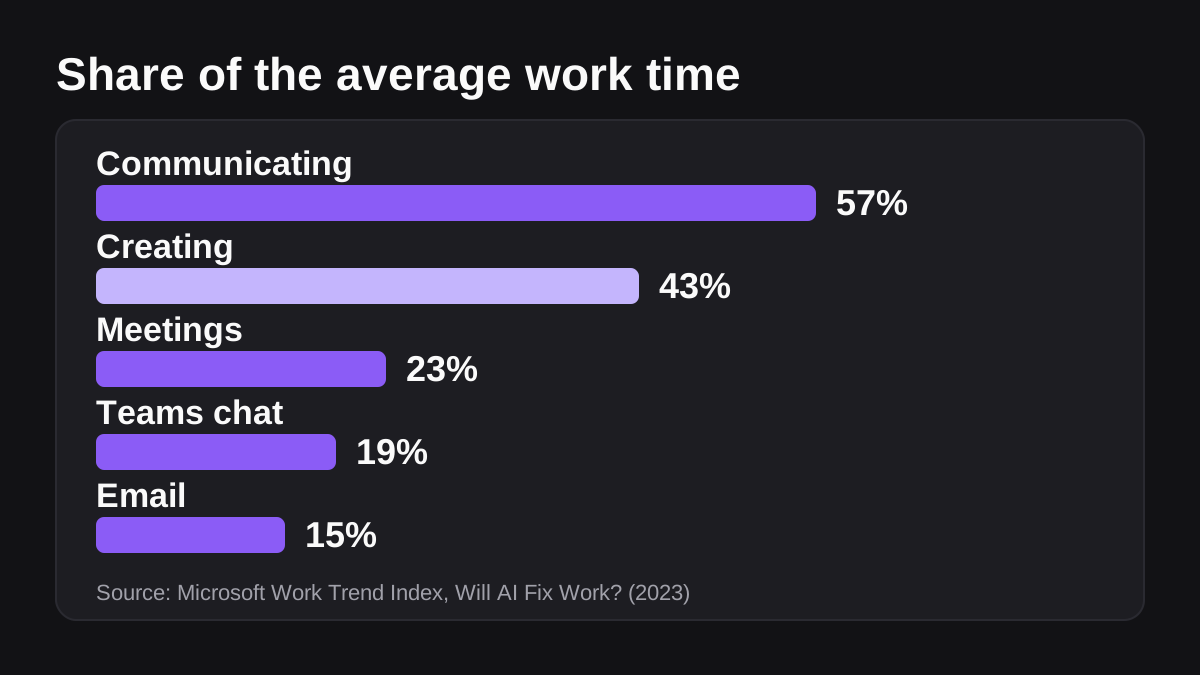
Microsoft's Work Trend Index tells a similar story from telemetry. The average employee spends 57 percent of their time communicating in meetings, email and chat, and 43 percent creating documents, spreadsheets and presentations [2]. Meetings take 23 percent of time, Teams chat 19 percent and email 15 percent [2].
Not all communication is busywork. A good conversation with a customer is real work. The point is to find the part that exists only because your tools do not talk to each other, or because nobody wrote down who owns what.
Why does busywork pile up in small teams?
Small and mid-sized teams often grow by adding tools and habits, not by redesigning how work flows. Three causes show up again and again.
- Tools that do not share data. Someone copies numbers from a CRM into a spreadsheet, then from the spreadsheet into a slide. Asana notes that the average employee uses 10 apps in a day [1].
- Constant interruptions. Microsoft found that employees are interrupted every 2 minutes during the workday by meetings, emails or pings [3]. Separately, 68 percent of people say they lack enough uninterrupted focus time [2].
- Searching and rebuilding. 62 percent of people say they spend too much time searching for information [2]. If you cannot find last month's report, you build it again, which is the duplicative work Asana counts at 209 hours a year [1].
The result is a team that feels busy and behind at the same time. Microsoft reports that 80 percent of the global workforce lacks enough time or energy to do their work, while 53 percent of leaders say productivity must increase [3]. Those two numbers pull against each other, and busywork sits in the gap.
The hidden cost of every interruption
An interruption is not just the seconds it takes to read a message. In Gallup's interview with researcher Gloria Mark, interrupted work was usually resumed the same day, but on average it took 23 minutes and 15 seconds to get back to it [4]. There were about two intervening tasks before people returned to the original one [4]. People also interrupted themselves about 44 percent of the time [4].
That matters for your audit. Some busywork is not a task at all. It is the switching around the task. Keep an eye out for jobs that force people to check three tools before they can start.
How do you run a one week busywork audit?
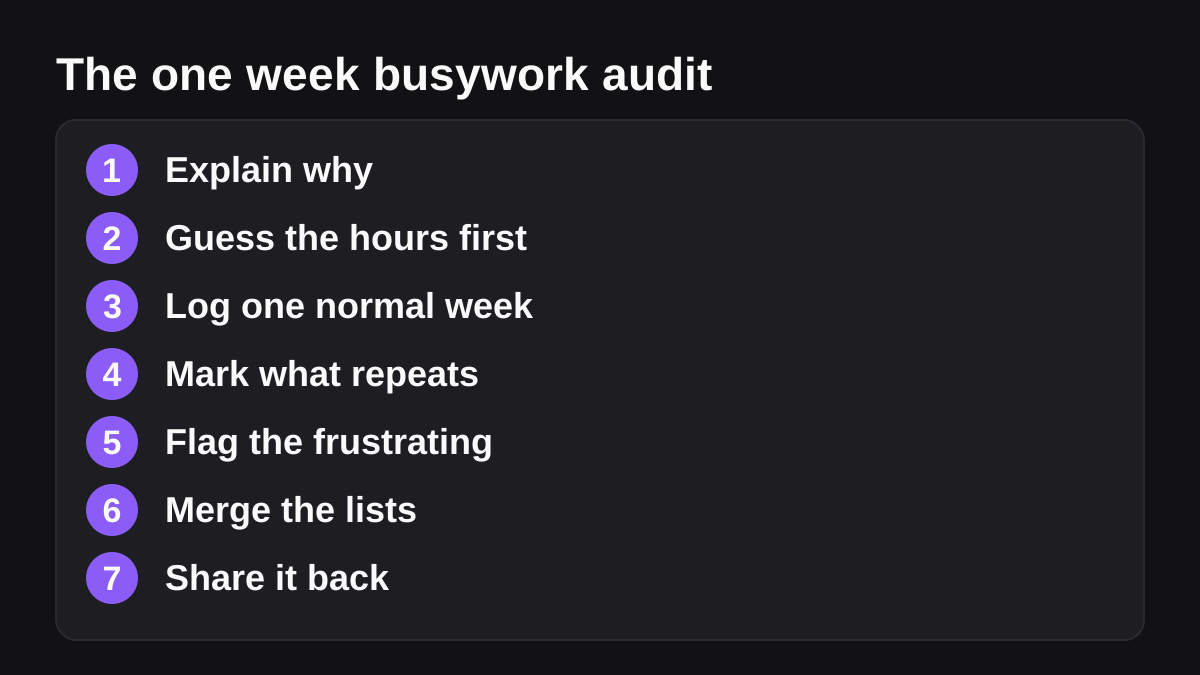
You do not need special software. A shared sheet and a short brief are enough. Follow these steps.
- Explain why. Tell the team you are looking for chores to remove, not people to measure. Say what happens with the results.
- Guess first. Ask each person to write down how many hours a week they think they spend on admin, reporting and chasing. The gap between the guess and the log is often the most useful finding.
- Log for one normal week. Each time someone finishes a task, they add a line: what it was, which tools it touched, how long it took and who asked for it. Aim for lines of five to ten words.
- Mark what repeats. Add a column for how often the task comes back: daily, weekly, monthly or once.
- Flag the frustrating ones. Ask people to star the three tasks they would happily never do again. Annoyance is a good signal.
- Merge the lists. Combine everything into one sheet, group the same tasks together, and total the minutes.
- Share it back. Show the team the top ten by time. People are more honest next time when they see their effort led somewhere.
What should each log line include?
Keep it light or people will skip it. A useful line has five parts: the task, the tools involved, the time it took, how often it happens and who it was for. The tools column matters most. A task that touches three or more tools is a strong candidate for later automation, because that copying between systems is exactly the kind of work software can do.
What if people forget to log?
They will. Ask for a two minute review at the end of each day instead of logging as they go, and look at calendars and sent messages to jog memory. Self-reports are never perfect, so treat the totals as a good estimate, not an exact count.
How do you sort busywork into drop, fix or delegate?
Once you have the combined list, go through it task by task and ask the same three questions in order. Do this before you think about any tool.
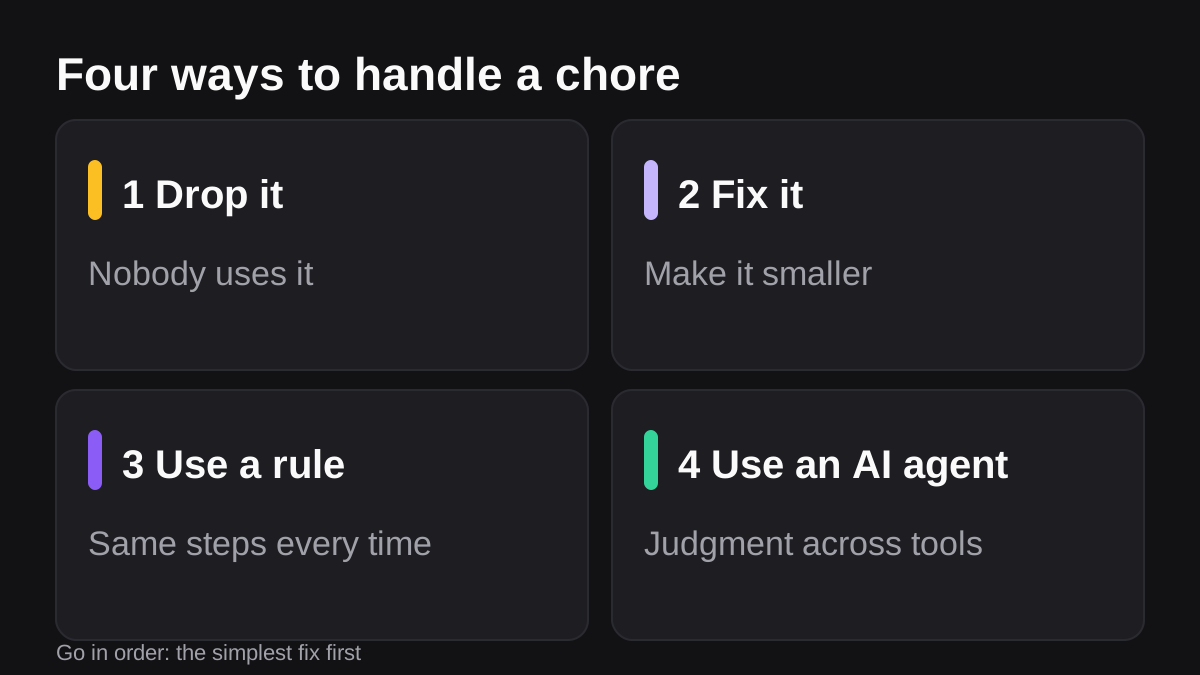
- Does anyone use the result? If not, drop the task. Stop the report nobody reads. Cancel the recurring meeting nobody misses.
- Can the task be made smaller or simpler? If yes, fix it. Merge two reports into one, replace a long update with a three line template, or agree on a single source of truth.
- Does it still repeat and eat real time? If yes, delegate it to software.
The order matters. Anthropic advises finding the simplest solution possible and only adding complexity when needed [5]. Dropping or fixing a task is the simplest solution of all.
| Choice | When it fits | Example | Who decides |
|---|---|---|---|
| Drop | Nobody uses the output | A weekly status email that nobody replies to | The task owner and their manager |
| Fix | The task matters but is bloated | Two overlapping spreadsheets merged into one | The team that owns the process |
| Delegate to a rule | Fixed steps, same every time | A scheduled reminder or a form that routes a request | Whoever builds the workflow |
| Delegate to an AI agent | Needs judgment across several tools | Building a weekly pipeline report from the CRM and billing tool | A named person who approves the output |
When is a simple rule enough?
If a task follows the same steps every time, a rule-based workflow is usually the cheaper and more predictable choice. Slack says Workflow Builder helps you automate everyday tasks and processes in Slack, and it offers templates for common jobs plus workflows that start on a schedule [6]. Our guide to Slack Workflow Builder versus AI agents walks through where that line sits.
When do you need an AI agent instead?
Reach for an agent when the task needs to read from several tools, pick the right data and write something that makes sense, and the steps are hard to fix in advance. Anthropic describes agents as the better option when flexibility and model-driven decision-making are needed at scale, and warns that their autonomy brings higher costs and the potential for compounding errors [5]. That is the reason to keep a person in the approval path.
Which busywork should you automate first?
Pick the task that scores best on four points: it repeats, it touches several tools, you can check the result in a few minutes, and a person can approve it before it goes out. Our post on which jobs to give an AI employee first explains each test in more detail.
Look down your merged list for these common finds:
- The weekly report. Someone pulls numbers from a CRM, a billing tool and a doc, then writes five bullets. See how to automate recurring reports in Slack.
- Chasing updates. Asking each person for their status before a meeting. The output is a single page with owners and dates.
- Retyping the same email. Follow ups, reminders and routine replies that differ only by name and date.
- Copying between tools. Anything where a person is the integration between two systems.
- Month-end checklists. Rule-based, with a clear pass or fail and a few items for review.
If you want a hand with the delegating part, Wopie is an AI employee that takes a job in a Slack or Microsoft Teams channel, reads your connected tools, produces the finished work and pauses anything sensitive for human approval. You can see how that works in Slack and Teams, and which tools it can read on the integrations page. A person always signs off on anything that leaves the company, as described in the approval gates and audit trail. Before a job starts, Wopie shows an estimate of the credits it will use, and you can see the pricing page for how credits work.
What should you keep human?
Keep people on anything with legal, tax or employment consequences, any sensitive conversation with a customer or colleague, and any one-off decision where you will not get repeat runs to learn from. Use software to prepare the material and let a person decide.
How do you check that busywork is actually going down?
Do not rely on a feeling. Choose two or three numbers before you change anything, and check them again after a month.
| Measure | How to count it | Good sign |
|---|---|---|
| Hours of admin per person per week | Compare the guess and the log from the audit with a second week of logging | Falling, without quality dropping |
| Time to produce the weekly report | Minutes from start to posted, including review | A fraction of the original time |
| Number of status meetings | Count from the calendar | Fewer, shorter or replaced by a posted summary |
| Corrections on delegated work | How many facts or sentences the reviewer changed | Falling each week |
| Team mood | A one question check in each Friday | People say they have more time for the real job |
Hours saved are only worth something if they go somewhere. Decide up front what people will do with the time: more customer calls, deeper analysis, or simply finishing at a reasonable hour. Microsoft found that chats sent outside the 9 to 5 workday were up 15 percent year over year, with an average of 58 messages per user arriving before or after hours [3]. If busywork shrinks but the after-hours pings do not, the real problem may be elsewhere.
What to do next
Use this short checklist to get moving this week.
- Pick one team of three to eight people and tell them why you are auditing.
- Collect guesses of weekly admin hours before anyone logs.
- Run the one week log, with five parts per line.
- Merge the lists and total the minutes for each recurring task.
- Sort every task into drop, fix, rule or agent, in that order.
- Choose one task that repeats, touches several tools and can be checked in minutes.
- Keep a named person approving the output, and write down what a correct result looks like.
- Measure again after a month, and decide whether to add a second task.
The best outcome is not a clever tool. It is a calendar and a task list that look lighter on Friday than they did on Monday, with a short list of chores you no longer do by hand.
Bring Wopie onto your team.
It owns the recurring work and checks with you before anything goes out. Your first $100 of work is on us.
Hire for freeSources
- [1]How work about work gets in the way of real work · Asana · accessed Oct 23, 2026
- [2]Will AI Fix Work? Work Trend Index Annual Report · Microsoft WorkLab · accessed Oct 23, 2026
- [3]2025: The year the Frontier Firm is born · Microsoft WorkLab (Work Trend Index Annual Report) · accessed Oct 23, 2026
- [4]Too Many Interruptions at Work? · Gallup Business Journal · accessed Oct 23, 2026
- [5]Building effective agents · Anthropic · accessed Oct 23, 2026
- [6]Guide to Slack Workflow Builder · Slack · accessed Oct 23, 2026