Microsoft Copilot vs an AI employee: what each one actually does
Copilot vs AI agent: Copilot helps one person inside Microsoft 365 apps, while an AI employee takes a job in a Teams channel. See where each fits.
By the Wopie team · October 21, 2026 · 9 min read
Listen to this article· 11 min
If you are weighing Copilot vs an AI agent, the short answer is this: Microsoft Copilot is an assistant that helps one person inside the Microsoft 365 apps they already use, and an AI employee is a worker that takes a whole job from a team channel, uses your connected tools and hands back finished work. They overlap a little. Most teams do not have to pick one.
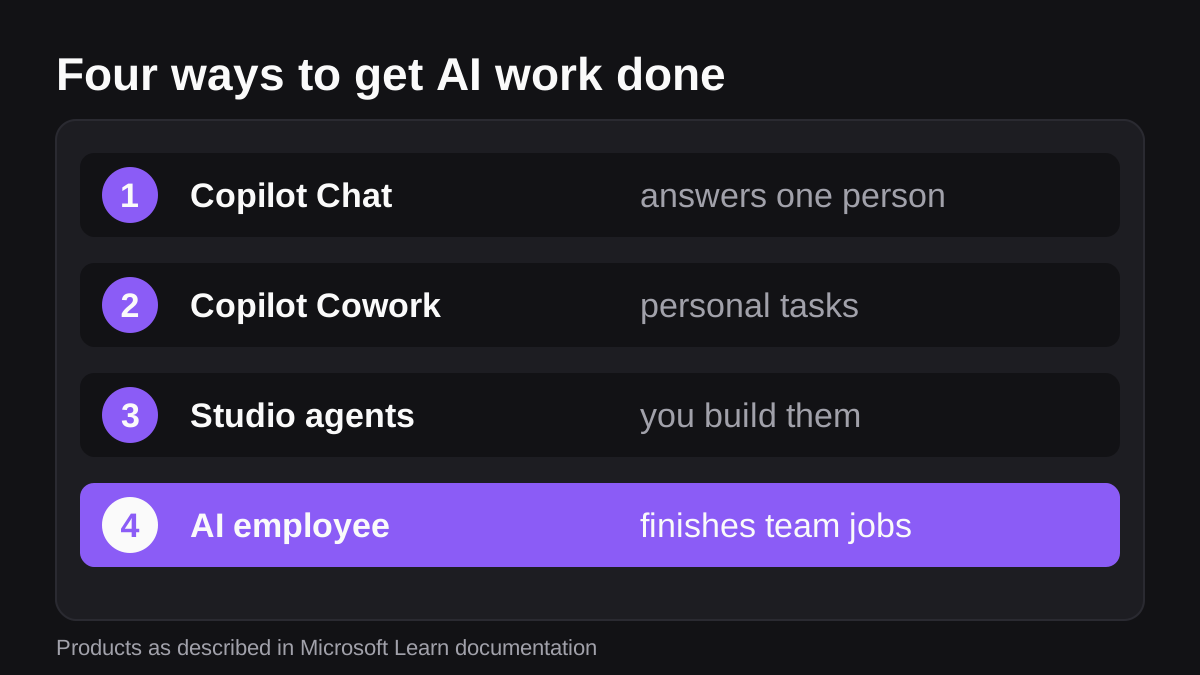
Microsoft has also blurred the line itself. It now sells Copilot Cowork, which carries out tasks across Microsoft 365 [4], and Copilot Studio, where you build your own agents [2]. So "Copilot" can mean an assistant, a task runner or a build kit, depending on the license.
This guide sorts out what each option does, where it stops, and how to choose for a small or mid-sized team. It is general information, not legal, security or licensing advice. Check your own plan with your Microsoft admin.
What does Microsoft Copilot actually do?
Microsoft describes Copilot as an engine that coordinates three things: large language models, content in Microsoft Graph that you have permission to access, and the Microsoft 365 apps you use every day [3]. In plain terms, it reads your mail, files, meetings and chats, then helps you write, summarize and analyze.
The in-app features are easy to picture. Microsoft lists drafting and summarizing in Word, analyzing data and creating formulas in Excel, drafting emails and summarizing threads in Outlook, and summarizing and transcribing meetings in Teams [1]. Each of those helps one person do their own task faster.
Which Copilot license gives it access to your work data?
This is where many teams get confused. Microsoft's overview separates a Basic license from a Premium one. Copilot Chat (Basic) uses web data and can use your organization's content only if you upload it, open it in Teams or Outlook, or use a pay-as-you-go agent [1]. Microsoft 365 Copilot (Premium) pulls work data automatically through Microsoft Graph and Work IQ [1].
The same page says Copilot Cowork and Copilot Code are reached through usage-based billing, and you need the Premium license to use that [1]. Licensing changes often, so confirm with your admin before you plan around it.
What is the difference between Copilot and an AI agent?
A useful split is who starts the work, and how much of it gets finished.
- An assistant answers when you ask, inside the app you have open. You do the rest.
- An agent follows instructions, uses tools and decides the next step. Microsoft's own definition of an agent in Copilot Studio is an AI assistant that handles conversations and completes tasks, drawing on knowledge sources and using tools to take action [2].
For a longer breakdown of assistants, agents and plain automation, read how AI agents differ from assistants and automation tools.
Here is how the options compare in practice. Read each row on its own.
| Option | Who it serves | What it does | Where it stops |
|---|---|---|---|
| Copilot Chat and in-app Copilot | One person | Drafts, summarizes and analyzes inside Microsoft apps | You still do the follow-up work |
| Copilot Cowork | One person | Carries out tasks across Microsoft 365 and asks before important actions | Built around one user's Microsoft 365 account |
| Copilot Studio agents | A team that builds them | Handles conversations and tasks you design | Someone has to build, test and maintain it |
| An AI employee | A team channel | Takes a job in Slack or Teams, reads connected tools, returns finished work | Needs clear jobs and approval rules |
What can Copilot Cowork do that plain Copilot cannot?
Cowork is the closest Microsoft product to an agent. Microsoft says it can send emails, schedule meetings, create documents, post in Teams and manage your calendar, and that you approve each action before it happens [4]. It can also run prompts on a schedule so recurring tasks happen on their own [4].
The approval design is worth copying in your own policy. Microsoft says Cowork pauses before important actions like sending an email or scheduling a meeting, and shows a risk level for medium and high risk actions [4]. There is also an option to skip future prompts for similar actions [4]. Think carefully before you click that one for anything that leaves the company.
Cowork is still built around one person's session. It acts on your behalf, in your Microsoft 365 environment [4]. If your job is "the whole team needs a Monday pipeline brief from our CRM, ad platform and billing system", a personal task runner is a poor fit by design.
Is Copilot Studio the same as an AI employee?
No. Copilot Studio is a graphical, low-code studio for building and managing agents and workflows [2]. You connect them to data through prebuilt or custom connectors, then publish them to places like Teams [2]. You can build a lot with it, and Microsoft gives you analytics, evaluations and administration tools for running what you build [2].
That is the trade. A studio gives you control and costs you time. Someone on your team has to design the agent, test it and keep it working. Microsoft also notes that the harness you choose changes how the agent reasons, how complex a task it can take on and how it is billed [2].
An AI employee flips that. You do not design the process first. You describe the job the way you would to a new hire, and the agent works out the steps. Wopie is built this way. You add it to a Slack or Teams channel, give it a job, it reads your connected tools, produces finished work and pauses anything sensitive for human approval. If you want a picture of how that handover works, see how to onboard an AI agent like a new hire.
How do agents in a Teams channel behave?
If you live in Teams, this part matters, because it is where an AI employee differs most from in-app Copilot.
Microsoft's developer documentation says an agent installed in a team or group chat can be used by all members of the conversation [5]. After install, it can see conversation metadata such as the member list, and in a team it can see team details and the full list of channels [5]. By default, agents in channels and group chats only receive messages when someone @mentions them directly [5].
That default is a quiet privacy feature. The agent is not reading every message. You hand it a job by naming it in a post.
There are limits to know about. Support for agents in private channels is limited, and agents cannot post messages or Adaptive Cards in private channel conversations [5]. For a fuller walk through of channel setup and admin checks, see how to use AI in Microsoft Teams beyond Copilot.
Which is safer: Copilot or an outside AI agent?
Neither is safe by default. Both depend on permissions, approvals and review. But they fail in different ways.
How does Copilot handle your data?
Microsoft says Copilot only surfaces organizational data that an individual user has at least view permissions for [3]. That sounds reassuring, and it is. It also means Copilot will happily surface a file that was shared too widely years ago. Microsoft itself tells you to use the permission models in services like SharePoint to make sure the right people have the right access [3].
Microsoft also states that prompts, responses and data accessed through Microsoft Graph are not used to train the foundation models behind Copilot [3]. And it reminds users that AI responses are not guaranteed to be 100% factual and should be reviewed before sending to others [3].
What should you check on any outside agent?
When Copilot uses an agent from outside Microsoft, the privacy statement and terms of that agent decide how it handles your data [3]. Admins can view the permissions and data access an agent needs and choose which agents are allowed [3]. Apply the same test to any agent, Microsoft's or not.
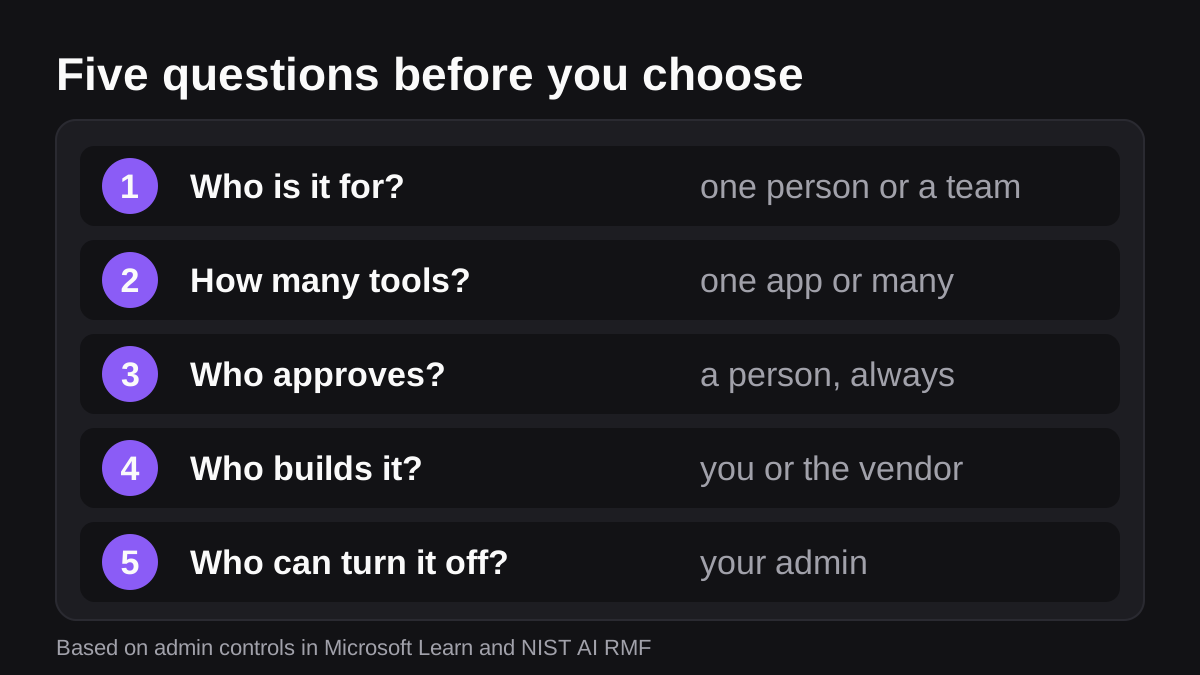
- What can it read, and can you narrow that to one channel or one tool?
- What can it change or send, and does a person approve those steps?
- Is there a log of what it did and who approved it?
- Where does your data go, and is it used for training?
- Who in your company can turn it off?
NIST's AI Risk Management Framework is a good outline for a one page policy. NIST says it is meant to help manage risks to individuals, organizations and society from AI, and that it is intended for voluntary use [6]. For how Wopie handles approvals and records, see the security page.
Which should you choose for your team?
Use the job, not the brand, to decide. Here are common cases.
- You want faster writing, summaries and spreadsheet help for each person. Use Copilot in the apps. It is built for that [1].
- You want one person's recurring chores handled in Microsoft 365. Look at Copilot Cowork, with approvals left on [4].
- You have a process, a developer or power user to build it, and a need for tight control. Copilot Studio fits, and you accept the build and upkeep cost [2].
- You want a shared job done across several systems, ending in a document or message a person would otherwise write. That is the AI employee case. A weekly pipeline report, a month-end pack or a batch of overdue invoice reminders all fit. See which jobs to hand over first.
You can also mix them. A finance lead might use Copilot in Excel for analysis, then ask an AI employee in a channel to assemble the final pack from the accounting tool and post it for approval.
What does it cost to try an AI employee?
Wopie's pricing page offers $100 in free credits with no card, then plans from $50 a month, with one shared balance for the whole company and no seat fees. Before a job starts, Wopie tells you what it will use. See pricing for the current details. Copilot license prices change, so ask Microsoft or your reseller for a current quote rather than trusting a table in a blog post.
What to do next
Run a short trial that tells you which tool earns its place.
- List five jobs your team repeats. Mark each one as personal (one person, one app) or shared (many people, many tools).
- Give the personal jobs to Copilot or Cowork. Keep approval prompts on for anything that sends or schedules [4].
- Give one shared job to an AI employee. Pick a weekly report you already know well, so you can check the result.
- Set the rule for approvals. Anything that goes outside the company, moves money or changes a live record gets a person's yes.
- Run the five security questions above on every tool, then ask your Microsoft admin to confirm who can install what.
- Review after two weeks. Keep what saved time, and drop what only added another place to check.
If you want to try the shared job, add Wopie to one Teams channel and start with a single weekly task.
Put an AI employee in Microsoft Teams.
Wopie joins your Teams channels, takes on the reports and follow-ups, and checks with you before anything goes out.
See Wopie for TeamsSources
- [1]What is Microsoft Copilot? | Microsoft Learn · Microsoft Learn · accessed Oct 21, 2026
- [2]Overview - Microsoft Copilot Studio | Microsoft Learn · Microsoft Learn · accessed Oct 21, 2026
- [3]Data, Privacy, and Security for Microsoft Copilot | Microsoft Learn · Microsoft Learn · accessed Oct 21, 2026
- [4]Copilot Cowork overview | Microsoft Learn · Microsoft Learn · accessed Oct 21, 2026
- [5]Channel and Group Conversation Chat for Agents - Teams | Microsoft Learn · Microsoft Learn · accessed Oct 21, 2026
- [6]AI Risk Management Framework | NIST · National Institute of Standards and Technology (NIST) · accessed Oct 21, 2026