How to onboard an AI agent like a new team member
To onboard an AI agent, give it a role, its own access, written instructions, a probation period and a named manager. Here is the 30 day plan, step by step.
By the Wopie team · October 15, 2026 · 11 min read
Listen to this article· 13 min

To onboard an AI agent, treat it like a new hire with a narrow job. Give it a clear role and a human manager, its own account with only the access it needs, written instructions, a supervised trial period and a regular review. Skip those steps and you risk ending up with a tool that nobody owns, nobody trusts and nobody checks.
That is not a technology problem. One enterprise software vendor puts it bluntly: successful AI adoption "is not a technology problem. It is a management challenge" [1]. The same article suggests giving an agent a title, a reporting line to a human manager and clear goals, much as you would for a person [1].
This guide shows how to onboard an AI agent in a month, in plain steps you can run with a small team. It covers access, instructions, testing, approvals and review. It is general information, not security or legal advice.
Why does an AI agent need onboarding at all?
An agent can read, write and act across your tools faster than any person. That is the benefit, and also the risk. Without a defined role, it will guess. Without limits on access, it can touch things it should not. Without a manager, no one notices when quality drifts.
Security researchers describe the failure mode directly. The OWASP project calls it excessive agency and names three root causes: excessive functionality, excessive permissions and excessive autonomy [3]. In plain terms, the agent has more tools than it needs, those tools can reach more than they should, and it acts without enough oversight [3]. Every one of those is a setup choice, and onboarding is where you make it well.
There is a management side too. Microsoft's 2025 Work Trend Index uses the term "agent boss" for someone who builds, delegates to and manages agents to amplify their impact [7]. It also says organizations need a new measure it calls the human-agent ratio, which asks how many agents are needed for which roles and tasks [7]. Whatever you call the role, someone on your team has to do it.
What goes wrong when you skip it
- The agent is connected to everything because that was easier.
- Nobody wrote down what a good result looks like, so every output is judged by mood.
- Early mistakes are caught by chance, by whoever happens to read the thread.
- The team treats the agent as a threat or a toy, and uses it less each week.
The last point matters more than it sounds. The Workday article advises positioning people as mentors and supervisors of the agent, not as its competitors [1].
What is the 30 day plan to onboard an AI agent?
The Workday article recommends treating an agent's first 30 days as a probationary period [1]. That is a good frame for a small company because it gives you a natural end date and a decision at the end of it.
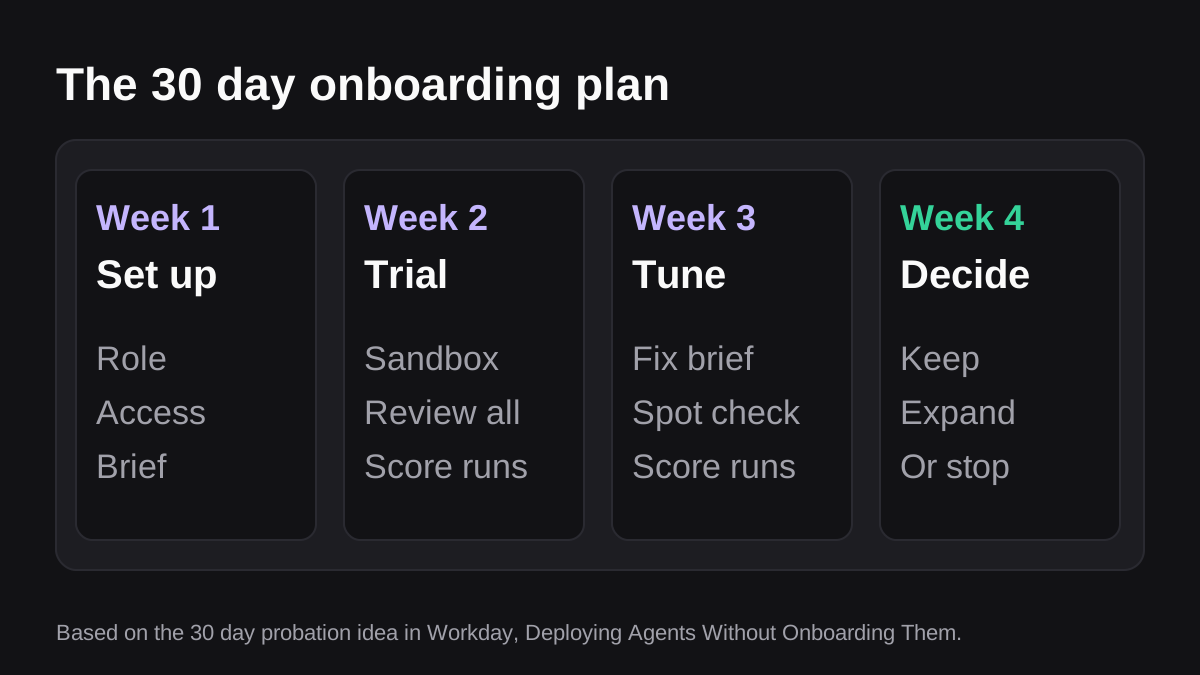
Here is the plan as numbered steps.
- Pick one job and one owner. Choose a recurring task with a clear right answer, such as the weekly pipeline report or a list of overdue invoices. Name the person who owns that job today. They become the agent's manager.
- Write the role down. Give the agent a title and say who it reports to and how success is measured [1]. "Weekly pipeline report builder, reports to the head of sales, done when the report matches the CRM and posts by 9am Monday" is enough.
- Set up access. Connect only the tools the job needs, with the lowest permissions that work (more on this below).
- Write the brief. Explain the job as you would to a new colleague, with examples of good and bad output.
- Test it in a sandbox. Run it on old or sample data before it touches anything live [1][4].
- Run supervised. For the first runs, a person approves every action [1].
- Review and adjust. Read the record, fix the brief, and widen or narrow what the agent may do.
- Decide at day 30. Keep it as is, expand it, or stop.
How do you give an AI agent the right access?
Access is the first place to be strict. Treat it like handing out keys on day one: only the doors the job needs.
Give it its own identity
The Workday article advises that every agent needs a unique identity, a service account that is distinct from any human user [1]. That makes the log readable, because you can see which actions came from the agent. It also means you can turn the agent off without disturbing anyone's personal login.
Apply least privilege
OWASP's guidance is to limit the permissions granted to connected systems to the minimum necessary [3]. Its example is an agent that recommends products: it should be able to read a products table, with no rights to insert, update or delete [3]. The same page advises offering only the tools the application actually needs, and avoiding open-ended ones [3].
For a team, that translates into a simple rule: start read-only, and add write access one action at a time, only after the agent has earned it.
Know how your chat tool scopes access
In Slack, the data an app can reach depends on its scopes, and by default an agent can see the messages sent to it directly [2]. Adding it to a channel or conversation extends its access to that conversation [2]. Slack also says that by default members can install apps with agents, but owners and admins can turn on app approval so apps are reviewed first [2]. If your company has not decided who approves agents, decide before you onboard one.
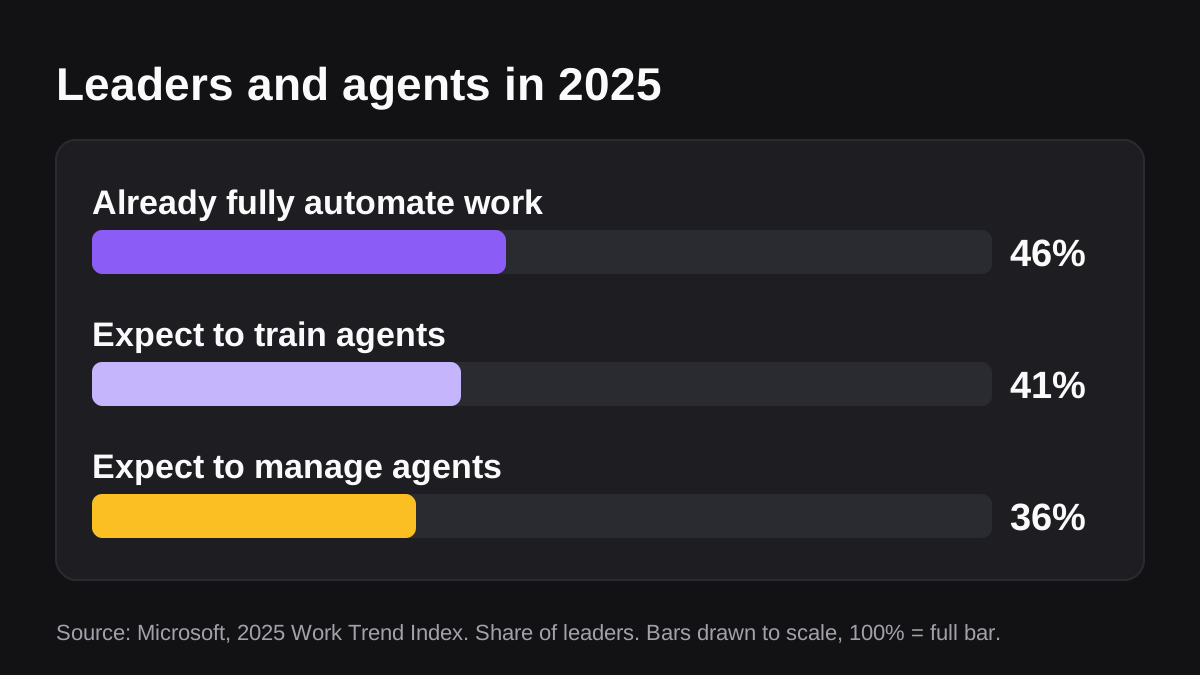
The numbers above are a reminder that this is becoming normal management work. Microsoft reports that 46% of leaders say their organization already uses agents to fully automate workstreams or business processes, and that leaders expect their teams to be training agents (41%) and managing them (36%) within five years [7]. These are survey results about expectations, not proof that any tool works. They do show why having a plan beats improvising.
What should you put in the AI agent's instructions?
The Workday article compares the system prompt to an employee handbook, and says hard rules should be enforced in the software layer, not left as suggestions [1]. That is the right split. Write guidance in words, and enforce limits with permissions and approvals.
A useful brief has six parts:
| Part | What to write | Example |
|---|---|---|
| Purpose | The outcome, in one sentence | Build the weekly pipeline report for the sales channel |
| Inputs | Which tools and fields to read | Open deals and stage changes from the CRM |
| Output | The format and where it goes | One summary and one sheet, posted for approval |
| Rules | What it must never do | Never email a customer, never edit a deal |
| Examples | One good result and one bad one | A past report you liked, and one you did not |
| Escalation | Who to ask when unsure | Ask the sales manager in the channel |
Anthropic's engineering guidance on agents adds two useful points. First, start with simple prompts and improve them through thorough evaluation [4]. Second, agents can pause for human feedback at checkpoints or when they hit blockers [4]. Build both into the brief: begin small, and say exactly when the agent should stop and ask.
Keep the brief short and update it
Do not write a forty page manual. A page is plenty. When the agent makes a mistake, add one line that would have prevented it, then run the job again. Over a month, the brief becomes a record of how your team really works.
How do you test an AI agent before it goes live?
Think of the trial period as probation. The Workday article says that before an agent talks to real customers, it should run in a sandbox [1]. Anthropic makes the same recommendation, extensive testing in sandboxed environments along with appropriate guardrails [4].
You do not need a special lab. For most small teams, a sandbox means one of these:
- Old data. Ask the agent to rebuild last month's report, then compare it with the one a person made.
- Shadow mode. The agent does the job while a person still does it the usual way, and you compare both for two or three cycles.
- A private channel. Outputs go to a test channel only you can see, never to customers or leadership.
Score each run on the same few checks: were the numbers right, was anything missing, did it follow the rules, did it stop when it should have? Write the score down. A table with four columns and ten rows is enough.
How do approvals and oversight work during the trial?
The Workday article says that initially a human should approve every single action [1]. That is the right default for week one, and for anything that leaves the company at any time. The OWASP guidance supports it, recommending human-in-the-loop control so a person approves high-impact actions before they are taken [3].
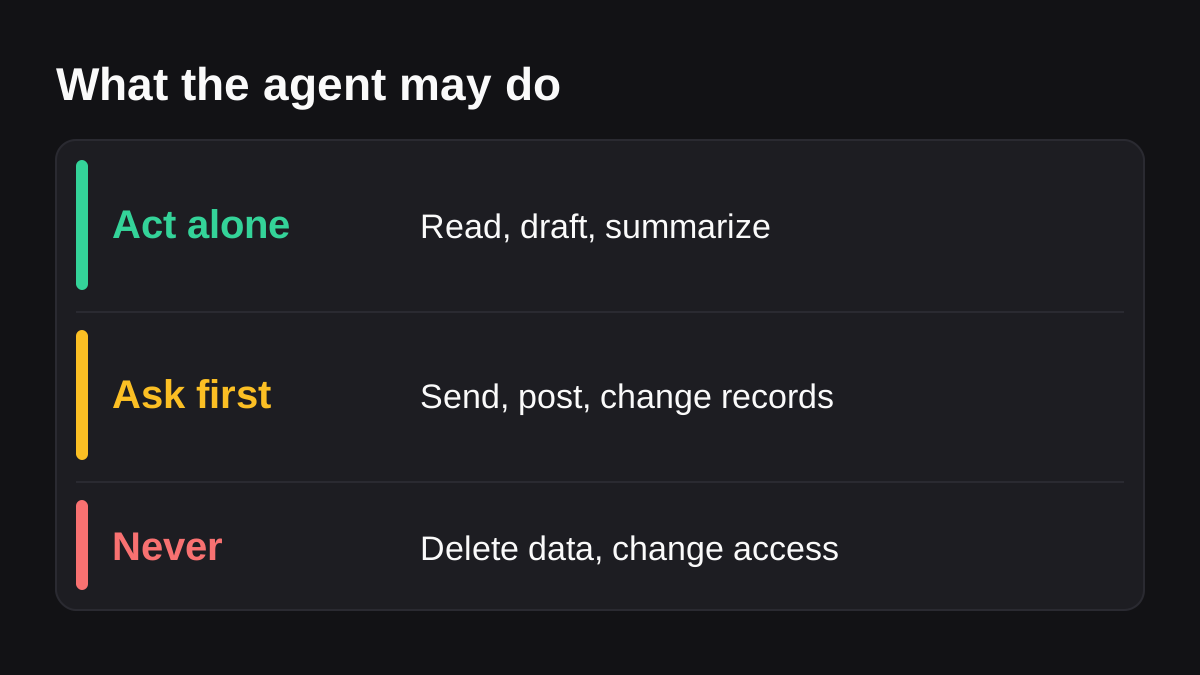
A simple way to decide is to sort every action the agent might take into three groups:
- Act alone. Reading data, drafting, summarizing, preparing a file.
- Ask first. Posting to a wider channel, sending to a customer, changing a record, anything involving money.
- Never. Deleting data, changing permissions, or decisions about people, pay or legal matters.
Over time you can move some actions from "ask first" to "act alone", but only with evidence from the log. This is how Wopie works by design: you brief it in a Slack or Teams channel, it reads your connected tools, produces the finished work and pauses sensitive actions for approval. Its approval gates and audit trail record every approval and action in a log you can read and export. Whatever product you use, ask for the same two things: approvals and a record.
Watch for over-trust
The more polished the output, the easier it is to approve without reading. The EU AI Act's human oversight article, written for high-risk systems, tells overseers to stay aware of the tendency to rely automatically on a system's output, and says they should be able to decide not to use it, override it, or stop it with a "stop" button or similar procedure [5]. Most small business uses are not high-risk under that law, but the habits are worth copying. Keep a way to switch the agent off, and spot check even the outputs that look perfect.
How do you review the agent and decide whether to expand it?
Hold a short review each week of the trial, then a longer one at day 30. Use the same questions every time:
- How many runs were there, and how many needed a correction?
- What kinds of mistakes happened, and did the brief change to stop them?
- Did the agent ever try something outside its role?
- What did the team say about it?
- How much time did the owner spend reviewing, compared with doing the job by hand?
If review time is not clearly lower than the old workload, do not expand. Fix the brief or pick a better job. Also remember that Slack itself warns that because agents use AI, they can be wrong, and advises using human judgment [2]. A good outcome at day 30 is not "no more checking". It is a smaller, faster check that you chose on purpose.
Use a framework if you need to justify it
If someone asks who decides what the agent may do, the NIST AI Risk Management Framework is a sensible reference. NIST describes it as intended for voluntary use, to improve the ability to build trustworthiness into the design, development, use and evaluation of AI [6]. You do not have to adopt it in full. Even borrowing its idea, that someone is accountable and risks are checked regularly, gives your review a shape.
What if the AI agent is the wrong fit for the job?
Sometimes the honest finding at day 30 is that the job is not suited to an agent. Signs include rare tasks with too little repetition, work that needs judgment about people, or a process that changes every week so the brief never settles. In those cases a simple automation, a template or a person is the better tool. Stopping a trial is a result, not a failure, and it costs far less than a rollout nobody trusts.
If you are still choosing a first job, start with the list in which jobs to give an AI employee first. For background on what the software is, read what an AI employee is.
What to do next
- Pick one recurring job and name the person who owns it.
- Write the role in two lines: title, manager and what success looks like.
- Create a separate account for the agent and connect only what the job needs, read-only to begin with.
- Write a one page brief using the six parts above.
- Run it in shadow mode for two or three cycles and score each run.
- Sort every action into act alone, ask first and never.
- Put a day 30 review in the calendar, with the decision written down in advance.
If you want to try this with a real job, you can start a pilot and check usage costs on the pricing page first.
Hand Wopie the job that eats your week.
Delegate it in a channel. Wopie gathers the context, does the work and waits for your approval. The first $100 of work is on us.
Get started freeSources
- [1]Deploying Agents Without Onboarding Them Is A Critical Mistake · Workday · accessed Oct 15, 2026
- [2]Work with AI agents in Slack · Slack Help Center · accessed Oct 15, 2026
- [3]LLM06:2025 Excessive Agency · OWASP Gen AI Security Project · accessed Oct 15, 2026
- [4]Building Effective AI Agents · Anthropic · accessed Oct 15, 2026
- [5]Article 14: Human Oversight | EU Artificial Intelligence Act · artificialintelligenceact.eu · accessed Oct 15, 2026
- [6]AI Risk Management Framework · National Institute of Standards and Technology (NIST) · accessed Oct 15, 2026
- [7]The 2025 Annual Work Trend Index: The Frontier Firm is born · The Official Microsoft Blog · accessed Oct 15, 2026