AI for nonprofits: where it saves the most staff time
AI for nonprofits saves the most time on funder reports, donor reports and board packs. See what surveys show, what to automate first and what to keep human.
By the Wopie team · November 11, 2026 · 10 min read
Listen to the summary· 2 min
AI for nonprofits saves the most staff time on recurring paperwork: funder reports, donor reports, board packs and the first draft of anything that goes out in your name. In Google's global survey of 6,461 nonprofit respondents, staff using AI reported cutting administrative time from 18.8 hours to 10.0 hours a week, a saving of 8.8 hours per person [3]. That is self-reported, so treat it as a ceiling, not a promise.
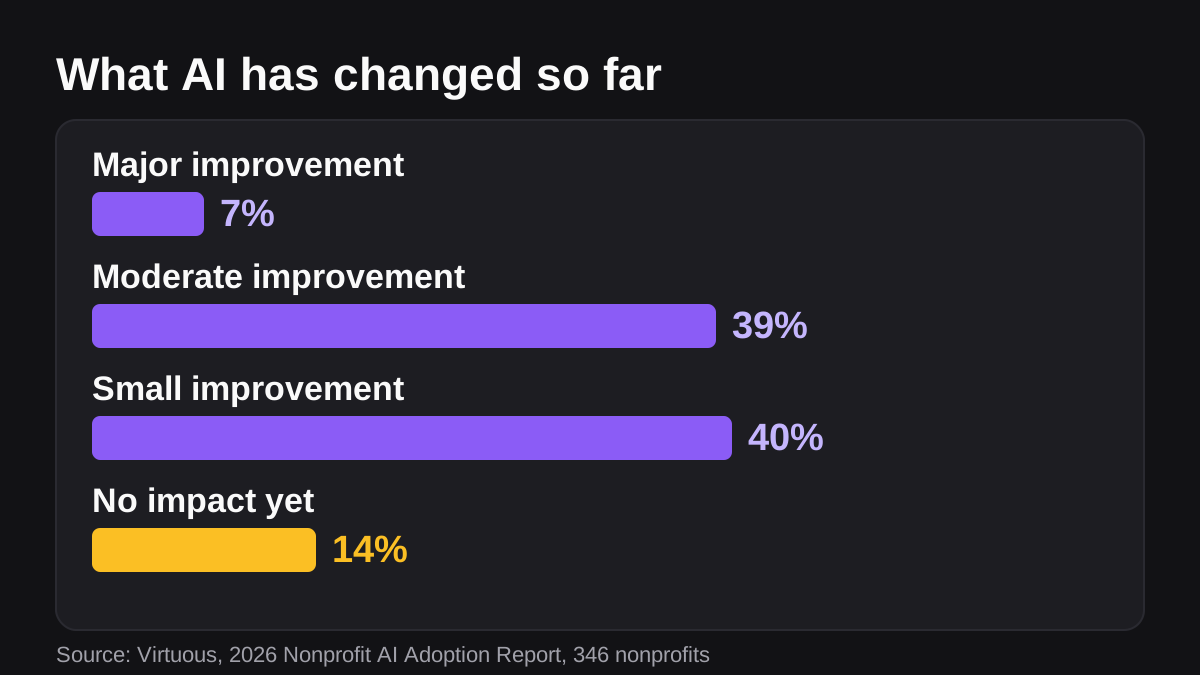
The catch is that saved time does not always turn into better work. Only 7% of nonprofits in one 2026 survey say AI has brought major improvements in capacity and strategic priorities [1]. The ones who see more tend to point AI at a specific, repeated job, with a named person approving the result. This guide shows where that works, how to set it up step by step and what to keep human. It is general information, not legal or tax advice.
How are nonprofits using AI right now?
Mostly for words. In the Virtuous and Fundraising.AI survey of 346 nonprofits, run in December 2025, 92% use AI in some way [1]. The most common uses are donor communications and content at 62%, marketing and social media at 60%, and email and creative work at 60% [1]. Data analysis and reporting is at 42%, and operations and internal automation is at 24% [1].
Look at that last number. The jobs that take the most hours of quiet, repetitive effort sit near the bottom of the list. Google's report found a similar pattern: marketing is where 80% of nonprofits pilot AI first, which builds confidence to move into fundraising and program evaluation later [3].
Use is also shallow. In the Virtuous survey, 65% describe their use as reactive and individual, 18% as operational and 7% as strategic [1]. One fundraising leader in the report put it this way: "We're just doing the same things more efficiently" [1]. If everyone on your team has a chatbot tab open but the grant report still takes a weekend, you are in that group.
Where does AI save a nonprofit the most staff time?
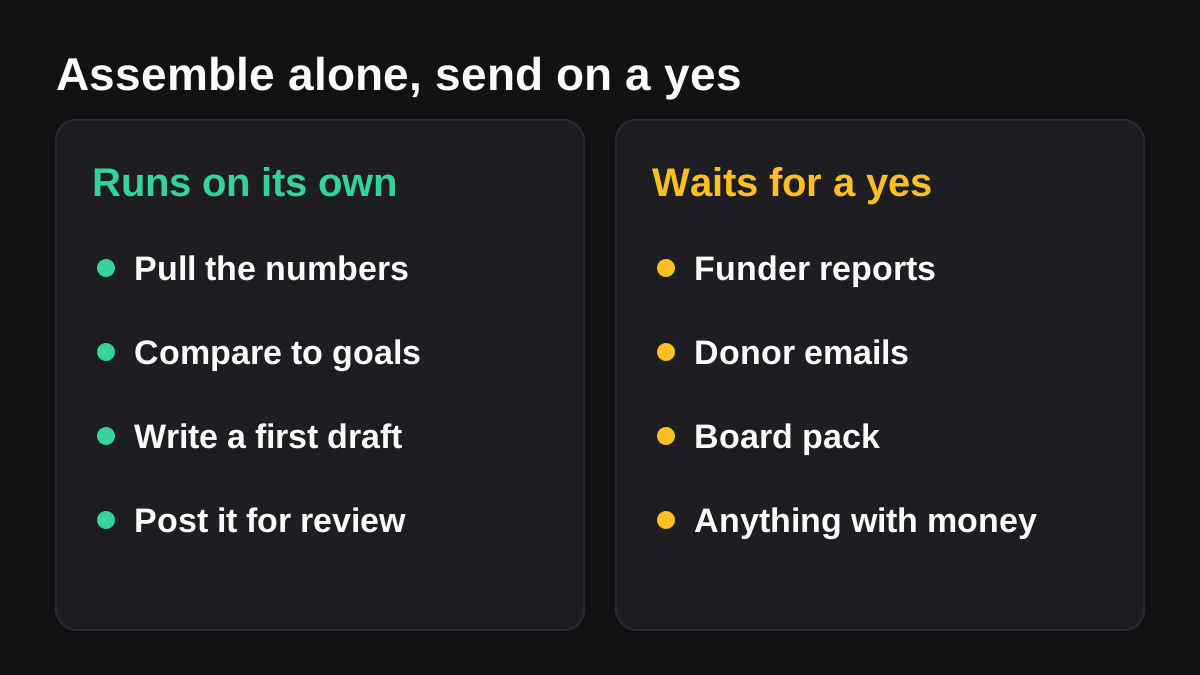
Rank each job on four questions. Does it repeat on a calendar? Does it pull from several tools? Is a person the bottleneck only because assembling it is slow? And what happens if the draft is wrong? The best jobs repeat, pull from several places and fail safely, because someone reads them before they leave.
For most small nonprofits, that points to five jobs.
| Job | What AI does | Who approves | Why it saves time |
|---|---|---|---|
| Funder performance report | Compares results with the grant's stated objectives and drafts the update | Program lead, then the funder contact | Deadlines come from the funder, not you |
| Quarterly donor report | Pulls giving and campaign numbers and writes the quarter in your template | Development director | Same layout every time, new numbers |
| Board pack | Gathers finances, programme numbers and open decisions | Executive director | Assembled by hand the weekend before |
| Impact story for the newsletter | Finds the change in the data and drafts a short brief | Communications lead | The story is in the spreadsheet, nobody has time to look |
| Thank-you and follow-up drafts | Drafts personal notes from each donor's giving history | Development staff | Volume is high, tone matters |
Notice that every row ends with a person. That is not a courtesy. It is the design.
What does the Google survey say about time saved?
Google's benchmark found that staff using AI report reclaiming over a full workday a week [3]. The same report found that 49% of staff use AI regularly, 86% believe it could make their work more effective, and 79% want training [3]. The gap between belief and daily use comes down to resources. Staff named funding at 57%, training at 49%, identifying use cases at 45% and awareness at 43% as the bottlenecks [3].
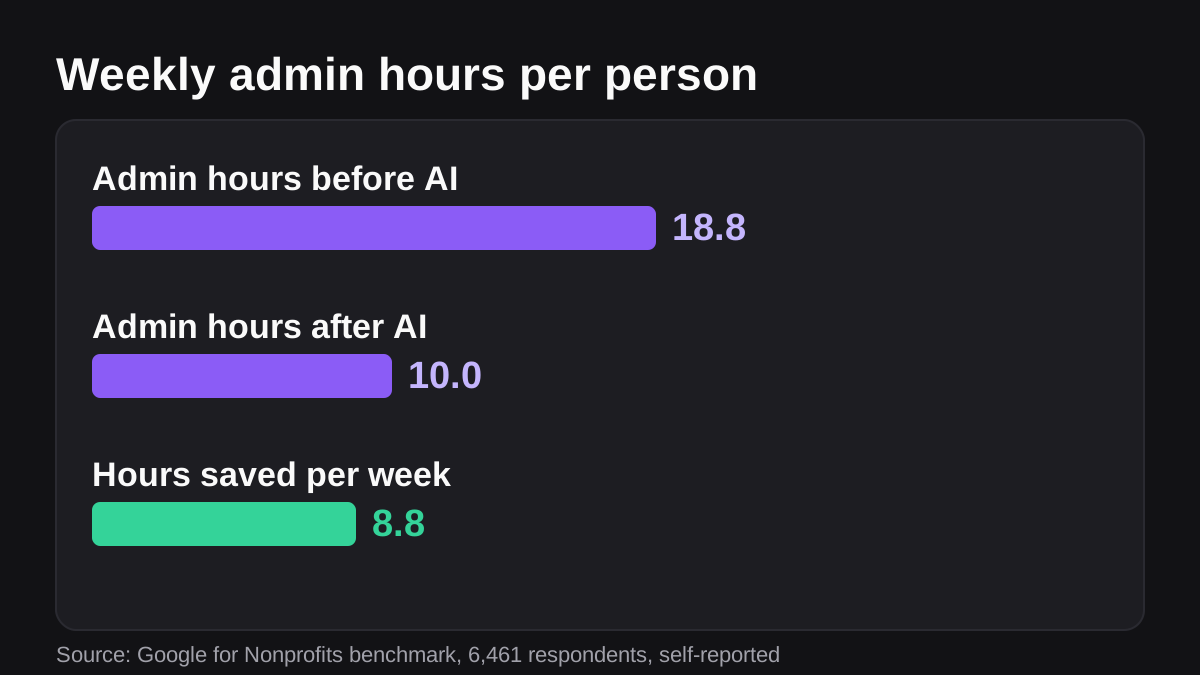
Two cautions. First, this is a survey of people who already use AI, and they report their own hours. Second, the savings only matter if you do something with them. The report says teams can reinvest the time into direct services and program reach [3]. Decide in advance what the hours are for.
How do you automate a funder report with AI?
Funder reporting is the clearest example, because the rules are written down. Under the federal Uniform Guidance, performance reports should compare accomplishments with the objectives of the award for the period, explain why goals were not met, and explain cost overruns or higher-than-expected unit costs [6]. Reporting intervals are no less frequent than annual and no more frequent than quarterly, unless a specific condition applies [6]. Annual reports are due no later than 90 calendar days after the reporting period, and quarterly or semiannual reports no later than 30 calendar days after it [6].
Your own funders may have different templates and dates, so always follow the grant agreement. But the structure above is a good model for any update: objectives, results against them, an honest explanation of the gaps and the money.
Here is a process you can follow:
- List every report you owe. Funder, due date, owner, template and where the numbers live. A simple sheet is enough.
- Write the commitments down once. For each grant, record the objectives and milestones in one place the agent can read.
- Agree the numbers. Decide which sheet or system is the source for spend, participants served and outcomes, and what each column means.
- Define the layout. Objectives, results against each one, explanation of anything missed, then spend. Use the funder's template when there is one.
- Run it beside your own draft once. Compare the AI version with what a person would have written and fix every difference in the instructions.
- Set the approval step. A named program lead reads it, checks the figures against the source and signs off before it reaches the funder.
- Schedule it ahead of the deadline, early enough to leave a week for review.
Our guide on how to write an SOP an AI agent can follow shows how to turn steps one to four into instructions that anyone, human or AI, could follow.
What about donor reports, board packs and thank-you notes?
These follow the same pattern: gather, compare, draft, approve.
For a quarterly donor report, the agent reads giving and campaign records from your CRM and programme outcomes from your results sheet, then writes the quarter against your stated goals in your template. A development director edits the tone and decides what to emphasize. Because donors read these closely, a person should check every number and every name.
For a board pack, the agent reconciles the period's finances, pulls programme and fundraising figures, reads the previous minutes and lists the decisions still open. The executive director reads it, adds judgment and decides what the board must see first. The value is not a prettier pack. It is that the weekend before the meeting is free.
Thank-you notes are different, because they are personal. An agent can draft a first line from a donor's giving history, such as first gift, gift size or years of support. A person should send them, and should skip the automation entirely for major donors and for anyone who has had a difficult experience with you.
If you are planning donor outreach more broadly, see our post on how to follow up every lead within an hour without hiring. The same rules about speed and approval apply to donors.
What are the risks of using AI in a nonprofit?
Real ones, and they are mostly about trust. Donors, funders and the people you serve share sensitive information with you.
Do you need an AI policy?
Yes, and most nonprofits do not have one yet. In the Virtuous survey, 47% have no AI governance policy [1]. TechSoup's benchmark found that 76% of nonprofits lack an AI strategy, and more than 75% of those with budgets under $500,000 have no formal strategy [2]. Among organizations that use AI regularly, privacy and security concerns are the top barrier at 32%, followed by time and capacity at 31% [1].
A one-page policy is a fine start. Say what data may go into AI tools, who may approve what, and who answers questions. Our guide on writing an AI acceptable use policy for a small company sorts data into risk tiers you can adapt. For a wider checklist, NIST's AI Risk Management Framework is a voluntary framework for managing AI risk across design, development, use and evaluation [8]. You do not need all of it on day one.
What can go wrong when an agent can act, not just write?
The OWASP Gen AI Security Project calls the core problem excessive agency: damaging actions taken in response to unexpected, ambiguous or manipulated output, caused by too much functionality, too many permissions or too much autonomy [7]. Its two main fixes are to require a human to approve high-impact actions before they are taken and to limit permissions to the minimum necessary [7].
For a nonprofit, that becomes a short list:
- Read first. Give any AI tool read access to the records a job needs and nothing more.
- Keep case notes out. Sensitive beneficiary and safeguarding records should not be in scope unless you have decided, in writing, that they should.
- Gate anything outward. Emails to funders and donors, and anything that moves money, wait for a named approver.
- Keep a trail. You should be able to see what was read, what was drafted and who approved it. We cover this in AI audit trails: what to log when AI does real work.
Compliance work needs special care. Most tax-exempt organizations must file an annual information return unless they fall into one of the listed exceptions [4]. Organizations that normally have gross receipts of $50,000 or less may file Form 990-N instead [4]. For a December 31 year-end, the initial due date is May 15 and the extended date is November 15, though extended dates do not apply to Form 990-N [5]. An AI tool can help you gather the figures, but a person with the right expertise should prepare and sign the return. This is general information, so check your own situation with your accountant.
How do you start without disrupting your team?
Small teams often worry that AI means a new project. It does not need to. The Google survey found that 65% of nonprofit staff have fewer than three hours a month for professional upskilling [3], so the first job has to be small and easy to explain.
Use this order:
- Pick one recurring report with a clear deadline and a clear owner.
- Time it today. Write down how many hours it takes, and who does what.
- Start read-only. Let the tool gather and draft. Do not let it send anything.
- Review every draft for a month, and keep a note of what you had to fix.
- Add a second job only when the first one runs with few corrections.
Where does an AI employee like Wopie fit?
Wopie is an AI employee that takes jobs in a Slack or Microsoft Teams channel, reads your connected tools, produces finished work and pauses anything sensitive for human approval. The nonprofits page shows the jobs teams hand over first: the quarterly donor report, the grant update to the funder, the board pack and the impact brief for the newsletter. Drafts are prepared in your tools and wait for a person before anything reaches a funder, as described in approval gates and audit trail. You can check pricing before you begin, and new accounts start with $100 in free credits and no card.
It is not the right tool for everything. If your process is not written down, if every case is a special case or if the task involves sensitive case notes, fix the process or keep it with a person first. Automating a muddled process only makes it muddled faster.
What to do next
Use this checklist this week:
- List every report you owe in the next six months, with its due date and owner.
- Circle the ones that pull from two or more places and mostly produce a summary.
- Time the top one. If it takes more than three hours, it is your first job.
- Write down where the numbers live and what each column means.
- Decide, in writing, who approves anything that goes to a funder or donor.
- Write a one-page AI policy covering what data is allowed in.
- Run the first draft beside your own, then review the output monthly.
Staff time is the scarcest thing a small nonprofit has. Spend it on the people you serve and the relationships that fund the work, and let a well-supervised tool do the assembling. Start with one report, keep a person on every outward step and add jobs as trust builds.
Bring Wopie onto your team.
It owns the recurring work and checks with you before anything goes out. Your first $100 of work is on us.
Hire for freeSources
- [1]The 2026 Nonprofit AI Adoption Report · Virtuous, with Fundraising.AI · accessed Nov 11, 2026
- [2]What AI Means for Nonprofits in 2025: Insights from the AI Benchmark Report · TechSoup · accessed Nov 11, 2026
- [3]Putting AI to Work for Your Mission: A Global Benchmark for AI in the Nonprofit Sector · Google for Nonprofits (survey conducted by Qualtrics) · accessed Nov 11, 2026
- [4]Annual exempt organization return: who must file · Internal Revenue Service (IRS) · accessed Nov 11, 2026
- [5]Return due dates for exempt organizations: Annual return · Internal Revenue Service (IRS) · accessed Nov 11, 2026
- [6]2 CFR § 200.329 - Monitoring and reporting program performance · Legal Information Institute, Cornell Law School · accessed Nov 11, 2026
- [7]LLM06:2025 Excessive Agency · OWASP Gen AI Security Project · accessed Nov 11, 2026
- [8]AI Risk Management Framework · National Institute of Standards and Technology (NIST) · accessed Nov 11, 2026