How to run a weekly update in Slack without chasing anyone
How to run a weekly update in Slack: set the questions, schedule the reminder, collect replies in one thread and post a summary. Steps and a checklist.
By the Wopie team · October 19, 2026 · 9 min read
Listen to this article· 11 min

To run a weekly update in Slack without chasing anyone, you set a fixed set of questions, let Slack send the reminder on a schedule, collect every reply in one place, and post one short summary on a set day. Slack can handle the reminder and the collecting. The part that still costs you an hour, reading everything and writing the summary, is the part worth handing off.
This guide shows you how to build a weekly update in Slack in five steps, what to ask, what to avoid, and where each tool stops being enough. Where a rule or figure comes from a source, it is cited. Where it is my own judgment, I say so.
Why do weekly updates turn into chasing?
Most weekly updates fail for the same reason. The person who wants the update has to ask for it, wait, remind, and then stitch the answers together. That is work about work, and it lands on the one person least able to spare the time.
The wider picture explains why it matters. Microsoft's Work Trend Index found that communication, meaning meetings, email and chat, takes 57 percent of the average employee's time in Microsoft 365 apps, while creating documents, spreadsheets and presentations takes 43 percent [5]. The same report found that 68 percent of people say they do not have enough uninterrupted focus time in the workday [5]. That data comes from Microsoft's own product usage and survey, so read it as a signal about knowledge work in general, not a measure of your team.
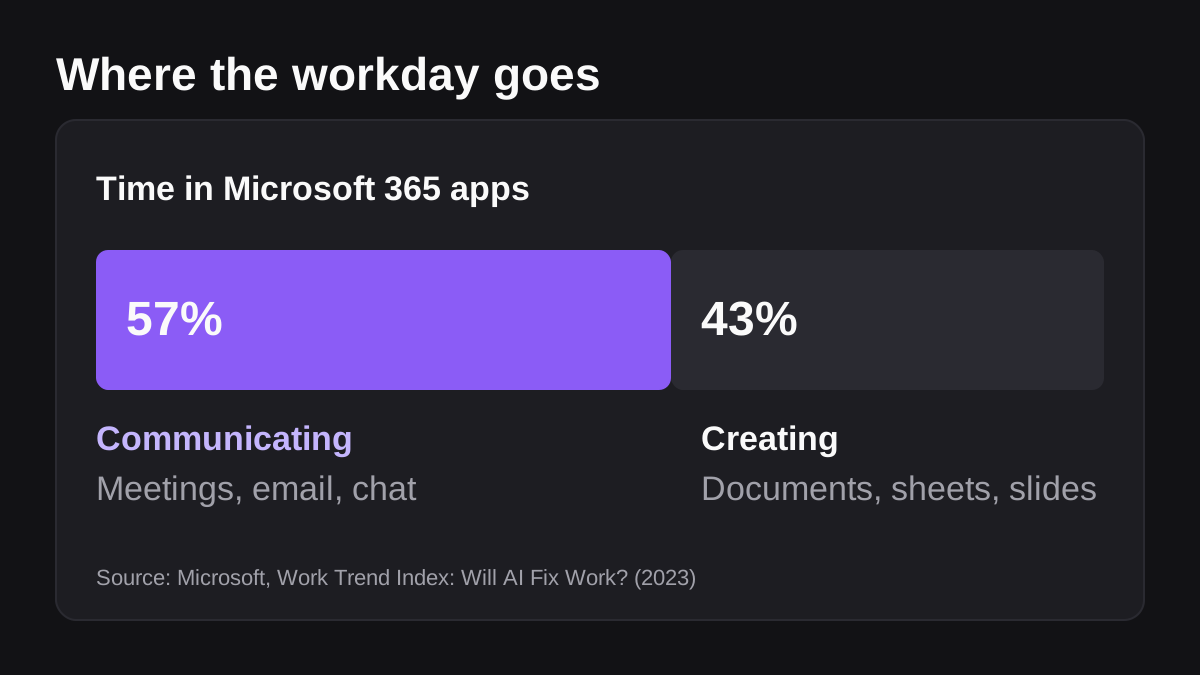
A weekly update is meant to cut that communication load. One short, predictable update can replace a meeting and a string of "any news on this?" messages. It only does that if collecting it is nearly free.
What should a weekly team update in Slack contain?
Keep the questions fixed and few. Atlassian's weekly update play asks each person to reflect on their top three priorities for the week, add the reason behind each, note any challenges or roadblocks, and make a specific ask, such as feedback, finding the right contact or training [2]. The play estimates 15 minutes of preparation, about 5 minutes to write the update and 1 minute to share it [2].
You can turn that into a template of four questions:
- What are your top three priorities this week, and why do they matter?
- What got done since last week?
- What is blocked, or at risk?
- What do you need from someone, and from whom?
Four questions is my own suggestion, built from Atlassian's list. The point is that every person answers the same questions in the same order. That is what makes the replies easy to combine later.
Written or video?
Atlassian's Teamwork Lab compared the two. In its test, direct reports who received Loom video updates showed a 38 percent increase in connection with their manager, against 9 percent for written Slack updates [2]. That was Atlassian's own internal test, so treat it as one data point, not a rule. The same play suggests keeping video updates to 3 to 5 minutes [2].
For a small team, a written update in Slack is usually the better default. It is quicker to write, it can be skimmed, and it can be searched months later. Use video when a team is spread across locations and wants to feel closer, and keep the format the same each week.
How do you set up a weekly update in Slack, step by step?
Here is the full method. Each step lists who or what does the work.
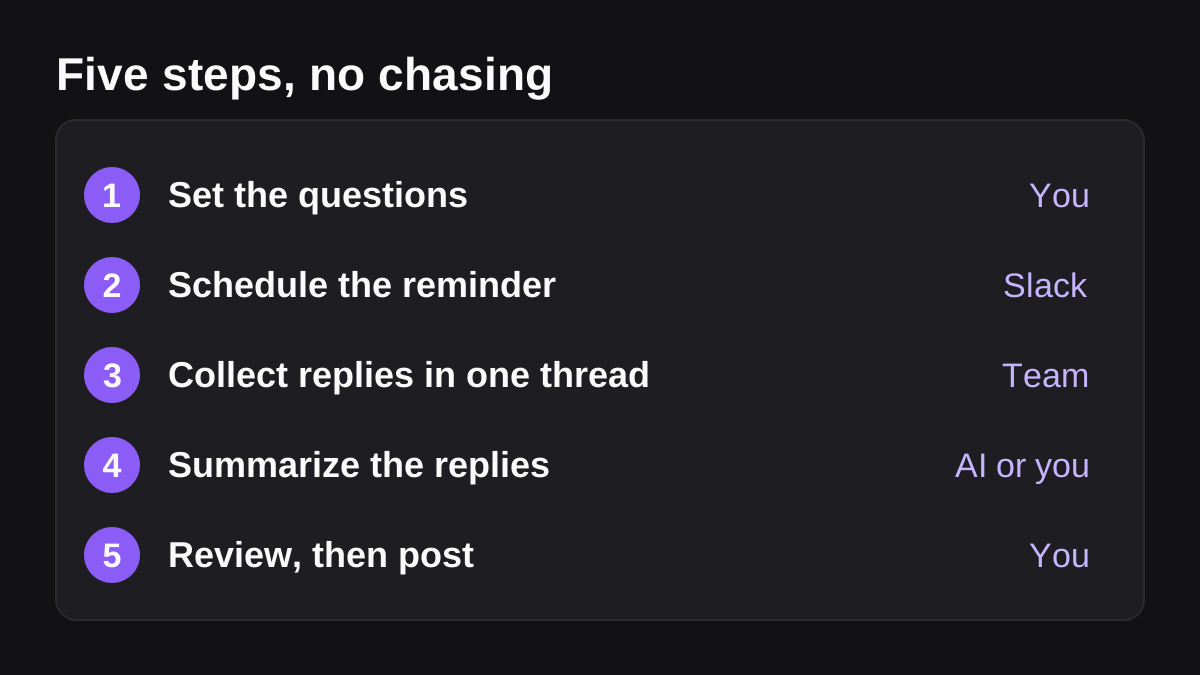
- Set the questions. Write the four questions above, or your own version. Keep them to a handful. If the update takes more than five minutes to write, people will skip it.
- Schedule the reminder. Use Slack so nobody has to remember to ask. The options are in the next section.
- Collect replies in one thread. Ask everyone to answer in a single thread or through a form, so the answers sit together and not in direct messages.
- Summarize the replies. Someone reads everything and writes the short version: what moved, what is blocked, who needs what.
- Review, then post. Check the summary against the replies, add anything the team should know, and post it in the team channel on the same day each week.
Atlassian's play also asks the team to respond to each other's updates, even with just an emoji, and its example templates commit to replying within 24 hours [2]. It calls consistency key [2]. I would add one more rule of my own: if a blocker appears in an update, someone answers it in the thread the same day. People keep writing updates when they see them acted on.
Which Slack tools can send the reminder and collect the answers?
Slack gives you three useful building blocks. None of them writes the summary, but they take most of the chasing off you.
| Tool | What it does | Main limit |
|---|---|---|
| Reminder command | Sends a recurring reminder to a channel | Repeats by day of the week only; no form |
| Scheduled workflow with a form | Posts the reminder and collects answers | Needs a paid plan; answers need exporting or forwarding |
| Thread in the team channel | Collects replies in one place | Relies on people remembering to reply |
The reminder command
The simplest option is a channel reminder. Slack's example is typing a command such as remind #marketing-team to submit expenses every Thursday [4]. You can repeat a reminder by the day, for example every Monday, but not in time increments such as every hour [4]. Reminders for a specific day arrive at 9 a.m. in your time zone by default, and you can change that in your preferences [4]. Guests cannot create channel reminders [4].
That is enough to prompt a team to post in a thread. It does not give you a form, and it does not collect anything for you.
A scheduled workflow with a form
Workflow Builder is the more capable route. You can start a workflow on a schedule by specifying a date, time and cadence [3]. Slack's own announcement names weekly status updates as an example of something that can now begin at a set time and then repeat [1]. It also calls standardized forms one of Workflow Builder's most widely used features [1].
A scheduled workflow can include the form in its reminder message, so people answer without leaving the message [1]. Responses can be downloaded as a CSV file for a spreadsheet tool such as Google Sheets, sorted by Slack username, time stamp, and question and answer [1]. The workflow creator and any workflow managers can download form responses [6].
Know the limits before you build. Workflow Builder is available on paid plans [3]. A message step that posts to a channel needs posting permission in that channel [3]. And the 2020 announcement describes the feature as it was then, so check the current interface in Slack's help center before you follow any older tutorial [1][3].
A plain thread
Some teams need none of this. A reminder on Monday morning, a pinned template and a thread for replies will carry a team of five for months. Start here if you have never run a weekly update, and move to a workflow only when the reminder step becomes the weak link.
How do you stop the weekly update from becoming another chore?
A weekly update collapses when it costs more than it returns. These are the common failures, and how to prevent each one.
| Problem | How it shows up | Prevention |
|---|---|---|
| Too many questions | Replies shrink to one line or stop | Keep to four questions and five minutes |
| Nobody reads it | Updates are posted and never answered | Reply to every blocker within a day, as Atlassian's templates commit to [2] |
| Late or missing replies | The summary waits on one person | Set a cut-off time and post without the missing replies |
| Summary written differently every week | Readers cannot compare weeks | Reuse the same headings every time |
| One person does all the work | The organizer burns out | Rotate the summary job, or hand it off |
Set a cut-off, not a chase
The core idea of this whole guide is to replace chasing with a rule. Pick a time, for example Thursday at noon, after which the summary is written from whatever has arrived. Say so in the reminder. People who miss the cut-off will notice the summary went out without them, and that works better than a message from a manager.
Keep one live meeting if you need it
A written update replaces a status meeting. It does not replace the meeting where the team argues through a hard decision. If a blocker needs real discussion, move it out of the update and into a short call. That is my own judgment, not a finding from a source.
Can an AI employee write the weekly summary for you?
Slack's tools handle the reminder and the collecting. The expensive step is step four: reading ten replies, spotting the blockers, noticing that two people are waiting on the same person, and writing it up in a few lines. That step is where an AI employee fits.
Wopie is an AI employee that takes jobs in a Slack channel. You describe the job in the channel, for example: "Every Thursday at noon, read the replies in the weekly update thread, write a summary with what moved, what is blocked and what each person needs, and post it for my approval." It reads the thread and your connected tools, drafts the summary, and pauses anything sensitive until a person approves it. The Slack page shows what working in a channel looks like.
A few points keep this honest:
- The summary is a draft. Read it against the replies the first few weeks. Approval gates and an audit trail mean the post waits for a yes, and there is a record of who gave it.
- It can draw on more than the replies. If the weekly update should also include numbers, such as open tickets or pipeline, the job can read those tools too. How to automate reports in Slack covers the four routes for that.
- It is not always the right tool. For a team of four who all sit in one thread, a person can write the summary in ten minutes. An AI employee earns its place once there are many replies, many sources, or no one with the time. Which jobs to give an AI employee first helps you decide.
- Brief it like a new hire. Give it the questions, the audience, the cut-off and the format. How to onboard an AI agent like a new team member explains how.
Cost is predictable because you pay for finished jobs, and the pricing page explains how that works. A weekly summary is a small, repeatable job.
What to do next
Here is a short checklist for this week.
- Write four fixed questions and keep the update under five minutes.
- Choose written or video, and keep it the same each week.
- Pick the day, such as Monday for the questions and Thursday at noon for the cut-off.
- Set the reminder: a channel reminder to start, a scheduled workflow with a form once you want the answers collected.
- Ask everyone to reply in one thread, and answer every blocker the same day.
- Name the person who writes the summary, or hand that step to an AI employee with approval before posting.
- Review after four weeks: did replies stay on time, did anyone act on the blockers, did the meeting count fall?
If you want to try the AI route on a real weekly update, you can start a pilot with Wopie in a channel you already use. Begin with one team, keep a person in the approval step, and widen it only once the summary has earned trust.
Put an AI employee in your Slack.
Wopie joins your channels like any teammate, owns the recurring work and checks with you before anything sensitive goes out.
See Wopie for SlackSources
- [1]3 new Workflow Builder tools to help you find your flow · Slack · accessed Oct 19, 2026
- [2]How Successful Teams Share Weekly Team Updates · Atlassian Team Playbook · accessed Oct 19, 2026
- [3]Build a workflow: Create a workflow in Slack · Slack Help Center · accessed Oct 19, 2026
- [4]Set a reminder · Slack Help Center · accessed Oct 19, 2026
- [5]Work Trend Index | Will AI Fix Work? · Microsoft WorkLab · accessed Oct 19, 2026
- [6]Guide to Slack Workflow Builder · Slack Help Center · accessed Oct 19, 2026