AI employee cost: what it really costs compared with a new hire
AI employee cost compared with a new hire: what an average US hire costs, how AI is priced, the hidden costs on both sides, and a simple way to compare.
By the Wopie team · October 13, 2026 · 9 min read
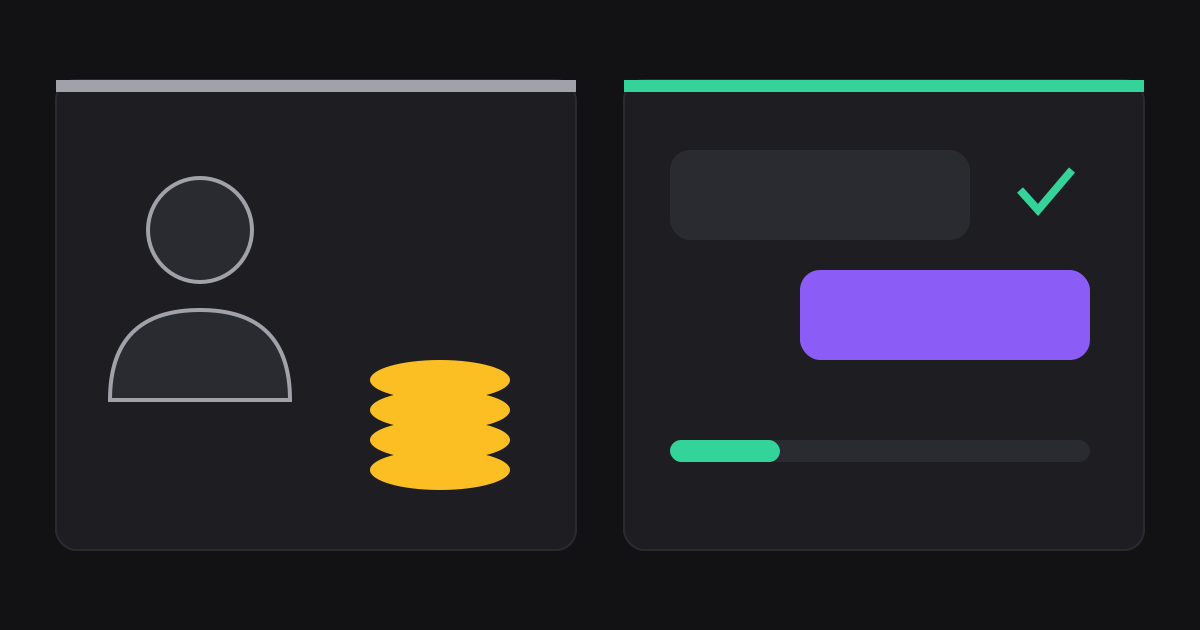
AI employee cost is usually a small monthly bill that follows how much work you hand over, while a new hire is a large fixed bill that starts on day one. For the average US private employer, one hour of employee time costs $45.38, and about 30 percent of that is benefits rather than pay [1]. An AI employee is typically billed by usage, by the job, or by subscription, and a team can start for tens of dollars a month. The two are not like for like, though, so the useful question is what each costs for the same set of tasks.
This guide gives you a way to answer that for your own company. It covers what a hire really costs, how AI is priced, what each side hides, and a five-step method to compare them. It is general information, not financial or employment advice, and every number is either from a cited source or clearly marked as my own arithmetic.
How much does a new hire really cost?
Salary is only the first line. The US Bureau of Labor Statistics tracks what employers pay for each hour of work, and its March 2025 figures for private industry are a good baseline [1].
Total compensation averaged $45.38 per hour worked. Of that, wages and salaries were $31.89, or 70.3 percent. Benefits were $13.49, or 29.7 percent [1]. Inside the benefits, legally required items such as Social Security and unemployment insurance were $3.29 an hour, paid leave was $3.43, insurance was $3.34, and retirement and savings were $1.53 [1].
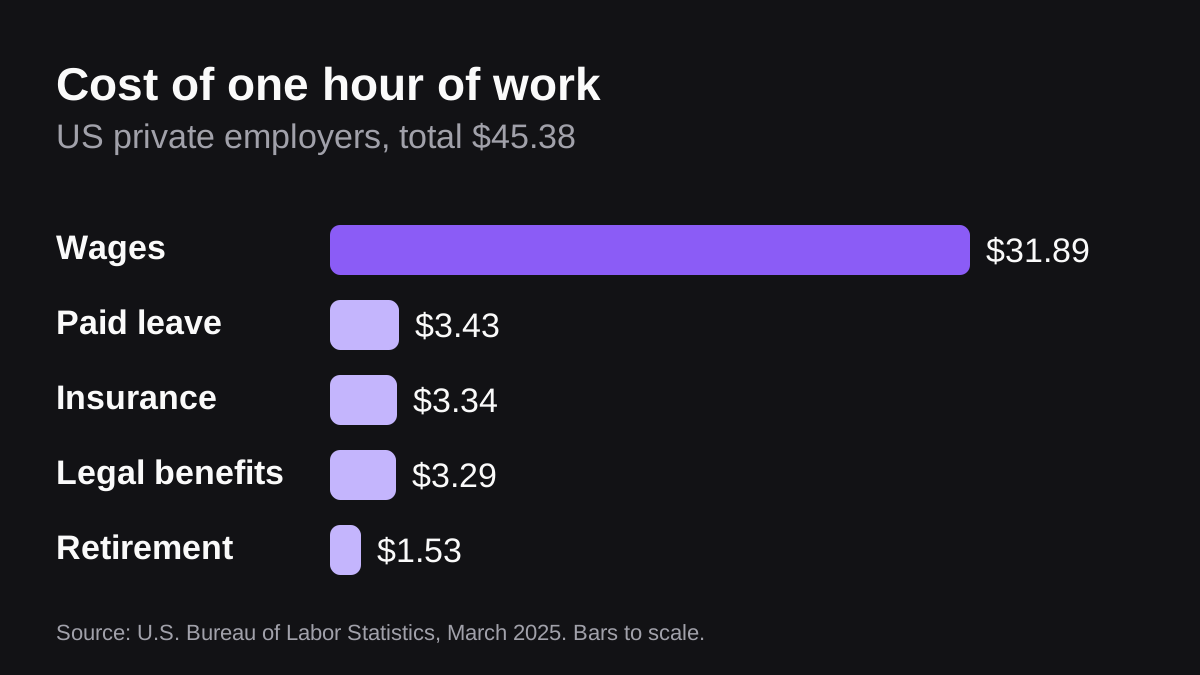
Here is what that means in practice. If you multiply $45.38 by 2,080 working hours in a standard year, you get roughly $94,400 a year. That is my own arithmetic on a national average across all private occupations, so a junior operations coordinator will cost less and a senior finance manager will cost more. Use your own salary and add about 40 percent as a first estimate, which is the same idea in reverse: pay is about 70 percent of the total, so the total is about 1.4 times pay [1].
Then add the cost of finding the person. SHRM's 2025 benchmarking reports put the average cost per hire at $5,475 for nonexecutive roles and $35,879 for executive roles [3]. Those figures cover recruiting, not the weeks it takes a new person to learn your tools and customers, which is a real cost that is hard to put a number on.
Finally, the split is steady. In March 2022, benefits were 29.6 percent of compensation, and health insurance alone was 7.1 percent [2]. Three years later the figure was 29.7 percent [1]. That is why the 1.4 times rule is stable enough to plan with.
How is an AI employee priced?
There is no single price, because vendors charge in different ways. Four models cover most of what you will see.
| Pricing model | What you pay for | Good fit | Watch out for |
|---|---|---|---|
| Per seat | A fixed fee for each person who has access | Tools one person uses all day | Paying for people who rarely use it |
| Per job or per credit | Each finished piece of work | Background work for a whole team | Large jobs costing more than you expected |
| Flat subscription | A set monthly amount for a bundle | Predictable, narrow use | Limits on volume or features |
| Raw model usage | Tokens read and written by a model | Teams building their own tools | Engineering time and no guardrails |
What do per-seat AI tools cost?
Seat prices are public, which makes them easy to total. Microsoft 365 Copilot Business is listed at $25.20 per user per month on monthly billing, with a promotional $18 per user per month on yearly billing that applies to the first year only [5]. Slack's own plans, which include built-in AI features, run from $7.25 per user per month on Pro to $15 per user per month on Business+ when paid annually, or $8.75 and $18 when paid monthly [6].
Those prices give a team of ten at the monthly Copilot rate about $252 a month, which is my own arithmetic from [5]. That is cheap next to a salary. The catch is not the price. It is that a seat gives a person an assistant, and the person still does the job. You are paying to make an existing hire faster, not to take work off the list.
What does usage-based AI cost?
Under the hood, many AI products pay a model provider by the token, which is a small chunk of text. Anthropic's published rate for Claude Sonnet 5.5 is $2 per million input tokens and $10 per million output tokens, with a 50 percent discount for batch processing [4]. A job that reads 200,000 tokens of context and writes 5,000 tokens of output would cost about 45 cents at those list prices. That is my own arithmetic from [4], and it ignores everything else around the model, such as the tools, the setup and the monitoring.
This is why raw model cost is a poor guide to what you will pay. Vendors bundle the model with connectors, scheduling, approvals and support, and price the bundle. What matters to you is the price of the finished job.
How does Wopie price its work?
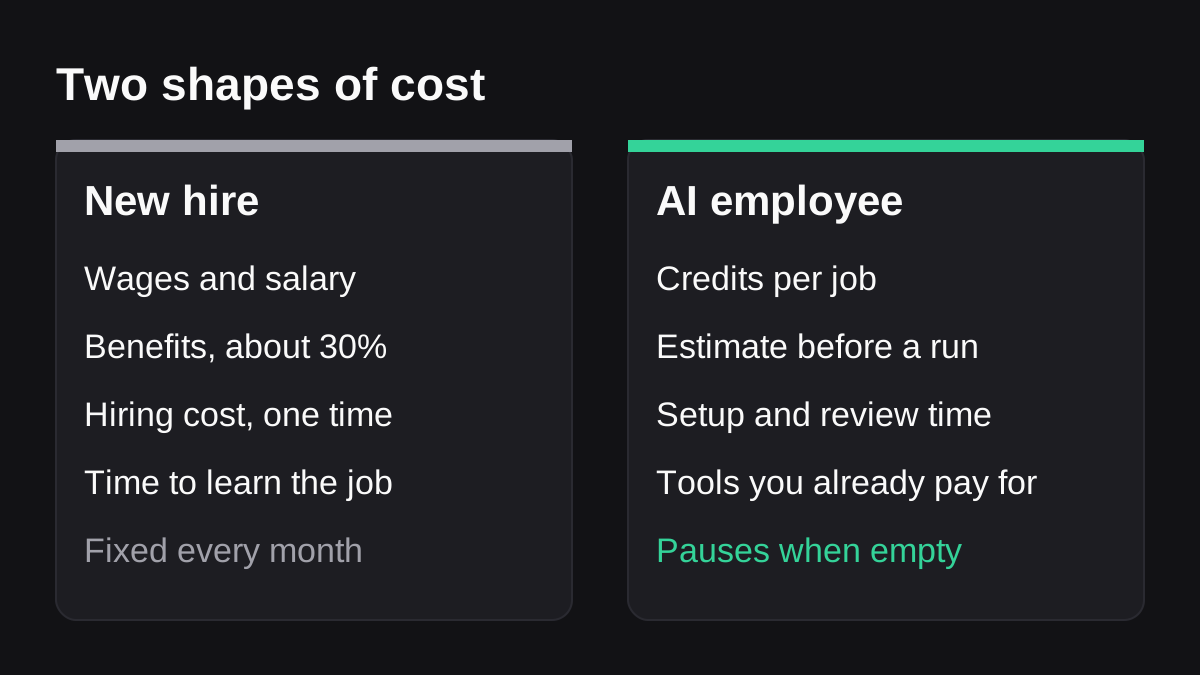
Wopie charges for finished work rather than seats. According to its pricing page, one dollar buys 200 credits, paid plans start at $50 a month for 10,000 credits, and a free pilot starts with $100 of credits, which is 20,000, with no card. It estimates a job's credits before it runs, and if the balance runs out it stops taking new work instead of billing you more. The pricing page shows example jobs in the range of 6 to 23 credits, but those figures are labeled illustrative, so test your own jobs before you plan around them.
What costs does each side hide?
Both options have costs that do not appear on an invoice. Name them before you compare.
The hidden costs of a hire
A hire brings management time, equipment, software licenses, training and the risk of a poor fit. None of these show up in the BLS wage figures, which cover pay and benefits only [1]. People also take leave, which is built into the per-hour figure above: paid leave alone is $3.43 an hour [1]. A part-time or contract role changes the picture, so use your actual terms.
The hidden costs of an AI employee
You pay in setup and supervision. Someone has to write down how the job is done, connect the tools, check early outputs and approve anything sensitive. Plan for several hours a week in the first month, then less. This is the same cost as onboarding a person, only smaller, and it is worth doing well because the quality of the instructions decides the quality of the results.
You also still pay for the tools it works inside. If it reads your CRM, accounting system and chat tool, those subscriptions continue. And it can be wrong. A person who checks every output erases part of the savings, but a person who checks nothing is a risk. Anything that sends email, moves money or edits live records should wait for a human to approve it. You can see how that works in the approval gates and audit trail description.
When is an AI employee cheaper, and when is a hire the better buy?
An AI employee tends to win on work that is frequent, rule-based and made of the same steps each time. Examples are a weekly pipeline report, a month-end reconciliation, chasing overdue invoices, or sorting new support tickets. You can read more about which tasks suit software in our guide to what an AI employee is and the difference between agents, assistants and automation.
A hire is the better buy when the work needs judgment, relationships, negotiation or accountability that must sit with a named person. It is also the better buy when the work is irregular, so the tool would sit idle, or when the cost of one error is high and review would take as long as doing the work.
Most small teams land in between. They keep their people and take the dullest ten hours off each person's week. Because that is a share of several roles, you rarely avoid a hire entirely. You buy time back, and you delay the next hire until the work really needs one.
How do you compare the two for your own team?
Use this method. It takes under an hour with a spreadsheet.
- List the tasks, not the role. Write down the five to ten recurring tasks you would hand over, with how often each happens.
- Time each task. Ask the person who does it for the real minutes per run, including the chasing and the fixing.
- Price the time. Multiply minutes by the person's loaded hourly cost. Use about 1.4 times their pay as a first estimate, based on the BLS split of 70.3 percent wages and 29.7 percent benefits [1].
- Price the AI side. Run two or three of the tasks on a free pilot, read the credit estimates, and multiply by how often they recur. Add your own review time at the same loaded hourly cost.
- Compare the monthly totals, then add what is hard to price: faster turnaround, fewer missed follow-ups and less dependence on one person.
If step four shows the AI total is not clearly lower, stop. Either the task is a poor fit or the instructions need work. That is useful to know before you commit to a plan.
How can you keep AI employee cost under control?
Cost control is mostly about three habits.
- Ask for an estimate before each job. A price you see first is a price you can refuse.
- Set a cap. A monthly credit balance that pauses when empty is safer than open-ended billing.
- Start with one workflow. Prove a weekly job for a month, look at the usage and the review time, and only then add more.
Also watch for open-ended pricing and bundled extras. If you cannot say what a month will cost within a reasonable range, ask the vendor how they would help you set a limit.
If you are a small or mid-sized team, see how Wopie fits small and mid-sized businesses, and how it works in Slack and Teams.
What to do next
Keep it small and concrete.
- Pick one recurring task that takes a person at least an hour a week.
- Work out its loaded monthly cost using the 1.4 times rule.
- Run it once on a free pilot and read the credit estimate before it starts.
- Review the output and note how many minutes the check took.
- Compare the totals, and decide whether to keep going, change the instructions or drop it.
You can start a free pilot with no card and see the number for yourself, or check the pricing details first.
Pay for finished work, not seats.
Start free with $100 in credits, then expand when the work proves itself.
See pricingSources
- [1]Employer Costs for Employee Compensation News Release - 2025 Q01 Results · U.S. Bureau of Labor Statistics · accessed Oct 13, 2026
- [2]Tracking Employer Costs for Wages and Benefits · U.S. Bureau of Labor Statistics · accessed Oct 13, 2026
- [3]SHRM Releases 2025 Benchmarking Reports: How Does Your Organization Compare? · SHRM · accessed Oct 13, 2026
- [4]Pricing · Anthropic (Claude Developer Platform documentation) · accessed Oct 13, 2026
- [5]Microsoft Copilot Plans and Pricing: AI for Business | Microsoft 365 · Microsoft · accessed Oct 13, 2026
- [6]Slack Pricing Plans: Find the Right Fit for Your Team | Slack · Slack Technologies, LLC · accessed Oct 13, 2026